Put the commitment in My Day
Meeting to-dos and goal check-ins sit beside the person’s work. Agreed next steps keep an owner and a place to follow up.
Give every number an owner and every meeting a next step. Bring your team’s goals, issues and commitments beside the service, project and sales work already in Current.
Team is in Beta. Your workspace administrator controls access.
For the free trial: card up front. We email you the exact amount three days before the first charge, and you can cancel anytime during the trial.
Source: supported ticket records
Three primary numbers per person
The example number is below its target. Review the handoff before choosing the next step.
3. A person decides. Nothing is added until approval.
Illustrative values show the workflow, not a customer result. In Current, access and available source records determine each suggestion.
Your weekly meeting belongs beside the work it changes. Connect a missed number to an issue, a quarterly goal to its owner, and an agreed next step to the person’s day.
Current is EOS software purpose-built for MSPs. Bring your Entrepreneurial Operating System (EOS) practices beside your service, project and sales work, with the numbers, owners and next steps connected.
Current is independent software, not affiliated with or endorsed by EOS Worldwide. EOS terms describe familiar practices here; Current keeps its own product names.
Review three primary numbers per person, with targets, recorded history and supported automatic or manual inputs.
Give quarterly priorities an owner, milestones and check-ins, with links to the work your team can read.
Follow a timed agenda through numbers, goals, headlines, to-dos and issues. Review each proposed follow-up before adding it.
Bring company direction and quarterly priorities into planning. Export a branded pack from the records you can read.
Connect seats, responsibilities and reporting lines. Try a new structure in a playground before publishing it.
Give each person three primary scorecard numbers. Supported automatic measures read the work already connected to Current. Self-reported measures keep a person in the loop.
Milestones keep the next step visible.
See its milestones, latest check-in and the projects and tickets linked to it.
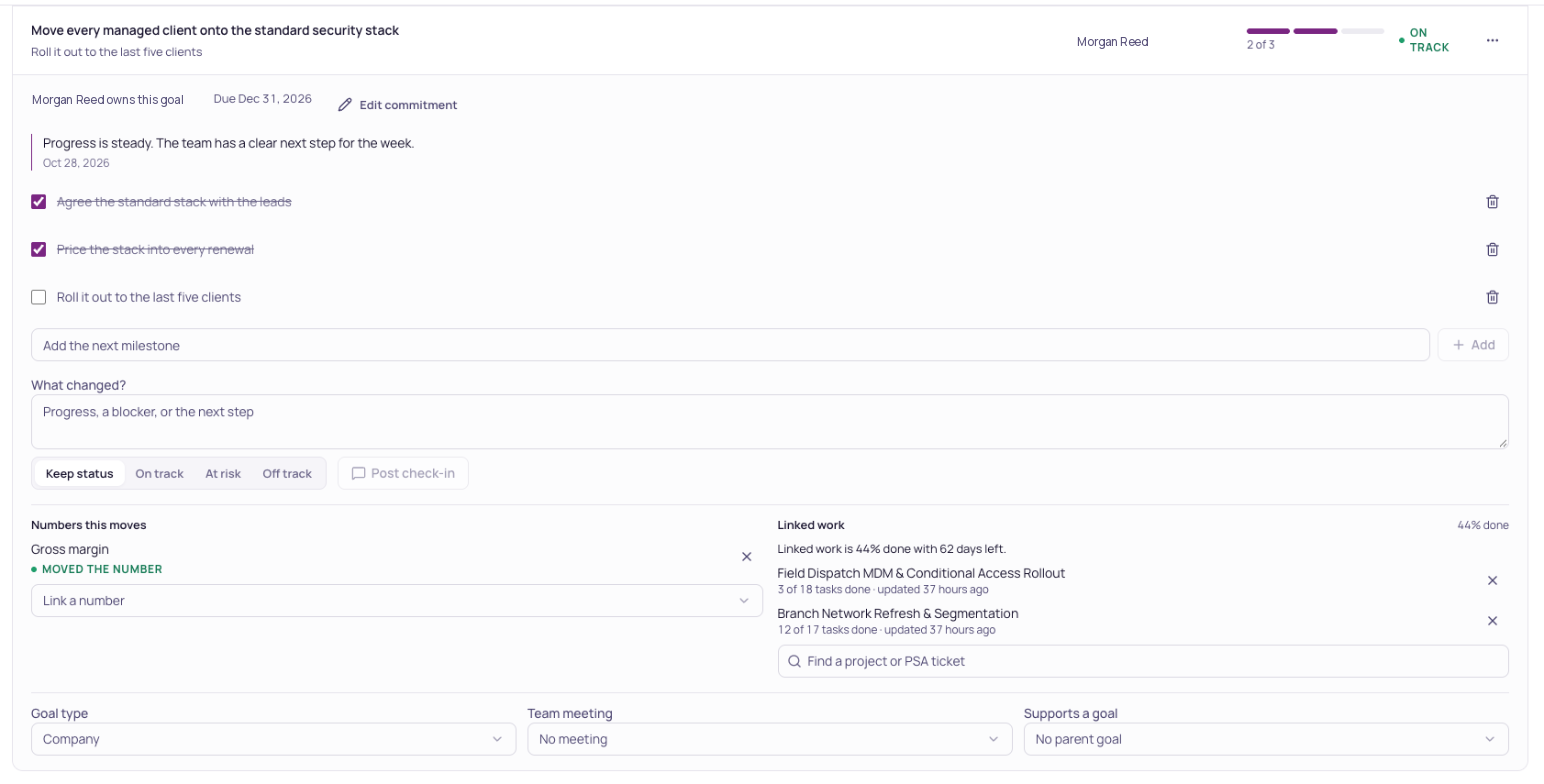
Owner and due date reviewed by the team.
Run a shared meeting with a timed agenda, numbers, goals and ranked issues. Capture to-dos, decisions and headlines as the team works through them.
Use the notes you capture to review AI-suggested follow-ups and their source evidence. Choose the owner and due date before approving each proposal.
Manual meetings work without recording. Saved Teams transcript imports are temporarily paused.
Map your organization into seats, responsibilities and reporting relationships. Open a person’s record to connect their numbers and goals with the commitments you can read.
Review changes in a playground before publishing the chart. Microsoft 365 directory data and photos can help build the picture where connected.
Read how Team worksSeats connect people, responsibilities and the numbers they own.
Follow the published seats from leadership to each team. Explore a branch to see who owns the work.
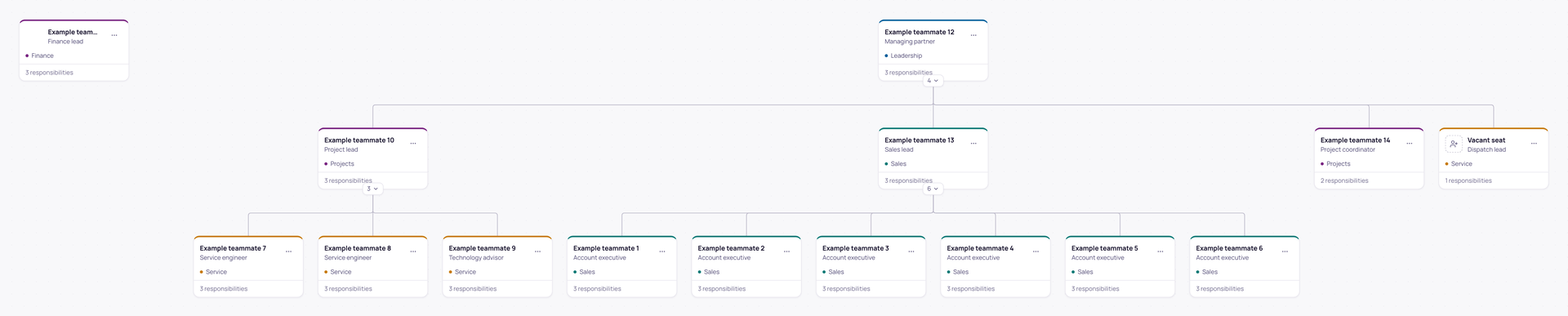
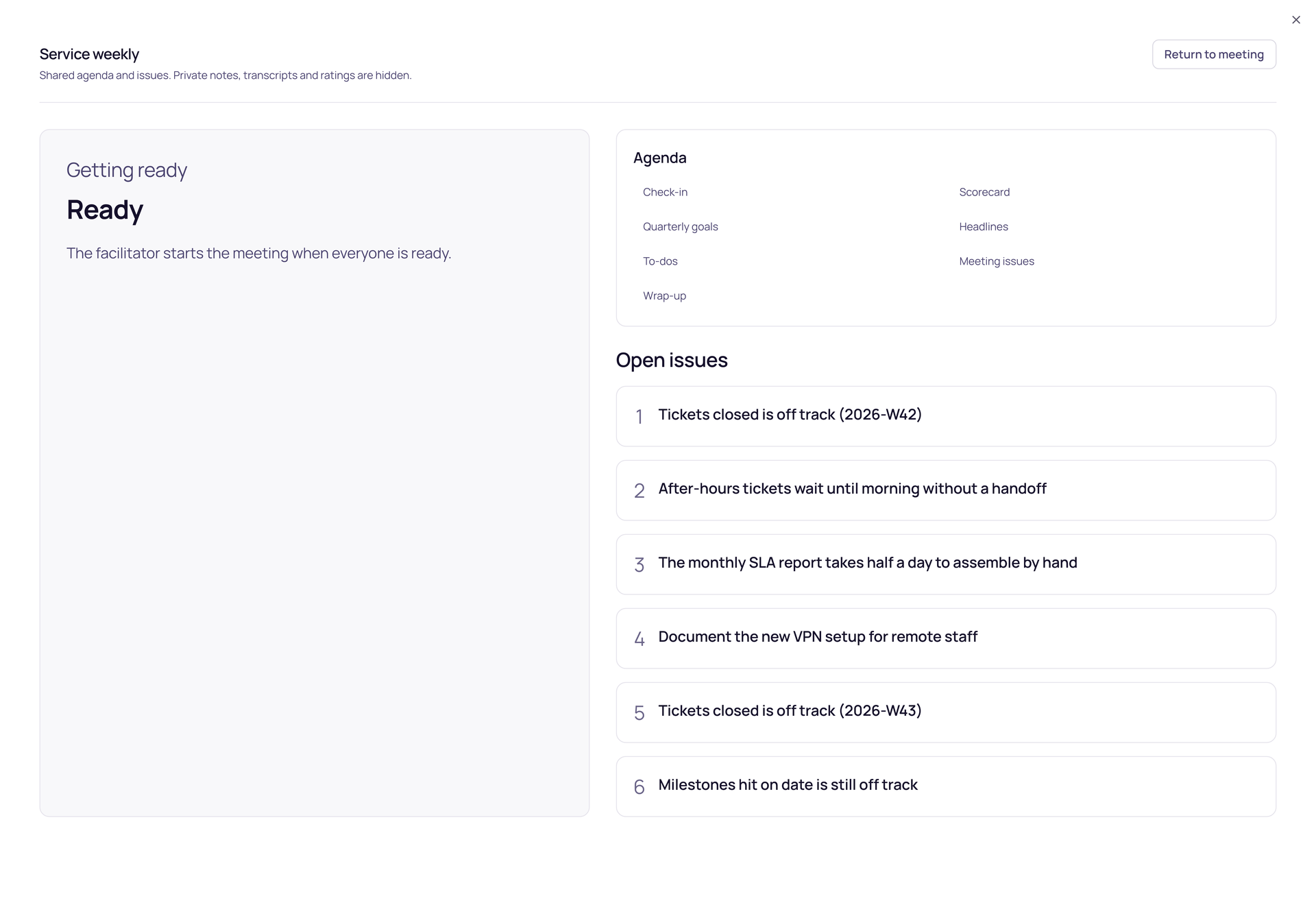
A read-only display keeps the agenda and shared issues visible without putting private notes on screen.
Meeting to-dos and goal check-ins sit beside the person’s work. Agreed next steps keep an owner and a place to follow up.
Prepare 1:1s and reviews with participant permissions. Workspace owners have an explicit, audited read-only view where allowed. The chart alone does not unlock private conversations.
Bring company direction, quarterly goals, issues and planning into the same workspace. Export a planning pack using the permitted records and your branding.
“What did we agree about the service handoff?” Ask Current brings together the Team sources you can read and links to the evidence, so you can open the record and keep working.
Permissions stay with the records. Private notes, raw peer responses and restricted figures do not become shared meeting context.
Meet Ask CurrentWhat did we agree about the service handoff?
Start with the saved meeting decision, its owner and the linked goal.
Illustrative question · answers depend on your permitted recordsTeam uses the supported business context already connected to Current. Keep your existing PSA for the records it owns, and bring the people, priorities and decisions around that work into one place.
Available fields, automatic measures and actions depend on your connection, configuration and role.
Both bring accountability and meetings together. These selected workflows show how each connects to the work.
Reviewed . Current Team is in Beta. Availability depends on each product’s setup and permissions.
Three primary numbers per person, with supported automatic measures and self-reported values.
BrightGauge Number gauges can populate scorecards, with scheduled snapshots and manual check-in overrides.
Strety’s BrightGauge guideGoals can link to permitted projects and PSA tickets already connected to Current.
To-dos can link to ConnectWise, Autotask and Halo tickets. Its Autotask integration also links quarterly goals to projects.
Strety’s integration guidesAutotask project linksAI suggests scorecard numbers from permitted meeting facts. A person reviews each suggestion before adding it.
AI Scorecard Suggestions uses selected business context to suggest metrics that a person can choose and refine.
Strety’s AI scorecard guidePublished seats connect responsibilities and reporting lines. Playground changes are reviewed before publication.
Seats, roles and assignees form its accountability chart, with drafts and an organization-wide chart.
Strety’s accountability chart guideCurrent details: Team guide. Strety links go to its official documentation. Product names identify the products being compared; no affiliation or endorsement is implied.
Current Team supports familiar EOS practices through scorecards, quarterly goals, weekly meetings, company direction and an accountability chart. It connects those practices to supported MSP work already in Current. Current is independent software and is not affiliated with or endorsed by EOS Worldwide. Team is in Beta.
Team brings scorecards, quarterly goals, issues, meetings, an accountability chart, private 1:1s and reviews into Current. It connects your operating rhythm to the work your MSP already manages here. Team is in Beta.
AI suggestions wait for a person to review and approve them. In a meeting, review the proposed issue, task, headline or decision and its evidence before adding it. Current does not send a Teams message or calendar invitation just because it suggested one.
Yes. Use the shared meeting room, timed agenda, scorecards, goals, issues and manual capture. Review AI-suggested follow-ups from your notes, choose their owners and due dates, and approve them before they are added. Saved Teams transcript imports are temporarily paused.
Each person can have three primary scorecard numbers. Supported automatic numbers read the connected records behind them; self-reported numbers are entered by a person. Targets, permissions and the reporting period determine what a number shows. Additional live metrics are labeled separately from recorded history.
Private coaching follows the conversation’s participant permissions. Workspace owners have an explicit, audited read-only view where allowed. Being someone’s manager in the chart does not grant unrestricted access to their private conversations. Raw peer responses and private notes are excluded from shared Team answers.
Current works alongside your existing PSA. Team uses the supported records already connected to Current, while the PSA remains the system for its own tickets, contracts and billing. Available data and actions depend on the integration and your role.
Ask Current can answer from permitted Team sources such as goals, company direction, issues, shared meeting records and accessible work context. It checks your access and links to its evidence. It does not turn a missing or restricted record into a performance judgment.
Bring your numbers, goals and people together in the workspace you already use.
For the free trial: card up front. We email you the exact amount three days before the first charge, and you can cancel anytime during the trial.