
Working opportunities: pipelines, stages, and winning
The built-in opportunity pipelines, building your own, adding custom fields, creating an opportunity, the questions a stage can ask before an opportunity lands on it, reading the board raw or weighted by win probability, reading the company's email inside the drawer, marking won or lost, and what happens on a win.
On this page · 14 sections
- The four built-in pipelines
- Building your own pipelines
- Your columns and your PSA's stages
- Custom fields on a pipeline
- Creating an opportunity
- The board and the list view
- Raw or weighted: what the board is really worth
- Inside an opportunity: the drawer
- What a stage can ask for before an opportunity lands on it
- Marking an opportunity won or lost
- What happens when you win
- Renewals for agreements that have ended
- Quotes and documents on an opportunity
- Deleting an opportunity
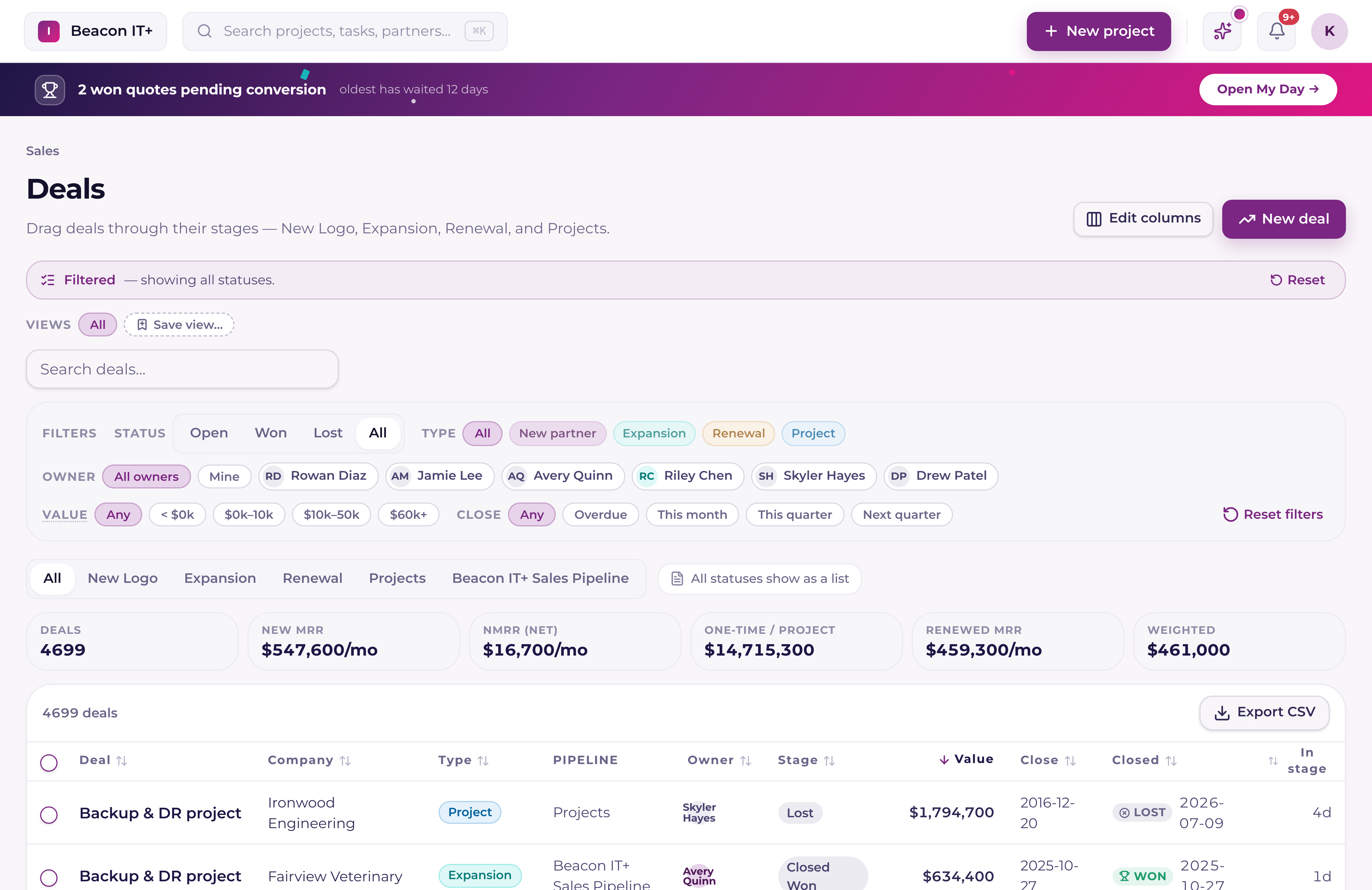
An opportunity is how Current tracks a piece of business from first conversation through won or lost. Every opportunity lives in a pipeline, moves through stages on a board, and (when it's won) can hand straight off into a project. Current starts you with four pipelines, and you can add your own.
The four built-in pipelines
| Pipeline | What it's for |
|---|---|
| New Logo | Brand-new customers |
| Expansion (nMRR) | Additional recurring revenue from an existing customer |
| Renewal | Contract renewals coming up on an account |
| Projects | One-time project work, whether or not it comes with recurring revenue |
Building your own pipelines
If your team tracks a kind of work that doesn't fit the four built-in pipelines, add one. Open Opportunities, choose Edit columns, then New pipeline. Sales Managers and Admins with CRM access can do this; everyone else sees the pipelines but can't change them.
- 1Name itGive it the name your team already uses. You can rename it later without disturbing any opportunities in it.
- 2Choose what its opportunities count asNew Logo, Expansion, Renewal or Project. This is how the opportunities in this pipeline are read by goals, commissions and forecasts, so pick the one that matches the money. A pipeline for acquisitions, for instance, is usually New Logo.
- 3Choose who sees itEveryone, or only the people you list. See the note below on what that does and doesn't do.
- 4Add its columnsA new pipeline starts empty. Add the stages your team moves work through, in the same Edit columns screen, then Save columns.
You can also reorder your pipelines into the order your team works in, and take one off the board when you've finished with it. Sales managers and tenant admins see Delete board at the end of the board tabs whenever a board they created is selected. It asks first, and it won't go ahead while open opportunities are still on the board: move them to another board first (won and lost opportunities can stay). Delete board archives the pipeline: it drops off the board tabs and stops being offered for new opportunities, its opportunities keep their history and still appear in reports and search, and you can restore it any time from Edit columns. Nothing is ever deleted.
Your columns and your PSA's stages
Each pipeline column can point at a stage in your PSA, which is what lets an opportunity push its stage across and what tells Current where an opportunity coming the other way belongs. Current now matches the obvious ones for you: on the first sync it reads your PSA's own stage list and maps every column whose name plainly matches one, ignoring a leading number, so "3 - Proposal" matches Proposal, plus your Won and Lost columns. Where two stages could both be right, it maps nothing and leaves that column to you. Those automatic matches work straight away, and each one is marked "Matched by name, check it, then Save to confirm" under the stage in Edit columns. Read them, change any that are wrong, and press Save columns: that is the whole of confirming them, and the mark goes away. Edit columns also tells you how many columns still need a mapping, and the first sync says so in its own summary.
Custom fields on a pipeline
Every opportunity already carries the amounts, the close date and the owner. If a pipeline needs to track something else (an acquisition's EBITDA, a project's site count, the percentage of revenue that recurs) add a custom field to that pipeline. It appears on every opportunity in that pipeline and nowhere else, so one team's extra detail never clutters another team's board.
Open Opportunities, choose Edit columns, and find the Custom fields box inside the pipeline you want. Type a name, pick what kind of value it holds, and add it. Sales Managers and Admins with CRM access set fields up; anyone who can already edit an opportunity can fill them in from the opportunity drawer.
There are eight kinds: Money, Number, Percent, Text, Date, Dropdown, Checkboxes, and Yes / no. Dropdown and Checkboxes take the list of answers you allow, typed one per line, Dropdown for one answer, Checkboxes for any number of them. Reach for those two whenever the answer should be one of a set, because everybody then picks the same wording and the field becomes something you can count rather than only read.
Rename a field by clicking its name, and use the arrows to put your fields in the order you want to read them in. Renaming or reordering keeps everything already entered. Retiring a field takes it off the opportunity drawer but keeps the values you saved, so restoring it later brings them all back.
Creating an opportunity
To add an opportunity to a pipeline, create it in that pipeline: every opportunity belongs to one pipeline and one company, and the pipeline is picked in the window that creates it. There are three ways in, and all three open the same kind of form. Account executives, sales managers, tenant admins and people with Full CRM, all with CRM access, can create opportunities.
- On the Opportunities page, press New opportunity. The Pipeline field starts on the pipeline tab you were looking at (the first pipeline when you were on All), and a Stage field beside it lists that pipeline's open stages, so you can drop the opportunity straight into a later stage.
- On Sales home, press New and choose New opportunity. It opens the same window on the Opportunities page.
- On a company record, press + Opportunity in the header. The company is already filled in, and the pipeline starts on Expansion for a customer and New Logo for a prospect; change it in the Pipeline field. The opportunity lands in the first open stage of the pipeline you pick.
- 1Open the windowUse any of the three ways above. Every opportunity is tied to a company, so on the Opportunities page you search for the company first (or add a new one from the same box).
- 2Pick the pipelineChoose the pipeline the work belongs on: New Logo for a new customer, Expansion for more recurring revenue from an existing one, Renewal, Projects, or one your team built. The opportunity type follows the pipeline until you change it.
- 3Enter the basicsName, amount (one-time and/or recurring), contract term, lead source and a projected close date, plus any questions the landing stage asks.
- 4Press Create opportunityThe opportunity appears on that pipeline's board and in Sales home, and reaches your PSA once CRM writes are on.
- Which pipelines you can pick: the Move to pipeline list shows a pipeline only when it is active, you can see it, and it isn't the pipeline you're on. A pipeline with no open column (a column that isn't Won or Lost), such as one made to archive old opportunities, shows in the list greyed out with "(add an open column first)" after its name. Add an open column to it in Edit columns and it becomes selectable.
- Only open opportunities move. Won and lost opportunities stay on their pipeline (reopen one to move it), and so does one that is already on the pipeline you picked.
- Each opportunity changes the same way it does from its own Details: the pipeline and stage together, the new stage's default win probability, and the new pipeline's opportunity type when that pipeline sets one. A moved opportunity then follows the new pipeline's visibility, so on a members-only pipeline only its members see it.
- The new stage's questions are checked for each opportunity. One that still needs answers stays where it is, so you can move it on its own and answer them.
- An account executive moves only opportunities they own.
- An opportunity already linked to your PSA sends its new stage to your PSA in the background, so give the new column its matching PSA stage in Edit columns before you move them; a column with no PSA stage can't send. An opportunity that isn't in your PSA yet moves in Current only, so a bulk move never creates an opportunity in your PSA.
The board and the list view
The Opportunities page shows a drag-and-drop board of open opportunities, one column per stage. The pipeline tabs sit at the very top of the page with the Board/List toggle beside them, and one toolbar underneath holds everything that narrows the board: a search box and six labeled menus, Status, Type, Owner, Value, Close, and Chance. Each button always names what it's set to, so the toolbar reads as a sentence about what you're looking at. Set a filter and its button turns purple and shows the value in place, with an x that clears just that one; a Reset button appears whenever anything is set. The stage columns size themselves to your screen: a short pipeline spreads out to use the width, and a long one shows the next stage peeking in at the right edge with a count of how many more sit past it. Click that count, or the arrow at the left edge, to page through the stages a screenful at a time.
Everyone with opportunity access sees the whole workspace's board, Account Executives included. The Owner menu opens a searchable list: All owners, Mine, My team (when you lead a sales team), and, for leadership, every CRM person by name; editing an opportunity still requires owning it or working its account. Switch Status to Won, Lost, or All and Current swaps to a list view instead, a kanban board only makes sense for opportunities still in motion. Each card shows the partner, the MRR/one-time split, how long the opportunity has sat in its current stage, and the owner.
Raw or weighted: what the board is really worth
The totals above the board, and the subtotal on every column header, add up what your opportunities are worth at face value. At the end of that strip is a cell marked Totals holding two words, Raw and Weighted. Choose Weighted and every one of those numbers becomes value multiplied by win probability instead, so a 10,000 opportunity sitting at 30 percent counts as 3,000. Nothing about the opportunities changes; only the arithmetic does, on the top row and in the column headers together, so the two always agree.
It starts on Raw, and Current remembers which way you left it, for you alone. A colleague opening the same board sees it their way, and a board nobody has switched reads exactly as it always did. The standing Weighted tile in that strip is a Raw-mode thing: in Weighted mode every money tile is already a weighted number, so it steps aside rather than saying the same thing twice.
Win probability comes from two places, and both are already in front of you. Every stage carries a default probability, set in Edit columns beside the stage name, so an opportunity picks one up simply by being where it is. Any individual opportunity can override that with its own number in the Win probability field in the opportunity drawer, for the one you know is better or worse than its stage suggests. Set the stage defaults once and the weighted view is worth reading from that moment on.
The Chance menu in the toolbar narrows the board to one band: Likely is 70 percent and up, Toss-up is 40 to 69, and Long shot is anything under 40. Any is the default and holds every opportunity. It saves into a view with the rest of your filters, so "my Likely opportunities in New Logo" is one click from anywhere on the page.
Inside an opportunity: the drawer
Click a card, a list row, or an opportunity on a company's Quotes & opportunities rail and the opportunity opens as a tab in the workspace drawer, the same drawer your tasks and tickets use (since September 19, 2026; before that a separate side panel opened on the board). Under the header sits a stage tile: the pipeline's working stages as buttons, the current one lit, plus Mark won and Mark lost. Tapping a stage moves the opportunity with the same checkpoint questions and movement rules a drag on the board applies. Four views follow. Overview: the fill-in strips an opportunity may carry (won with no close date, no lead source), the next step, the contacts attached to it, linked quotes, the MRR economics strip and recent activity. Details: the editable form. Its dropdowns (forecast, a preset contract term, owner, and lead source when it is a list) save as soon as you pick; the typed fields save as one with the Save changes button in the footer, then any custom fields its pipeline adds (those save on their own), the PSA opportunity link, and on a renewal the dossier and defense score. Activity: the timeline with an inline composer for notes, the company's email, a follow-up action, and the renewal save plays. Quotes: the linked quotes and their documents. Pop out opens the opportunity in its own browser window with the same tile and views, and Copy link gives teammates a link that opens the opportunity in their drawer. "The task drawer: tabs, the time tile, pop out, and Open work" covers the drawer itself.
An Emails section sits in the Activity view, holding the mail Current has synced for that opportunity's company. It's the same email history the company record shows, threaded and newest first, cut to the twelve most recent threads, enough to see where the conversation stands before you call, without leaving the opportunity to find out. Each thread expands to the full message. "View all on the company page" opens the whole archive.
- It starts collapsed and fetches nothing until you open it, so the board and the drawer stay fast.
- You see what you're already allowed to see: mail from your own mailbox, plus anyone's for sales leadership, and only on companies you can open. The rules are the same as everywhere else, see "CRM email sync: what lands on a company, and why".
- A company with nothing synced says so, and names Microsoft 365 as what feeds it. A read that fails says it failed and offers a retry, rather than showing you an empty list that reads like there was never any mail.
What a stage can ask for before an opportunity lands on it
A stage can carry a checkpoint: the questions an opportunity has to have answered before it's allowed onto that column. Drag a card onto a stage that asks something and a short dialog opens with only the answers that are still blank; fill them in and the move completes, cancel and the card goes back with nothing written. Opportunities you already have are left where they are, a checkpoint applies the next time somebody moves an opportunity, never retroactively.
Two more switches sit beside it, per pipeline and both off until you turn them on: "Opportunities move one stage at a time" and "Opportunities can't move backward". Closing an opportunity as Won or Lost, and reopening one, are always allowed whichever way those are set. A pipeline can also move opportunities for you as quotes are created and sent. All of it is set up in Edit columns by sales leadership, and it's covered in "Checkpoints: stage questions, movement rules, and Current Sales OS". Including Current Sales OS, which builds a whole working process in one pass if you don't have one yet.
Marking an opportunity won or lost
Drag an opportunity into the Won or Lost zone (or press Mark won or Mark lost on the stage tile in the drawer), and Current opens a short dialog to capture why. A lost reason is required. Current won't let an opportunity close as lost without one, since that reason is what feeds pipeline reporting later. A won reason is optional but encouraged. The lost reasons you pick from are your workspace's own list, the same one a contact record uses, and a sales manager or workspace admin can edit it under Settings › Sales and CRM › Lost reasons.
Won and Lost can carry a checkpoint of their own, and when they do, those questions sit in this dialog underneath the reason. It's the same short form the board opens on a drag, so "what do we need before this is Closed Won" is a question you can actually ask.
What happens when you win
Winning an opportunity is the one moment Current celebrates out loud. A short animated burst on the card when you mark it won (a quieter glow if you have reduced motion turned on). If the opportunity has a signed quote attached, winning routes you into the same guided wizard used to turn a won quote into a project: pick whether the work becomes a Current project or a support ticket, review the tasks and phases the wizard proposes, and confirm. Nothing is created in your PSA until you confirm that final step. See "ScalePad Quoter: turn won quotes into projects and charges" for the wizard walkthrough.
Renewals for agreements that have ended
Current creates that renewal opportunity about 90 days before the agreement's end date, while the agreement is still active. Plenty happens in those 90 days. The most common thing is the renewal itself: you close the old agreement in your PSA and write a new one, often folding a site or a service into a bigger agreement. The old agreement is now inactive, and the renewal opportunity Current made for it has nothing left to renew.
Current watches for that. When the agreement behind an auto-created renewal stops being active in your PSA, the opportunity is hidden: it comes off the board and the list, and it stops counting toward your pipeline totals, your goals, your dashboards and your reports. Nothing is deleted and nothing is marked lost. If the agreement goes active again, the opportunity comes straight back.
Quotes and documents on an opportunity
Open an opportunity and you'll find its quotes under the money figures. The newest one shows as a small preview of page one with its number, status and totals beside it. Click it to read the whole thing full screen, or download it. If the opportunity has had more than one quote, the earlier ones are listed underneath as history, newest first, so you can see what changed between versions without leaving the opportunity.
Nothing is stored in Current. The document is fetched from the copy filed against the opportunity in your PSA at the moment you open it, and kept only for as long as the page is open, so what you read is always the copy your PSA holds. Re-opening a quote you already looked at is instant; reloading the page starts fresh.
Who can see this is decided the same way as the quote itself: anyone with CRM access who can view the company. Partner Viewers never see quotes or their documents anywhere in Current.
To see them, set the Ended renewals filter on the Opportunities page to Shown. The number beside it tells you how many are being held back right now, and each one is marked with an Ended chip next to its opportunity type so you can tell them apart from live renewals. Reset filters puts it back to Hidden.
Deleting an opportunity
A duplicate, or an opportunity made by mistake, can be deleted from the foot of the opportunity's Details view with Delete opportunity. Whoever owns an open opportunity can delete it. Won and lost opportunities can be deleted only by a sales manager or a tenant admin, because a won opportunity is what a commission is paid on. An opportunity that is already on a commission statement can't be deleted by anyone; mark it lost instead.
Autotask can't delete an opportunity, so when an open opportunity is linked to one, Delete opportunity first marks the opportunity lost in Autotask with the reason Duplicate and the note "Duplicate, deleted in Current", and only then deletes the opportunity here. If Autotask refuses that change, the opportunity stays in Current marked lost, and its owner can press Delete opportunity again once the problem is fixed. An opportunity linked to ConnectWise or HaloPSA can't be deleted from Current yet; mark it lost instead.