
The Current CRM: companies, opportunities, and Sales home
How Current's CRM anchors every account on your PSA data instead of a separate contact database, and how saved views, columns, and filters (including your own company fields) narrow a list to the one you work.
On this page · 14 sections
- What "anchored on your PSA" means in practice
- The four pieces
- Saved views: your filters, columns, and sort under one name
- Choosing your columns
- What else you can put in a table
- Your own company fields as columns
- Filtering Companies by your own fields
- Companies your PSA marks inactive
- Customers with several sites
- Your own opportunity fields as columns
- Sharing a view
- Who sees the Sales section
- Sales home: your starting point
- Why this beats a generic CRM for an MSP
Most CRMs are a second database, a place you copy company names and opportunity amounts into, disconnected from the tickets, contracts, and hours your team actually delivers. Current's CRM is built the other way around: every company record is anchored on your PSA data (Autotask, ConnectWise, HaloPSA, Syncro, Rev.io, or SuperOps), so the same MRR, contract, and seat-count figures your PSA already tracks show up automatically, without anyone re-typing them.
What "anchored on your PSA" means in practice
When Current syncs your PSA's companies and contracts or agreements, it builds a company profile for each one (active MRR, licensed seats, contract status) straight from that data. Current adds the sales layer on top: opportunities, activities, ownership, and AI insight. If a company already has an active contract or agreement in your PSA, Current knows it's a customer the moment the sync runs. Nobody has to manually flag it.
The four pieces
- Companies, the anchored record for every account, from cold prospect to long-time customer. See "The company record: your single view of every account" for what's on the page.
- Opportunities, the pipeline that tracks a piece of business from first conversation to won or lost. See "Working opportunities: pipelines, stages, and winning".
- Sales home, the landing page for anyone with CRM access: your day's follow-ups, your pipeline, and AI-surfaced insight, or the whole team's if you lead sales.
- Goals, where sales leadership sets the targets every pace bar measures against, one period at a time: under Sales › Manage, or Team › Scorecards › Sales when your workspace uses Team. See "Setting sales goals and tracking progress".
Saved views: your filters, columns, and sort under one name
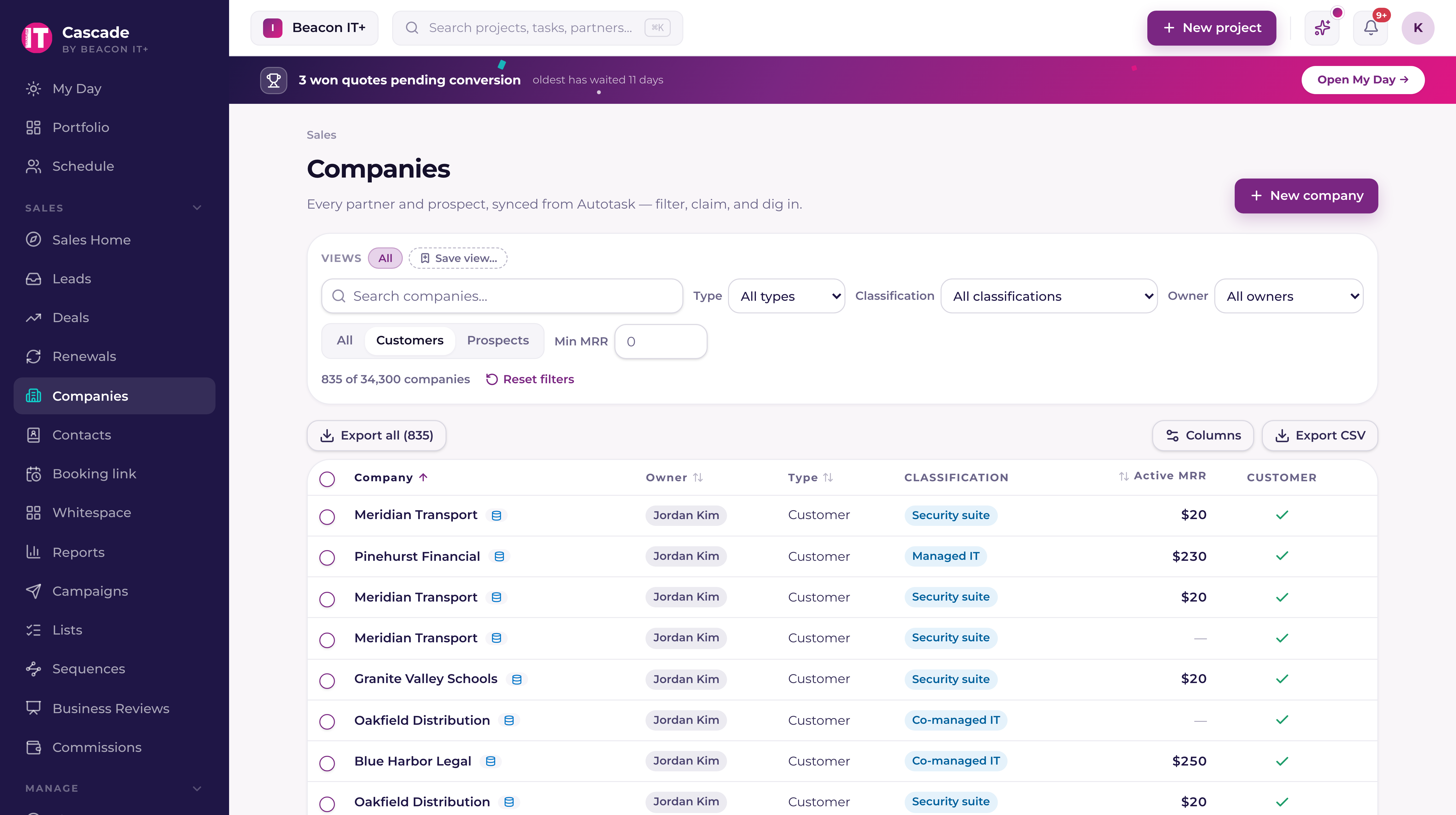
The Companies list starts with everything in it, which is rarely the list you want to work. Set the filters you want, arrange the columns, sort the way you read, then choose "Save view…" above the filter bar and give it a name. It appears as a pill you can click to get back to that exact list any time. A view remembers all three parts (the filters, the column arrangement, and the sort), so opening it tomorrow puts you back where you were.
Saved views and the Columns control work the same way on every CRM list. Each page keeps its own views: a view you save on Companies appears on Companies, not on Contacts. On Opportunities the same views live in a View menu at the right end of the toolbar instead of a pill row, open it to apply a view, save one, update it, share it, or make it your default; the button names the view you're on, and adds "edited" the moment your filters drift from what it saved.
- Companies, filters, columns, and sort.
- Leads. The same, plus which of the two views you were in (Funnel or List), which status you had selected, and who you had it assigned to. Save a view from the List and clicking its pill takes you back to the list.
- Contacts, filters, columns, and sort. Every contacts column sorts now, and the sorting happens in the database across everyone who matches your filters, so the order holds when you press Show more.
- Opportunities, filters, columns, and sort, on the List and All tabs. The Board is a set of stage columns rather than a table, so the Columns control (beside the Board/List toggle at the top of the page) sits out while you're on it; your filters still save from either.
- The contacts inside a CRM list, your search and your columns. Open a list, stay on its Contacts tab, and the view bar and Columns control sit above the table.
Choosing your columns
Open Columns at the right of the filter bar. The list runs in the same order as the table, top to bottom for left to right. Untick anything you never read and it leaves the table; tick it again and it comes back where it was. To move a column, drag it by the grip at the left of its row, or put focus anywhere in its row and press Alt (Option on a Mac) with the up or down arrow. On a table with more than 12 columns, a "Find a column…" box at the top narrows the list. "Keep columns in view" (0 to 3) keeps that many columns in place while the rest scroll sideways, which is what you want on a narrow screen when the company name keeps disappearing. Every change lands as you make it, so you can see the real table while you choose.
To make a column wider or narrower, drag the edge at the right of its header. The name column takes whatever room is left, so the table fills the page at any width. From the keyboard, press Tab until you reach the edge after a header, then press the left or right arrow; Enter puts that column back to its standard width. Click a header to sort by it and click again to reverse. Dates start newest first, numbers highest first, and text A to Z, and the sorted column shows a purple arrow.
"Reset columns" at the bottom of Columns puts the columns, their order, how many stay in view and their widths back to how the page starts. Your sort stays as it is.
A line under the table says how many rows are on screen, how many match your filters and the order, for example "60 of 1,240 shown · sorted by Company, A to Z". When there is no exact count of the matching rows (while you search a CRM list, for example), the second number is a dash rather than a figure that would count rows your filters leave out.
- The name column carries a lock in Columns: it is always shown and always first, since a list you can't read isn't a list. The row's action buttons aren't in Columns at all and stay at the end of every row.
- Columns only lists what the page you're on actually has. On Opportunities there is no Pipeline column while you're inside a single pipeline, no Value column unless you're allowed to see opportunity amounts, and no Closed column until a won or lost opportunity is in view. A column you can't see isn't hiding behind an unticked box. It isn't there.
- "Export CSV" sends the columns you can see, in the order you put them, so the file matches the screen. Money columns carry your workspace currency code in the header, like "MRR (GBP)", and the cells stay plain numbers so a spreadsheet can do arithmetic on them. On Companies, "Export all" walks every page the same way. On the Opportunities list it covers every opportunity matching your filters, not just the page on screen; inside a CRM list it covers the page you're on, which is all that table loads.
- Your working arrangement is yours alone and follows you between browsers. It only becomes something other people can see when you save it as a view and share that view.
- Column widths are yours too and follow you to any browser you sign in from, but a saved view doesn't carry them, so a teammate who opens a view you shared sees it at their own widths.
What else you can put in a table
Each list carries more than it shows. The extra columns start switched off, so a table you never touched looks the way it always has; open Columns and tick the ones you want. Everything you turn on lands in the CSV, and nearly everything sorts. The one exception is called out on its own column.
- Companies, City, State, Industry, Market segment, Lead source, Created, and Last activity. Sorting any of them orders the whole directory rather than the rows currently on screen.
- Opportunities, Probability, Forecast, Contract term, Lead source, Created, and Days in funnel. Days in funnel counts from the day the opportunity was created and keeps counting when it changes stage, which is the difference between it and In stage.
- Contacts, Mobile phone, Email health, Created, Last activity, City, and State. Email health is the same verification badge that sits next to the address, given its own column so you can sort every questionable address to the top.
- Last activity on a company, and on a contact, is the company's most recent signal (an activity, a ticket, or a synced email) worked out overnight. On Contacts the column says "(company)" so it never reads as when you last spoke to that person.
Your own company fields as columns
The fields your workspace added to companies (EBITDA, annual revenue, % recurring, employees, whatever your team tracks) are columns on Companies too. They start switched off like the rest of the extra columns, so defining a field changes nobody's table until they turn it on in Columns. Each one sorts by its real value, money and numbers by size and dates by date, with blanks at the bottom whichever direction you sort, and every column you turn on lands in Export CSV and Export all, with the workspace currency code in the header of a money column. Setting the fields up is on the company record, covered in "The company record: your single view of every account".
Filtering Companies by your own fields
Next to the rest of the filter bar sits a "Company fields" button. Open it, choose a field, choose a condition, and type the value. Add up to eight and they stack with AND, alongside the filters that were already there. The button carries a count while any of them are set, so a narrowed directory says it was narrowed.
- A money, number, or percent field offers Over, Under, Equals, and Is not.
- A text field offers Contains, Equals, and Is not.
- A date field offers After, Before, and On.
- Every field also offers Has a value and Is empty, which take no value of their own. Useful for finding the accounts nobody has filled in yet.
- Beside it, an Open opportunity control cuts the list to companies with an opportunity still in play, or to the ones without. An open opportunity is any opportunity before won or lost, in any pipeline.
The filtering happens in the database across every company matching the rest of your filters, so the count at the top and the order you sorted by both hold when you page through. Save the combination as a view and the conditions come back with it.
Companies your PSA marks inactive
The Status control on the Companies filter bar reads the active or inactive flag your PSA keeps on each company (Autotask, ConnectWise, HaloPSA, Syncro, Rev.io, or SuperOps), which every sync brings across. It starts on Active, so a company you mark inactive in the PSA drops off the list after the next sync. Choose Inactive to see only those, or All to see both, and with All an inactive company carries an Inactive label beside its name. A company whose status hasn't synced yet, or one that lives only in Current, counts as active.
- A company synced from your PSA can't be deleted in Current. To take one off the list, mark it inactive in the PSA.
- The second number in the count at the top is every company in the workspace, inactive ones included.
- A saved view remembers the Status it was saved with. A view saved before September 16, 2026 opens on Active.
- Status applies to the Companies list. Picking a company elsewhere, such as when you start an opportunity, still finds inactive ones, and a campaign audience has its own Company status filter that reads the same flag the same way.
Customers with several sites
When your PSA keeps one customer as several companies, one per site, a customer group puts them together. Each site stays its own row on the Companies list, labelled "Part of" its group, and the group filter narrows the list to one group's sites alongside every other filter. Tenant admins and sales leaders also see a Suggested groups panel at the top of the list whenever Current finds sites that look like one customer. See "Customer groups: one customer with several sites".
Your own opportunity fields as columns
Custom fields you added to a pipeline are columns on that pipeline's list. Open Columns on the List tab and they sit with the rest, off until you turn them on. They sort by their real value (money and numbers by size, dates by date), and blank ones sit at the bottom whichever direction you sort. The CSV carries the raw value so a spreadsheet can do its own arithmetic on it, with your workspace currency code in the header of a money column.
They only appear on their own pipeline. The All tab spans pipelines that each define their own fields, so a field from one would be blank down most of the list; Columns leaves them out there rather than offering a column that can't be filled in. Setting fields up is on the Opportunity pipelines and custom fields article.
Sharing a view
There are two ways to hand a view to somebody, and they are not the same. On one of your own views, open its pill and choose "Share with people…" to pick named teammates: they get the view in their own view bar and can apply it, but it stays yours to change or delete. You don't need to lead sales to do this. It's your view. Sales leadership additionally has "Share with team", which publishes a view to everyone with CRM access.
Who sees the Sales section
The Sales section only appears in the sidebar for people who've been given CRM access. Account Executives, Sales Managers and Tenant Admins have it by default, and giving someone the Service Manager role turns it on with the role. A Tenant Admin can extend it to a Project Manager, Engineer or Dispatcher, who then get a read-only slice: Sales home, plus Companies and Contacts in the menu section named for whatever your workspace calls the businesses you serve. No pipeline, no financial detail. A Tenant Admin can go further and turn on Full CRM for a Project Manager, Service Manager, Engineer or Account Executive, which opens opportunities, leads, campaigns, sequences, lists and Business Reviews on every account; it never opens commissions, coaching or the tools for running the sales team. The vCIO role comes with Full CRM already on. Partners never see any of it, under any circumstance. See "Sales Manager vs. Account Executive: who sees what" for the full breakdown, and "Roles & permissions: who sees what" for how roles work tenant-wide.
Sales home: your starting point
Open Sales home and Current shows a different view depending on your role, both of them a grid of tiles with one number each. An Account Executive sees "Your Day": their seven goals across the top, each with a bar and a tick marking where they should be today; a morning brief; their open book; seats, first appointments and motions; the accounts closest to churning; to-dos; and a short list of AI-surfaced coaching insights, capped low on purpose so it never turns into noise. A Sales Manager or Admin sees the Team Cockpit instead: the money row and the team's pace, the leaderboard across the whole sales team, wins and losses split by motion, and the same goal tracking rolled up. Leadership can flip between their own day and the team view from a switch at the top of the page, and the rest of the controls stay put when they do. See "The sales dashboard: pipeline, pace, and the leaderboard" for the tile-by-tile walkthrough.
Why this beats a generic CRM for an MSP
A standalone CRM stops knowing anything the moment an opportunity closes. Current doesn't. It keeps watching the same account through tickets, project health, contract seats, and hours delivered, because that data already lives in the platform. That's what powers things like the AI relationship read on the company record and the renewal and whitespace signals surfaced elsewhere in the CRM. Your CRM and your delivery platform are the same system, not two logins that drift apart.