
Company ownership and the account executive book
How to assign an account manager to a company, primary owners and co-owners, the unowned prospect pool, who sees which companies, moving many companies or a whole book to a new owner, and the bulk bar for tagging, listing, or deleting many at once.
On this page · 7 sections
Every Account Executive can read the entire company list, but works a defined book of business, the accounts they own or co-own. Understanding how Current decides who owns a given company (and therefore who can act on it) avoids a lot of confusion when a claim or an edit doesn't go the way someone expects.
Primary owner and co-owners
A company can have exactly one primary owner at a time, normally the Account Executive who's building the relationship. It can also have any number of co-owners, added by sales leadership when more than one person needs full access to an account (a hand-off in progress, a team-sell situation, and so on). Both the primary owner and any co-owners get full visibility and can act on the account; the primary-owner designation is what shows up as "Account Manager" wherever that appears.
The unowned prospect pool
A company with no assigned owner and no active contract sits in what Current calls the unowned pool, visible to every Account Executive, first-touch-wins. Any AE can open it and claim it directly from the company record: a "Claim this company" button appears right in the hero band whenever a company is unowned and not yet a customer.
- 1Find an unowned prospectOn the Companies list, switch the filter to Unowned to see only claimable accounts.
- 2Open the company recordReview the account before claiming it, activity history and any existing notes carry over.
- 3Click Claim this companyYou become the primary owner immediately. If someone else claims it first, you'll see who got there ahead of you.
Who can see which companies
| Role | Companies visible |
|---|---|
| Sales Manager / Tenant Admin | Every company in the CRM |
| Account Executive | Every company (reading is workspace-wide); edits only companies they own or co-own, and can claim from the unowned prospect pool |
| Anyone with Full CRM (an Account Executive, Project Manager or Engineer) | Every company; works any account's contacts, opportunities, notes, tags and Business Reviews, creates companies, and claims from the unowned prospect pool. Cannot change who owns a company or an opportunity, or delete a teammate's opportunity |
| Project Manager / Engineer (if given CRM access) | Every company, read-only, no financial detail, no opportunities |
| Partner | Never. The CRM is not visible to partners under any circumstance |
This is enforced at the database layer, the same way every other tenant boundary in Current is. It isn't just a filter on the page. Reading any company in your own workspace is allowed by design, but an Account Executive genuinely cannot edit their way into another AE's account or claim a customer they don't own; the server refuses the write. Full CRM, which a Tenant Admin turns on per person, is the one widening, and it stops short of ownership: its holder can claim an unowned prospect like any Account Executive, but never reassigns an owned company or changes whether it counts as a customer. See "Sales Manager vs. Account Executive: who sees what" for the full side-by-side, and "Roles & permissions: who sees what" for how this fits the rest of the role model.
Assign an account manager to a company
The account manager is the company's primary owner. Sales leadership (a Sales Manager, a Tenant Admin, or someone with the sales-manager flag) assigns one: open the company, click the owner chip beside its badges or the Owner tile in the hero band, search your team, pick the person and press Save owner. That works whether the company has no owner yet or already has one. Which way in depends on the company:
- A prospect nobody owns: any Account Executive can take it with Claim this company in the hero band, and becomes its account manager straight away. Sales leadership can assign it to someone else from the owner chip.
- A customer with no owner: only sales leadership can assign it. Customers never sit in the unowned pool, so Claim this company doesn't appear on them.
- Many unowned companies at once: on the Companies list, set Owner to Unowned, tick the companies, and press Assign owner in the bar above the table. Pick one person and confirm. Assign owner only fills companies with no owner: a selected company that already has one keeps it. To replace owners that are already set, use Change owner in the same bar, or Move a book… (see "Move every company from one person to another" below).
- From an alert about a company with no account manager: a hot-ticket alert on such a company says so and carries an Assign an owner button (in the Hot tickets tile on Sales home, and in the alert email). It opens the company with the owner picker already open, for the people allowed to assign.
- From Autotask: on a company linked to Autotask, Autotask's Account Manager field is the one Current follows. Set it in Autotask and the next company sync brings it across, as long as that person is linked to their Autotask resource on Users & roles. Assigning in Current sends it the other way.
Reassigning an owner
Only sales leadership (a Sales Manager, a Tenant Admin, or someone with the sales-manager flag) can move an already-owned company from one Account Executive to another, or add a co-owner. The quickest way is the owner chip at the top of the company page, or the Owner tile in the hero band: both open the same short picker (the steps below). More owners… in that picker, or Manage owners on the Owners card, opens the full owners editor, where you pick several people and star the one who becomes the account manager; the Companies list's Assign owner covers many unowned companies at once, and Change owner or Move a book… replace the owner of many companies in one run. Every change is recorded in the audit log. An AE can't reassign their own accounts to a teammate directly. If a hand-off is needed, ask a Sales Manager or Tenant Admin to make the change. On an account outside your book, adding or editing a contact tells you who owns the account before you start typing, so you can ask them or a sales manager instead.
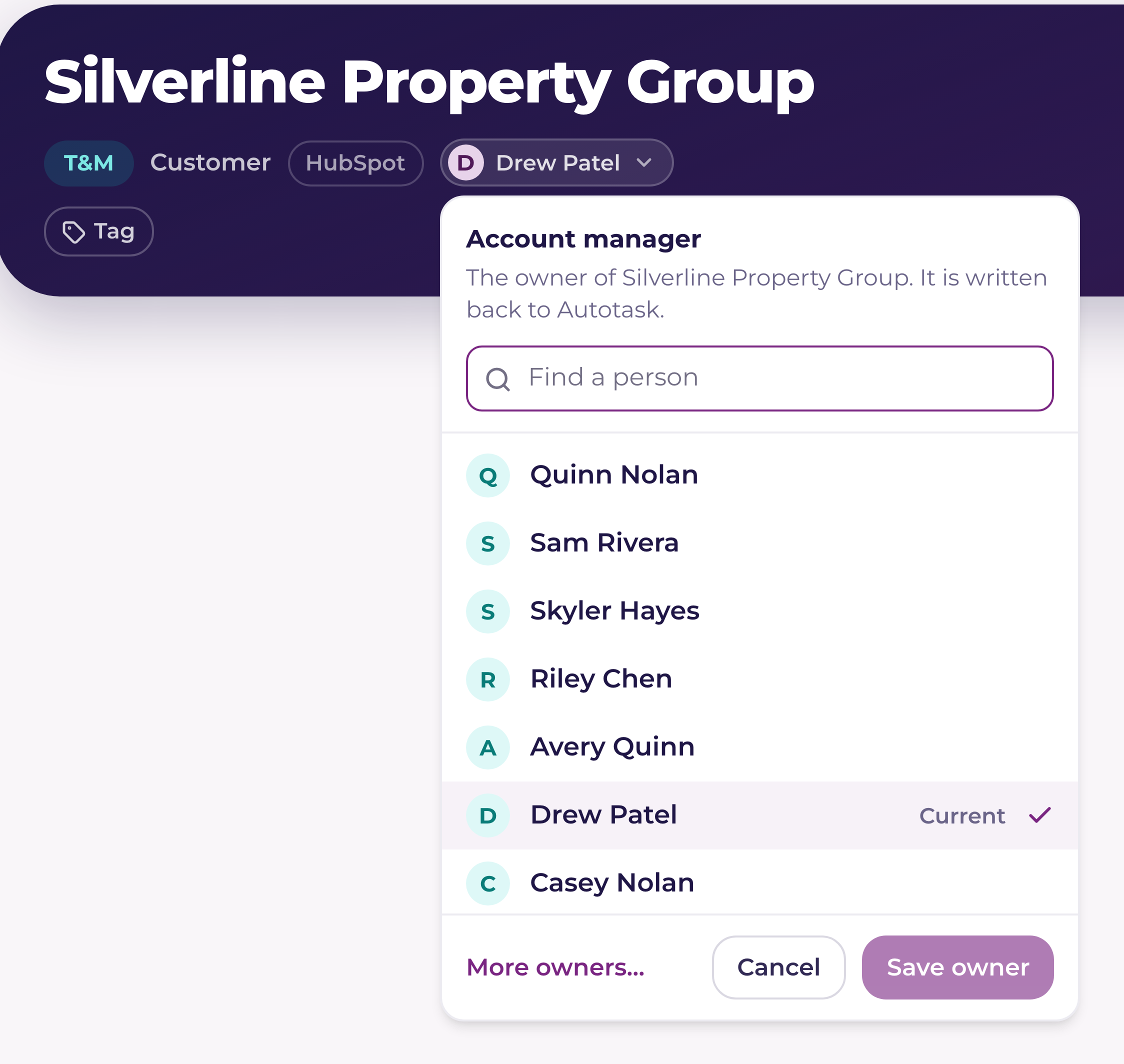
- 1Click the owner chip or the Owner tileOn the company record, the chip beside the company's badges and the Owner tile in the hero band both show the account manager. For sales leadership either one opens a short list of your team. (The Owner tile is on a prospect's band by default; on a customer, add it from the gear under the tiles.)
- 2Pick the new ownerSearch by name and pick the person. They replace the current account manager; any co-owners stay as they are.
- 3Decide about open opportunitiesIf the current owner has open opportunities on this company, a box offers to move them to the new owner too. It is off unless you tick it. Won and lost opportunities never move, so commission already earned stays with the person who earned it.
- 4Save ownerThe change is saved in one step. Use More owners… instead when you want to keep the old owner on as a co-owner or add several people.
- The new account manager is sent to your PSA as the account manager (Autotask's Account Manager, ConnectWise's Territory Manager, HaloPSA's account manager). They must be linked to a PSA person on Users & roles; if they are not, the push fails with a message naming them, and the change in Current is kept until you link them and push again.
- When HubSpot two-way sync is on and the new owner is linked to a HubSpot owner, HubSpot's company owner is updated on its next sync. Otherwise HubSpot keeps its owner, and the Owner tile says who HubSpot lists.
- The old and the new owner each get a notification. Account-manager to-dos (multi-thread, card-expiry, survey and price-increase follow-ups) close for the old owner and open for the new one.
Move every company from one person to another
When someone leaves, or a book changes hands, sales leadership (a Sales Manager, a Tenant Admin, or someone with the sales-manager flag) can move many companies to a new owner in one run, up to 5,000 at a time. There are two ways in on the Companies list.
- Change owner, in the bar above the table: works on the companies you ticked, or on every company matching your filters when you choose "All matching your filters". Set Owner to a person (people who have left are listed under Former staff) to see their book first.
- Move a book…, at the top of the page: pick whose companies to move (people who have left are listed too, so their book can still move) and who takes them. It moves every company where that person is the account manager, and, unless you untick it, the companies they co-own.
- 1Pick the peopleChoose the new owner. They have to be an active member of your team. For a book, choose whose companies to move first.
- 2Choose the optionsMove their open opportunities too (on for a book, off for a selection), Also move the companies they co-own (books only), and Keep the old owner on as a co-owner (off unless you tick it). Won and lost opportunities never move, so commission already earned stays with whoever earned it.
- 3Read the confirm screenIt counts what changes, says how many companies go to your PSA and roughly how long that takes, how many stay in Current only, and what happens in HubSpot. Anything that would stop the run is listed with a link to fix it. Above 250 companies you type the number to confirm.
- 4Let it runA progress bar fills as companies move. If the window closes, the run waits, and the Companies page offers Resume. When it finishes, the new owner and the old owner each get one notification, never one per company.
- Your PSA: for a company linked to your PSA (Autotask, ConnectWise or HaloPSA), Current sends the new account manager there, about 40 companies every 5 minutes. A company linked to Syncro, Rev.io or SuperOps, and one that lives only in Current, keeps the change in Current: a move never creates a company in your PSA. The new owner must be linked to a PSA person on Users & roles, or the run won't start until you link them.
- When sending to your PSA is in Test mode, a run is limited to 200 companies.
- A company whose owners changed after the run started is left alone, not overwritten. The summary lists every company that wasn't changed and why, lets you download the list, and Retry failed tries the ones that failed again.
- Undo: for 7 days, Undo puts back the owners of every company the run changed that nobody has touched since, and moves back the open opportunities it moved that are still open. A company whose previous owner has been deactivated stays with the new owner. So does a company linked to your PSA that had no account manager before (your PSA keeps the account manager Current sent; change it there if it should have none), and one that had co-owners but no account manager. The summary lists each one and why.
- Only one owner change runs in a workspace at a time, and every run is recorded in the audit log.
Acting on many companies at once
Tick the boxes on the Companies list and a bar appears above the table with everything you can do to the whole selection, up to 200 companies at a time. Assign owner and Change owner are there for leadership. Tags adds one tag to every selected company, or removes one from all of them. Add to list puts the selected companies' active contacts with an email address onto a saved list (pick an existing static list or make a new one), and tells you how many people that is before you confirm. Delete removes companies that live only in Current.
- Account Executives can select companies too. Their bar offers Tags and Add to list, and it works on their own book: the summary line says how many of the selected companies are outside it, and those are skipped rather than changed. With Full CRM, Tags and Add to list work on every selected company. Adding to a list needs a list you created, unless you are sales leadership.
- Delete is for sales leadership and tenant admins only, and it never touches a company that came from your PSA. Those rows are called out as "will be skipped" before you confirm; mark them inactive in your PSA and, after the next sync, they stop showing under Status: Active. A company with a won opportunity, any project, a HubSpot link, or a sync in flight is also left alone, and the result says how many were skipped for each reason.
- Every delete asks you to type DELETE, and it can't be undone. Each removed company is written to the audit log with who removed it and when, so an admin can always see what happened.