
Your PSA statuses on the project board
Every task in your PSA has a status, and most MSPs have added their own: Waiting Customer, Customer Note Added, Escalate, On Hold. Current's board has four lanes that every number in Current reads: Not started, In progress, Review and Done. You decide where each of your PSA's statuses goes. It can join one of the four lanes, get a column of its own on the board, or be ignored.
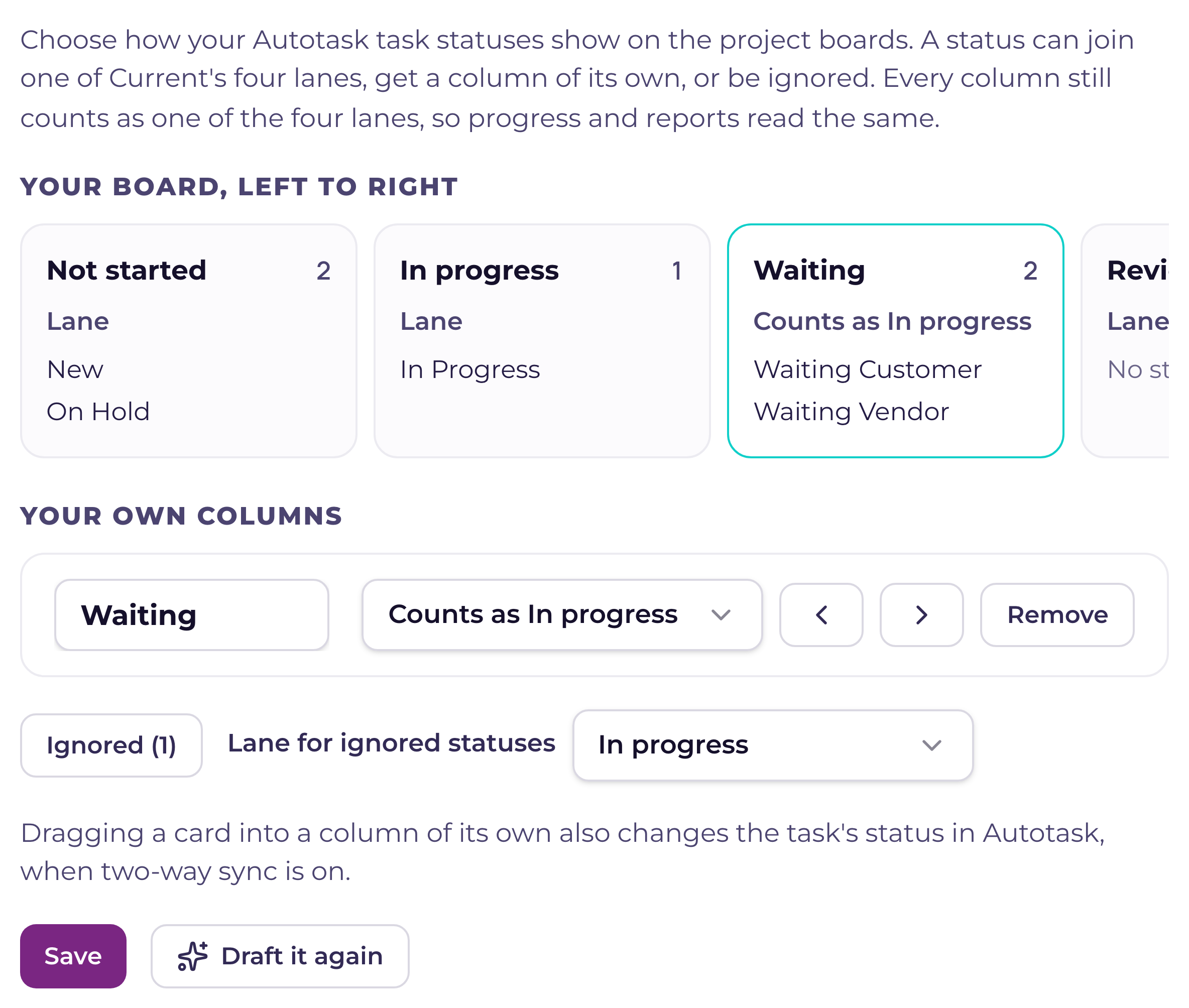
Arrange the board
- 1Open the Projects checkGo to Settings › Current setup › Readiness checks, open Projects, and press Place these statuses (or Change where statuses show) on the task statuses line. Only a tenant admin can do this.
- 2Check Current's draftThe first time, Current drafts the whole board from your status names: which statuses get a column of their own, which join a lane, which look alike and share one column, and the order. If it can't draft one, each status starts from a guess instead. Draft it again asks for a new draft.
- 3Change any rowFor each status, pick a lane, one of your columns, A column of its own, or Ignore. Rename a column, choose the lane it counts as, move it left or right, or remove it. The preview at the top shows the board as it will look.
- 4Press SaveOne Save puts the columns on every project board that syncs with your PSA and on the all-projects board, and moves tasks to the right lane. The check then runs again.
A column still counts as a lane
Every column of its own counts as one of the four lanes. A Waiting on customer column that counts as In progress puts its tasks in In progress for project progress, reports, My Day and everything else that reads status, so your numbers mean the same as before. A status your PSA itself closes always counts as done: the setup check shows it as Done (closed in your PSA), and it cannot be ignored or given a column of its own.
Dragging a card into a status column
Drag a card into one of these columns and Current sets the task's lane to the one the column counts as, and changes the task's status in your PSA to the column's first status. That reaches your PSA only for a task synced with it, and only while two-way sync is on; the message after the drop says whether it did. A column that holds several statuses always writes its first one. Dragging into a plain lane works as it always has. A card in a status column stays there while your PSA keeps that status, so to move it into the lane it counts as, change its status in the task instead.
Ignore a status
Ignore is for statuses nobody works in, such as an old status kept for history or one named Do Not Use. Ignored statuses leave the list and stop counting as setup to do. Their tasks go to one lane you choose for every ignored status, In progress unless you change it. Change that lane later and the tasks move with it. Open the Ignored list to place any of them again.
A project's own board
A project can still adjust a status column on its own board: rename it, recolor it, move it or set a limit. Its statuses come from the workspace's board, so it can't be deleted from one project; remove it in the Projects check instead and it leaves every board. A name you give it on one project stays when the workspace's board changes. A card you add in a status column lands in the lane it counts as, and moves into the column once your PSA gives the task that status.
How each PSA is read
With ConnectWise the check lists the statuses of your project boards, retired boards included, and a status counts as closed only when every project board that has it closes it; when your boards disagree, you choose where it goes. A HaloPSA checklist item has no status of its own, so it stays in its lane. Syncro keeps no list of task statuses Current can read, so there is nothing to arrange. If your workspace switches to another PSA, the old PSA's columns leave every board and their tasks show in their lanes.