
Connect N-able Cove backup to Current
Bring device and Microsoft 365 backup health into company reporting, with clear recovery-testing and mailbox-count limits.
On this page · 7 sections
Connect N-able Cove and each partner's device and Microsoft 365 backups sit on the company page, the backups-failing alert and the business review, so your team sees an account that has gone 48 hours without a good backup before the partner asks.
What it does for you
| Where in Current | What you get |
|---|---|
| Service desk tickets | When Cove backups are failing for the ticket's company, the backups-failing alert is listed in the company health panel, so the engineer sees it before starting work without opening Cove. |
| Company page | The Backup band counts Cove's device backup accounts, Microsoft 365 organizations, Exchange mailboxes and the accounts with recovery testing configured, with an expandable list of the accounts behind them. |
| Alerts | An account whose latest state needs attention, or whose last successful backup is more than 48 hours old, counts toward the company's backups-failing alert, which closes itself when the backups recover. |
| Reports and dashboards | Failing Cove accounts count toward the Backups failing now tile. |
| Business reviews | The Backup & continuity chapter carries the device backup accounts and Microsoft 365 organizations, how many need attention and the Exchange mailbox count, written as theme numbers rather than a vendor name. |
| Ask Current | Ask "which partners have failing backups?" or about one partner's backups, and Ask Current answers from the same figures and open alerts, with a link to each company. It needs CRM access. |
Cove brings server, workstation and Microsoft 365 backup evidence into Current. Device backup accounts and Microsoft 365 organizations stay separate, so an organization is never counted as a protected machine.
Before you connect
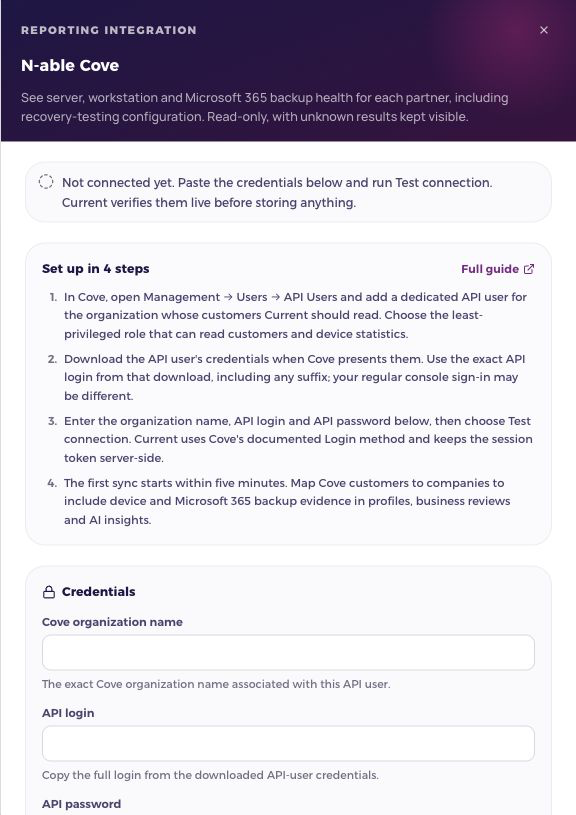
- 1Create an API user in CoveOpen Management → Users → API Users. Add a dedicated user for the organization whose customers Current should read. Choose the least-privileged role that can enumerate customers and device statistics.
- 2Keep the downloaded credentialsCove provides the API-user credentials at creation. Copy the exact API login, including its suffix. Current uses the documented Login method with the organization name, API login and API password.
- 3Test and save in CurrentOpen Settings › Integrations, select N-able Cove in the Backup group and press Manage, enter those three values and choose Test connection. Session visas are held server-side and refreshed as Cove responds.
Reading backup health
A documented failed, aborted, interrupted, completed-with-errors, faulted-in-progress or over-quota state needs attention. A successful backup older than 48 hours also needs attention. Active Microsoft 365 workload failures can flag the organization even if its aggregate status is missing. Unrecognized or missing results stay unknown. A current run is not treated as a completed success.
| Signal | What Current can say |
|---|---|
| Device backups | Backup accounts, last successful backup, reported status and whether attention is needed. |
| Microsoft 365 | Organizations and available Exchange, OneDrive, SharePoint and Teams workload states. |
| Mailboxes | Exchange user and shared mailbox counts from the latest backup session. These are not total licensed seats and are not combined with other providers’ seat totals. |
| Recovery | Whether recovery testing or standby imaging is configured. The documented configuration field does not prove that a recovery test succeeded; successful boot verification stays unknown. |
Connect, map, then review
A workspace admin connects the feed in Integrations. After a successful test, the first sync is queued and starts within five minutes. Current reads in bounded passes and resumes from the last saved page, so a large estate may take several passes. A completed sync schedules the next refresh six hours later. Sync now queues work; it does not mean the data is already refreshed.
Open Manage and map each vendor customer to a Current company. Current matches exact, unique names automatically; ambiguous names stay unlinked. Review the matches. A manual mapping, unlink or Ignore choice is preserved across syncs. Saving a mapping immediately updates the company’s imported records.
Where the information appears
- Company records show the mapped posture and an expandable list of devices or backup accounts. Account executives see only their authorized companies; external partner viewers cannot read the underlying integration mirrors.
- Business reviews and AI company insights use the same company-scoped evidence. These are current snapshots, even when the review covers an earlier period.
- Dashboards and reports use the shared metric catalog. Missing health is not a successful result; incomplete or stale data stays visible.
If a sync needs attention
| What you see | What to do |
|---|---|
| Credentials rejected | Check the dedicated API user and replace expired credentials in Manage. Never send tokens or passwords in a support message. |
| API access unavailable | Check the API user’s reporting permissions. Inventory can remain available while another endpoint is unavailable. |
| Waiting or retrying | Current saves progress and retries automatically. A vendor rate limit keeps its retry deadline even if Sync now is clicked again. |
| Sync error | Read the explanation in Manage. Earlier observations remain available with their dates. Persistent sync faults also reach Current’s super-admin Errors console through the existing error pipeline. |
| No company data | Check that the vendor customer is mapped to the intended company and that the first sync has completed. Unmapped records do not appear on a company profile. |
Rotate credentials or switch accounts
Replacing credentials for the same server or organization keeps company mappings. To switch to another server or Cove organization, disconnect first. Reconnecting to a different account resets this integration’s imported cache and mappings so reused vendor IDs cannot attach another organization’s data to an old company. Disconnecting stops future syncs and keeps existing observations until an account change replaces them.