
Connect N-able N-central to Current
Set up read-only device inventory and active issues, map customers, and understand sync progress and reporting limits.
On this page · 6 sections
Connect N-central and each company page lists its N-central devices and active monitoring issues, an open issue raises an alert your team sees on the company and on its tickets, and the device count feeds your dashboards and business reviews.
What it does for you
| Where in Current | What you get |
|---|---|
| Service desk tickets | With the service desk and the device register switched on, an open N-central issue shows as an RMM alert in the ticket's company panel, so the engineer sees what monitoring already reports before replying. |
| Company page | Infrastructure & security counts the company's N-central devices and active monitoring issues, and its N-central card lists each device and each issue. |
| Alerts | Any active N-central issue opens RMM alerts active as a warning, marked severity not supplied because N-central does not report one. It closes once a complete read finds no issues. |
| Reports and dashboards | N-central devices count toward the Endpoints per customer and Reactive ticket hours per endpoint tiles. |
| Business reviews | The fleet chapter includes the company's N-central device and issue counts, so the monitoring part of the review is filled in for you. |
| Ask Current | Ask about a company and Current reads its N-central device count and any open RMM alert along with the rest of its connected tools. |
The sync reads data only. Device management, patch changes and acknowledging alerts remain in N-central. The one way Current acts in N-central is a remediation plan step a person runs from a ticket: one of Current's scripts that you added to your Script/Software Repository, run with a separate API user's token a tenant admin adds in Settings › Service desk › Actions › N-central (see the remediation-plans article).
Before you connect
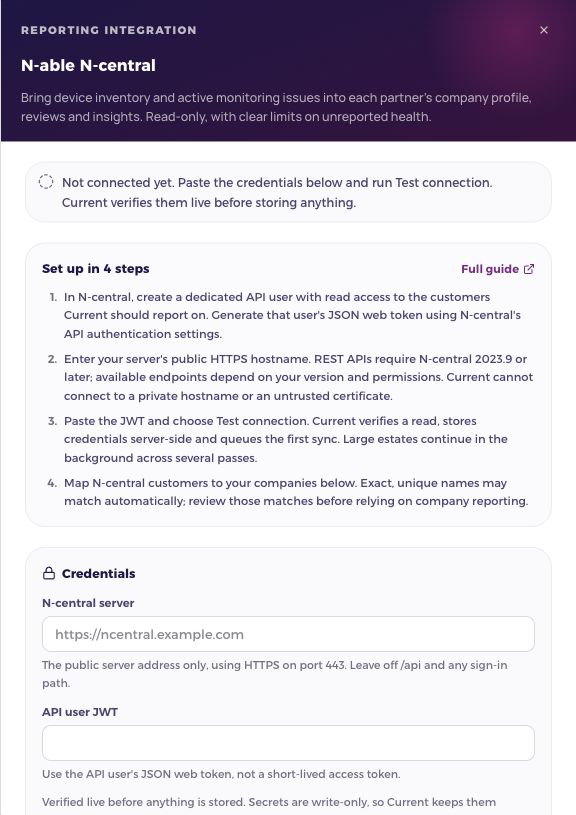
- 1Prepare a dedicated API userIn N-central, create an API user with read access to the customers you want to report on, then generate that user’s JSON web token. Use the JWT, not the short-lived access token returned by an API call.
- 2Check your serverUse a public HTTPS hostname on port 443 with a trusted certificate. N-central REST APIs require version 2023.9 or later, and individual endpoint availability still depends on the server version and permissions. Private network addresses cannot be connected.
- 3Test and save in CurrentOpen Settings › Integrations, press the N-able N-central row in the RMM group, then Manage on its card. Enter the server address without /api or a sign-in path, paste the JWT, and choose Test connection.
Connect, map, then review
A workspace admin connects the feed in Integrations. After a successful test, the first sync is queued and starts within five minutes. Current reads in bounded passes and resumes from the last saved page, so a large estate may take several passes. A completed sync schedules the next refresh six hours later. Sync now queues work; it does not mean the data is already refreshed.
Open Manage and map each vendor customer to a Current company. Current matches exact, unique names automatically; ambiguous names stay unlinked. Review the matches. A manual mapping, unlink or Ignore choice is preserved across syncs. Saving a mapping immediately updates the company’s imported records.
Where the information appears
- Company records show the mapped posture and an N-central card that lists the devices and, on its Active issues tab, the open issues. Account executives see only their authorized companies; external partner viewers cannot read the underlying integration mirrors.
- Business reviews and AI company insights use the same company-scoped evidence. These are current snapshots, even when the review covers an earlier period.
- Dashboards and reports use the shared metric catalog. Missing health is not a successful result; incomplete or stale data stays visible.
If a sync needs attention
| What you see | What to do |
|---|---|
| Credentials rejected | Check the dedicated API user and replace expired credentials in Manage. Never send tokens or passwords in a support message. |
| API access unavailable | Check the API user’s reporting permissions and, for N-central, the server version. Inventory can remain available while another endpoint is unavailable. |
| Waiting or retrying | Current saves progress and retries automatically. A vendor rate limit keeps its retry deadline even if Sync now is clicked again. |
| Sync error | Read the explanation in Manage. Earlier observations remain available with their dates. Persistent sync faults also reach Current’s super-admin Errors console through the existing error pipeline. |
| No company data | Check that the vendor customer is mapped to the intended company and that the first sync has completed. Unmapped records do not appear on a company profile. |
Rotate credentials or switch accounts
Replacing credentials for the same server keeps company mappings. To switch to another N-central server, disconnect first. Reconnecting to a different account resets this integration’s imported cache and mappings so reused vendor IDs cannot attach another organization’s data to an old company. Disconnecting stops future syncs and keeps existing observations until an account change replaces them.