
The left menu: My Day, your six modules, Pinned and All pages
How the left menu works since October 2026: up to six modules you choose under My Day, up to 10 pinned pages, Jump back in, All pages for every other page, and hiding the menu.
On this page · 7 sections
The left menu holds only what you use every day: My Day at the top, up to six modules you choose under it, the pages you pinned, and the places you were most recently. Every other page in Current is one keystroke away in All pages, at the foot of the menu. As Current adds features, they arrive in All pages instead of making the menu longer.
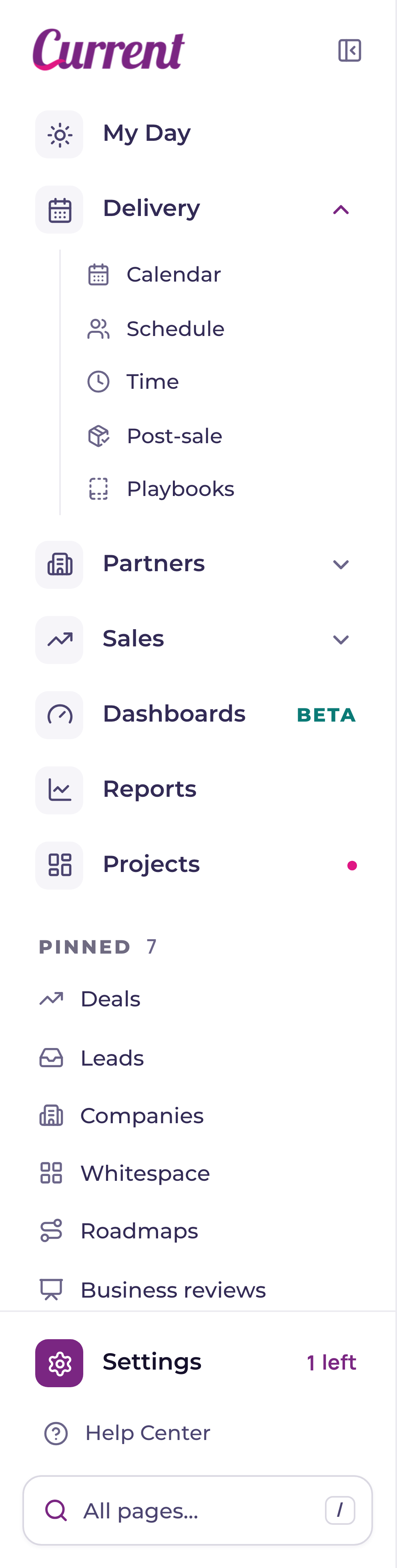
Six modules under My Day
My Day always stays first. The six rows under it are yours, and each holds a whole module: a department like Delivery, your customer section, Sales or Team, or a main page like Service desk, Projects, Dashboards or Reports. They start with the modules that fit your role; if you had four before October 6, 2026, you keep them and the two new rows fill from your role's list, once. An empty row reads Add a module. Click a department to see its pages underneath it, and click it again to close it; one opens at a time. Hover a row to see the swap button (the arrows): a short list opens right beside it, each module with a line on what it is for and the one there now ticked. Pick one and it takes the slot; a module already in another slot trades places with it. On a phone the list opens from the bottom of the screen. A single page never sits here on its own: drop one on a slot and its module goes there instead (Calendar puts Delivery under My Day). You can also drag a row straight out of All pages onto a slot.
Pin up to 10 pages
Pinned holds up to 10 pages, in the order you like. Everyone starts with Companies, Whitespace, Roadmaps and Business reviews pinned, and account executives, sales managers and tenant admins also get Opportunities and Leads (each only if your role can open it); unpin any you do not need and it stays unpinned on every browser. Pin a page from All pages (the pin at the end of a row, or Shift Enter), from the pin that appears when you hover a row under Jump back in, or by dragging a row onto Pinned. Drag a pinned row to reorder it, or focus it and press Alt with the up or down arrow. Hover a pinned row to unpin it; Delete unpins the row that has focus. From 8 pins the count reads like 8 of 10. If you had more than 10 pinned before October 6, 2026, the first 10 show; unpin one and the next comes back. Every change shows a short message, and the ones that move things have Undo.
Jump back in
Jump back in lists the last six places you visited that are not already under My Day or pinned, including projects you opened. The section name on the right says where each one lives.
All pages: every page in Current
Press / anywhere outside a text box, or click All pages at the foot of the menu. The page you are on steps back to the right and every page in Current appears beside it, grouped the way the old menu was: Home, then Yours (your modules, Pinned and Jump back in), then Delivery, your customer section, Sales, Team, Workspace and Platform, showing only the pages your role can open. Type to narrow the list: a word people use works too, so timesheet finds Time and QBR finds Business reviews. Move with the arrow keys or the mouse, and the stepped-back card shows the page you are on. A page you already opened in this tab shows as you left it; any other page shows an outline of its layout. Enter or a click opens it, and Esc clears what you typed or closes All pages.
Settings and Help at the foot
Settings sits at the foot of the menu, above the All pages bar, for everyone. With with the purple gear, opens the one Settings page; while your workspace has Current setup steps left, the row says how many, for example 2 left. For help, use the How do I… tab on the right of every page, or Get Help ↗ in your initials menu, which opens the full help center in a new tab. See "Settings: every setting in one place".
Click the panel button beside the Current wordmark, or press [, to hide the menu completely. A small All pages bar stays in the bottom-left corner, and a button in the top-left corner brings the menu back. Press [ again to show it. Current remembers your choice on this device.
- Portfolio is now called Projects. The page is the same, and typing portfolio in All pages or ⌘K still finds it.
- On a phone the menu is the slide-in drawer it has always been, with the same rows, and All pages opens full screen.
- Your six modules, pins and Jump back in follow you: sign in on another browser or computer and they are there, and a change made in one browser shows in the others within a minute.
| Question | Answer |
|---|---|
| Which pages are pinned by default? | Companies, Whitespace, Roadmaps and Business reviews, for everyone who can open them. Account executives, sales managers and tenant admins also start with Opportunities and Leads. Unpin any of them and they stay unpinned. |
| How many pages can I pin? | Up to 10. From 8 pins the count reads like 8 of 10. |
| How many modules go under My Day? | Up to six. My Day itself is fixed at the top and is not one of the six. |
| What goes in the slots under My Day? | Whole modules only: a department (Delivery, your customer section, Sales, Finance or Team) or a main page (Service desk, Projects, Dashboards, Reports, My opportunities). A single page such as Calendar or Opportunities belongs in Pinned. Settings is never a slot: it has its own row at the foot of the menu. |
| How do I put a module under My Day? | Hover a row under My Day and click the swap button (the arrows), then pick the module from the short list that opens beside it. You can also drag a row from All pages or from Pinned onto a slot: a single page puts its module there, so dropping Calendar puts Delivery under My Day. An empty slot reads Add a module; click it to fill it. |
| How do I expand a module? | Click a department under My Day and its pages open underneath it. Click it again to close it. One opens at a time. A main page like Service desk or Reports opens the page itself. |
| Where did the Sales and Workspace sections go? | Every page is in All pages, grouped by the same sections. Press / or click All pages at the foot of the menu. Put Sales under My Day to keep its pages one click away. Since October 10, 2026 the Workspace row is gone: its settings pages are in Settings, at the foot of the menu, and Holidays, alert routing and the Audit log stay in All pages under Workspace. |
| Which modules do I start with? | The ones that fit your role. Engineers, project managers, service managers and dispatchers start with Service desk, Projects, Delivery, your customer section, Dashboards and Reports. Account executives start with Sales, your customer section, Dashboards, Reports, My opportunities and Projects; sales managers have Team in place of My opportunities. Tenant admins start with Service desk, Delivery, Sales, your customer section, Dashboards and Reports. Anything your role cannot open is skipped and the next choice fills in. |