
Roadmaps: the account plan and the board
The standing plan behind a partner relationship: the goals they gave you, the budget and what it covers, how often you meet, and the quarter-by-quarter board of work you propose, decide and price against it.
On this page · 16 sections
- Where it lives
- The Account plan
- The board
- Changing a card's status
- Suggestions, from the systems you already run
- What ScalePad puts on the plan
- Draft a plan, and Ask the plan
- Deciding in the meeting
- The budget view
- Export the budget
- Since last time
- Prep
- What the Business Review reads from it
- Settings
- Who can see it, and who can change it
- The stale-plan to-do
A Strategic Business Review is an hour a quarter. The roadmap is the record between them: what the partner told you they want, what they said the budget is, how often you meet, and the work you have proposed to get there, quarter by quarter for three years. It keeps its shape between meetings, so the next review opens on what the last one decided instead of a blank page.
Where it lives
Three places, all reading the same record. A Roadmap card sits in the right column of every company record: the next review and how far away it is, how many items are agreed and how many are waiting on a decision, this fiscal year's investment against the figure the partner stated, the goals with their status, and how old the plan's last confirmation is. A count of zero is left off the card rather than printed.
Open the card and the roadmap takes over the screen for that one company, with five views behind the control at the top: Plan, Account plan, Budget, Since last time, and Prep. Closing it puts you back on the company record where you were.
Sales → Roadmaps is the same thing across your whole book, one row per company that has a plan, a card on its board, or a customer profile (prospects with none of those stay out of the way): the plan's freshness (Current, Stale, or No plan), the next review, how many items wait on a decision, what is approved for this fiscal year and the next, goals at risk, and the MRR the relationship already carries. Four filters narrow it (My book, Awaiting a decision, Stale plan, Review this quarter), and a Board view stacks the same companies under the quarter their next review falls in. Clicking a row opens that company's roadmap.
A search box sits in front of those four filters and matches two things: the partner's name and their account manager's. Every word you type has to turn up somewhere, in any order, and the words can land in different fields, so "acme dana" finds Acme Corporation while Dana looks after it and "dana" on its own finds every partner she looks after. Accents are folded on both sides, so Núñez is found by typing Nunez. Searching happens before the filters, so the four tiles across the top, the count beside the chips, the table and the Board view all describe what you searched for. What you typed rides in the address bar as ?q=, which makes a search something you can paste to a colleague, and Clear filters clears the box along with the chips.
The Account plan
Account plan holds what the partner said, in their words.
- Goals. Up to five, each with a status (On track, At risk, Off track), a line for why it matters to them, and an optional target quarter.
- Budget. A figure, or the words they used when they did not give one ("About the same as last year"), plus what it has to cover and the fiscal year it belongs to.
- Cadence. Quarterly, twice a year, or annual. It decides how long a confirmation stays good for.
- Next review. The date the card counts down to, and the date the portfolio filters and the nightly to-do read.
- In the room. The people who sit in the review, with their roles. These names are what the approval stamps read later.
Each goal and the budget carry their own stamp: confirmed on a date, by a name. When a stamp is older than the cadence (90 days on quarterly, 180 on twice a year, 365 on annual) that field goes stale and says so, with a "Still true?" strip and two answers. Yes re-stamps it as of today. Update opens the field so you can change the words first. A count beside the heading reads how many fields are waiting, so you know what to ask before you walk in.
The board
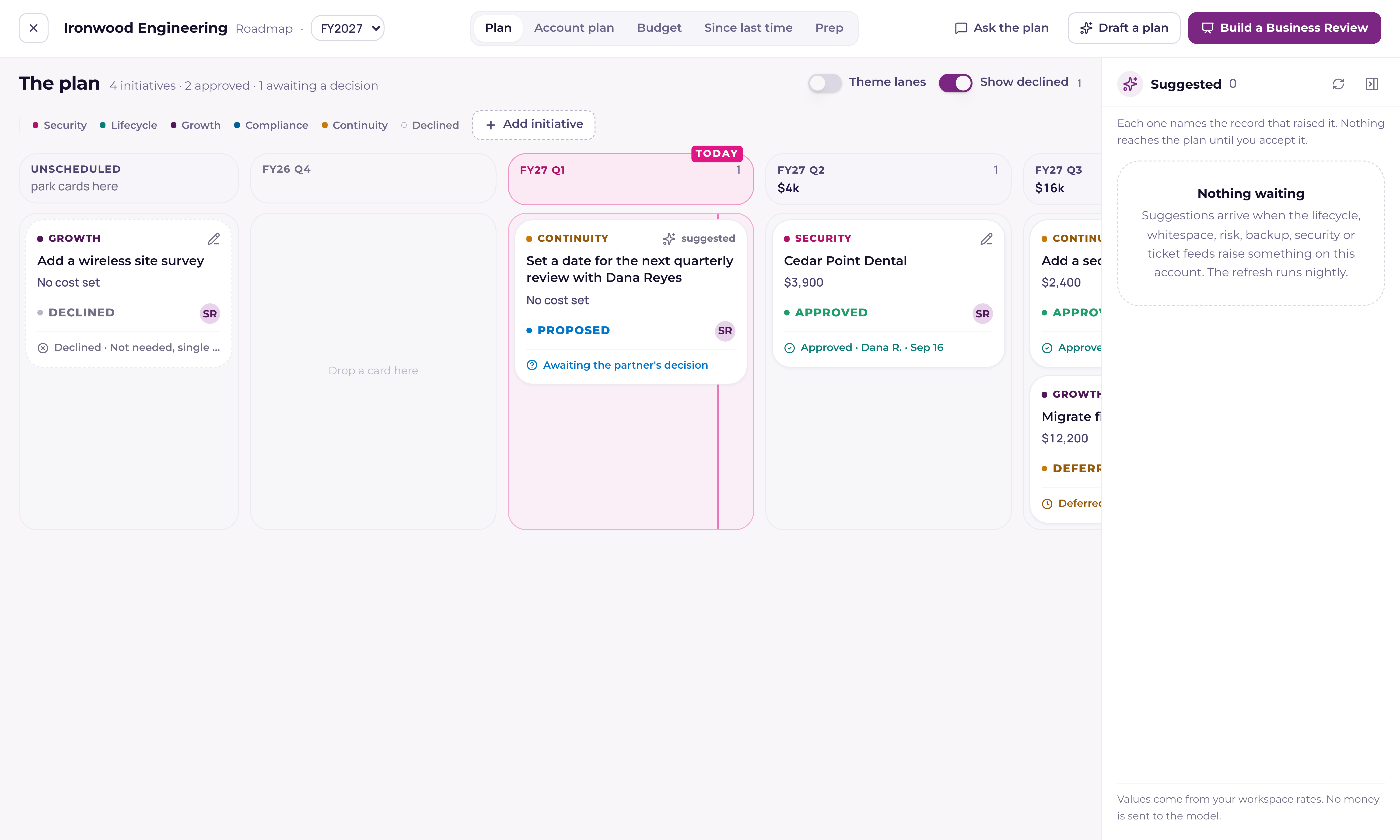
Plan is the board. Columns run from last quarter to eight quarters out, with an Unscheduled column in front for work that has no date yet. Cards move between columns by dragging, or from the keyboard: enter opens a card, space picks it up, the arrow keys move it, space or enter drops it, and escape puts it back. Each card belongs to one of five themes (security, lifecycle, growth, compliance, continuity), and the Theme lanes switch turns the single row of columns into one row per theme.
A card carries the work and its quarter, an owner and the person the opportunity lands on, the investment split into one-time and monthly, and the evidence behind it: the devices, tickets, contract or risk it came from, each as a chip that opens the record.
| Status | What it means |
|---|---|
| Suggested | A feed raised it and nobody has put it on the plan yet. It is never shown to a partner. |
| Proposed | On the board, waiting for a decision. |
| Approved | They said yes. An opportunity opens on your Expansion pipeline. |
| Scheduled | Booked into a quarter. Scheduling needs a quarter, so on a card in Unscheduled the menu asks which one. |
| In progress | The work has started. |
| Done | Finished. It stays on the board, quieter, and still counts in its quarter's budget. |
| Deferred | Moved to a later quarter, with the reason and the quarter it slipped from. |
| Declined | Turned down, with the reason. |
Changing a card's status
Every card carries its status with a small arrow beside it. Press it, on the card or in the card's detail sheet, and a menu lists all eight statuses with a line on what each one means. Pick one and the card changes at once, with Undo in the confirmation for a few seconds.
- Approved, Deferred and Declined are the room's decisions, so picking one opens the decision panel first: who decided, the note or the reason, and for a deferral the quarter it moves to. Approving a card opens one opportunity, and only ever one: moving a scheduled or finished card back to Approved opens nothing new.
- Scheduled, In progress and Done move straight through. A finished card keeps the date it started and the date it was done.
- Proposed reopens a card for a fresh decision. It clears the approval, deferral or decline on the card, and any opportunity it already opened stays where it is on your pipeline.
- The detail sheet also has a Schedule for picker. On an approved or scheduled card, picking a quarter schedules it there; on any other card it simply moves the card, exactly like a drag. Its footer offers the next step for agreed work: Mark scheduled, Mark in progress, Mark done.
Suggestions, from the systems you already run
The Suggested tray is docked to the right of the board. Every connected feed writes into it, and each row names the record it came from rather than asserting a finding: "Six laptops at the Edina office are past the warranty date in your ScalePad lifecycle feed".
- Lifecycle. Hardware past its warranty date and an operating system reported as out of support, from ScalePad Lifecycle Manager; and machines running a Microsoft release past end of support, from your RMM.
- Whitespace. A service they are not covered for that their own tickets and emails keep asking about, with the mentions counted.
- Risk. The standing risks your team raised on the company record, priced where a price exists.
- Ticket themes. Wording that repeats across five or more tickets in the last 90 days.
- Backup. Protected systems that are paused, failing, or with no completed backup in three days, from Datto BCDR, Backup Radar or Slide.
- Security. Multi-factor coverage short of the whole workspace, from your newest posture reading.
- ScalePad goals. What the partner told ScalePad they are working towards, offered for the account plan rather than the board.
- ScalePad action items. The open tasks on their ScalePad engagement, grouped: one row for each ScalePad initiative carrying its own open tasks, and one more for everything sitting on no initiative.
- ScalePad assessments. Every category their newest assessment scored under 70, with the score and the assessment it came from.
Accept turns a suggestion into a proposed card, carrying its evidence and its value onto the board. Dismiss asks why (Already covered, Not a priority this year, or Wrong for this client), and keeps the answer, so a later refresh never raises that row again. "Check the feeds now" re-reads every feed for this company: a problem that has been fixed leaves the tray on its own, and anything you have already accepted or dismissed is left exactly as it is.
Two rows take a different button, because they belong somewhere other than the board. A ScalePad goal reads Add as a goal and lands on the account plan unconfirmed, waiting for the room to say it is still true; a plan already holding five goals says so and asks you to remove one first. A ScalePad action-item row reads Add to the plan and attaches its tasks as evidence to the card that ScalePad initiative already put on the board, opening a card of its own only when there is none.
What ScalePad puts on the plan
A workspace running ScalePad gets four things on a company's roadmap the first time its feeds are read: the open initiatives as cards on the board, marked from ScalePad and carrying ScalePad's wording, quarter and budget; the goals, the open action items and the low assessment scores as the three suggestion rows above.
A ScalePad card keeps up with ScalePad until you take it over, field by field. While a field still holds what ScalePad last sent, ScalePad's newer version replaces it. Retitle a card, drag it to another quarter, or write your own description, and that field is yours from then on, while the ones you left alone keep following. Decide the card (approve it, defer it or decline it), and ScalePad never writes to any of its fields again.
The same rule covers the other end. An initiative marked complete in ScalePad marks its card done and one cancelled there declines it, but only on a card nobody in Current has decided: once the room has answered, that answer is the record. A card's theme lane is read from the partner's own newest assessment first, so an initiative named for a category like Network & Security lands in the lane that category belongs to; failing that it reads the words in the name, and failing that ScalePad's own outcome.
Draft a plan, and Ask the plan
Two AI features sit in the takeover's header, and both read only this company's records.
Draft a plan proposes goals, initiatives and sequencing, each line with a reason and the record behind it, and opens a review sheet where you take them one at a time: Accept, Edit, or Drop. Nothing is written until you press the button at the foot of the sheet. An accepted initiative becomes a proposed card in the quarter the line named; accepted sequencing moves a card you already have; an accepted goal joins the plan unstamped, because the words still have to be confirmed with the partner. A dropped line is struck through rather than removed, so you can see what you refused beside what you kept.
Ask the plan answers one question at a time and cites what it read: the chips under an answer open the card, the ticket or the contract behind it, so "two cards are waiting on a decision" is one click from those two cards. It reads the whole company record, not only the plan.
- The account plan and its goals, every card on the board with the decisions stamped on it, and the open suggestions.
- Tickets from the last 90 days, with the volume behind them month by month.
- Contracts: their names, their service lines and their dates.
- Quotes, by name and status.
- The last 25 notes and activities, and the last 25 emails by subject with a line of context.
- The last review the partner was shown: what it promised and what the room decided.
All of it is read as you, so a question never reaches a record your own permissions would not open, and a colleague asking the same question of the same company can get a different answer for that reason. None of it carries money: a contract line arrives as its name and how many units it covers, a quote as its name and status, an email as a subject rather than its body.
When nothing there answers the question, the reply names what it checked and how much of it: "I looked at the plan, 4 cards, 38 tickets from the last 90 days, 2 contracts, 25 notes and 25 emails, and nothing there answers that", followed by what those same records can answer instead. The counts are of what actually reached the answer, so a busy company whose oldest emails did not fit is never told they were read. A company with nothing on file at all gets the short version: it can only answer from records in this workspace.
Deciding in the meeting
A card can be decided in two places, and both write the same stamp: the detail sheet on the board, and The road ahead slide in Live mode, while everyone is looking at it.
- Approve. Pick who decided from the people on the plan's room list, add a note if there is one, and stamp it.
- Defer. Pick the quarter it moves to and say why. The card moves, and its stamp names the quarter it slipped from.
- Decline. Say why. The card stays on the board in a muted state with its reason, off the road ahead and out of every total; a Show declined switch on the board hides them when you want a clean view.
When nobody from the partner was in the room, the first option in the picker is "Nobody in the room, entered by" and your name, and the stamp reads that way: approved on a date, entered by the account manager, with no customer name on it. Names in the picker come from the plan's In the room list, so filling that list in once is what makes the stamps read properly all year.
Approving opens an opportunity on your Expansion pipeline, carrying the card's title, its one-time and monthly figures, and the person it is assigned to. Current uses the Expansion board your workspace already has and creates one in the same shape when there is none; the opportunity lands on a stage named Approved when the board has one, and on the board's entry stage when it does not. The panel names where the opportunity will land, and who it will land on, before you press the button.
The budget view
Budget draws three years by quarter, and nothing in the chart is typed. Four kinds of line stack in each quarter: contract renewals, in the quarter a contract ends; hardware refresh, from the lifecycle cards; initiatives one-time; and initiatives recurring, counted three months per quarter from the quarter a card sits in. Today's quarter is marked, and the current fiscal year sits on a band.
Under the chart sit three fiscal years, this one and the next two. Each shows the investment the plan holds for that year, and beside it what the partner said they had to spend: a figure, the words they used for it, and what it has to cover, all editable on the year they belong to. Save and confirm stamps that year with today's date and your name. A year nobody has answered stays blank rather than reading as zero, because a partner who has said nothing about 2028 has not said no to it.
A year that has a figure is drawn on the chart as a dashed rule at a quarter's share of it, across that year's own columns and no further, and its card reads how far the plan sits under or over it. When a year's stamp is older than the plan's cadence it brings up the same "Still true?" strip the account plan uses: Yes re-stamps the year without touching the figure, Update opens it so the number can change first.
Export the budget
Export, at the top of the Budget view, saves what is on the screen as an Excel file or a PDF, named for the company and the fiscal year ("Acme roadmap budget FY2027"). The Excel file has three sheets: By quarter (each kind of line against each quarter, with totals), Cards (every card with its theme, quarter, status, one-time and monthly investment, and the goal it serves) and Their budget (each year's figure, their words, what it covers, when it was confirmed and by whom, beside what the plan holds and what is left). The PDF carries your workspace's logo and colour, the three years, the chart and the quarter table, ready to send or print. Both hold customer prices only: no cost or margin is ever in the file.
Since last time
Since last time reconciles the promises in the last review the partner saw: delivered, slipped, dropped, or still open, with the goals that changed status underneath. When there is no presented review yet, the view reads "Where this plan started" and counts what the plan was built from instead, so a first meeting has an opener rather than an empty page.
Prep
Prep is three columns to read on the way into the room: what changed since the last review, what to ask, and what has gone stale. Every line links to the card or the record behind it, so it is a route into the plan rather than a summary that could drift from it.
What the Business Review reads from it
Live mode used to ask for the goals and the budget on two slides the account manager typed into, once per review. Those slides are retired: the plan holds both now, with a stamp per field, so the room confirms a record instead of re-typing the same answers each quarter. Three slides do that work.
- Since last time opens act 1. What was promised last time and what happened.
- Your plan, confirmed is act 2. The goals with their status and stamp, a Yes or an Update on each, the budget with "Still true?" when its stamp is older than the cadence, and the cadence and next date.
- The road ahead, in act 3, is the quarter board itself: four quarters across, four cards each and then a count, with Approve, Defer and Decline live on the slide. Drag a card to another quarter (or use its Move button) and the budget strip under it updates against the partner's stated figure while everyone watches; the review's road-ahead pages then carry an Updated in the meeting note.
The printed pack follows. Its closing page prints the plan under "What you told us" (the goals with their status and stamps, the budget and what it covers, the cadence and the next review), and the decisions the room made underneath, with investment figures only. The builder's Roadmap step reads the same cards, so what is on the board is what the road-ahead page prints. Both pages are sized to the sheet rather than spilling onto another one: the road ahead prints as many rows as fit and folds the rest into a line that counts them, while the total underneath still adds every priced item; the closing page gives up its closing sentence first, then the decisions past the ones that fit, then the goals, so what they told you and what the room decided are always on the page. A review that captured goals and a budget on the old slides seeds the Account plan from them the first time it is opened against a company with no plan, stamped by the account manager, and is left alone after that.
Settings
- Fiscal year starts in, under Settings › General › Region and words. January means plain calendar quarters ("Q3 2026"). Any other month names the year for the calendar year it ends in, so a year opening in February 2026 reads FY27. Changing it re-labels quarters; a card keeps the quarter it was put in.
- Replacement cost per device, on the Value ledger card. The default price of a workstation, laptop, server, firewall, switch and access point, used as the investment on lifecycle suggestions until a quote replaces it. On the roadmap itself the figure always reads as an investment.
- Roadmap approvals, which appears once an approval has created the board and names the pipeline those opportunities land in. It is read only: the opportunities themselves are worked on the pipeline, like any others.
Who can see it, and who can change it
Anyone with CRM access can read the roadmap for a company they can already see. Writing follows the CRM's own rule: sales leadership and tenant admins across the workspace, an account executive on their own book, and anyone carrying the Full CRM flag. A project manager or engineer who holds CRM access can read a plan without being able to change it. Partner Viewers reach none of it, on the page or underneath it.
The stale-plan to-do
Once a day, a company whose plan has gone stale, or whose next review falls inside 30 days, raises one to-do for its primary owner, naming that company and the date to confirm by. Only one is open at a time, and confirming a field on the plan completes it. A company with no plan at all raises nothing in anybody's list; it shows as No plan on the portfolio instead.