
Checkpoints: stage questions, movement rules, and Current Sales OS
A deal that reaches Proposal Sent with no amount and no close date is a deal nobody can forecast. A checkpoint fixes that where it happens: it is the list of questions a stage asks, and a deal can't land on that stage until they're answered. Sales leadership sets them up; for a rep it's a short form that appears on the drag and goes away once it's filled in.
What a checkpoint is
A checkpoint belongs to one stage in one pipeline. It holds an ordered list of questions, and each question is one of three things.
- +One of five built-in deal numbers, Monthly recurring, Hardware / one-time, Projected close, Forecast, or Contract term. Every deal already carries these, so requiring one is a single click and there's no field to build first.
- +One of that pipeline's own custom fields, the extra detail you track for this kind of work. See "Working deals: pipelines, stages, and winning" for how fields are added.
- +One of your company facts, a field on the company record rather than on the deal. It is answered once, and every later deal with that company starts with it already answered. "Questions the company answers once" below covers these.
Zero counts as an answer. A deal with no hardware really is zero one-time, and asking for that number again on the next move would train people to type one they don't mean.
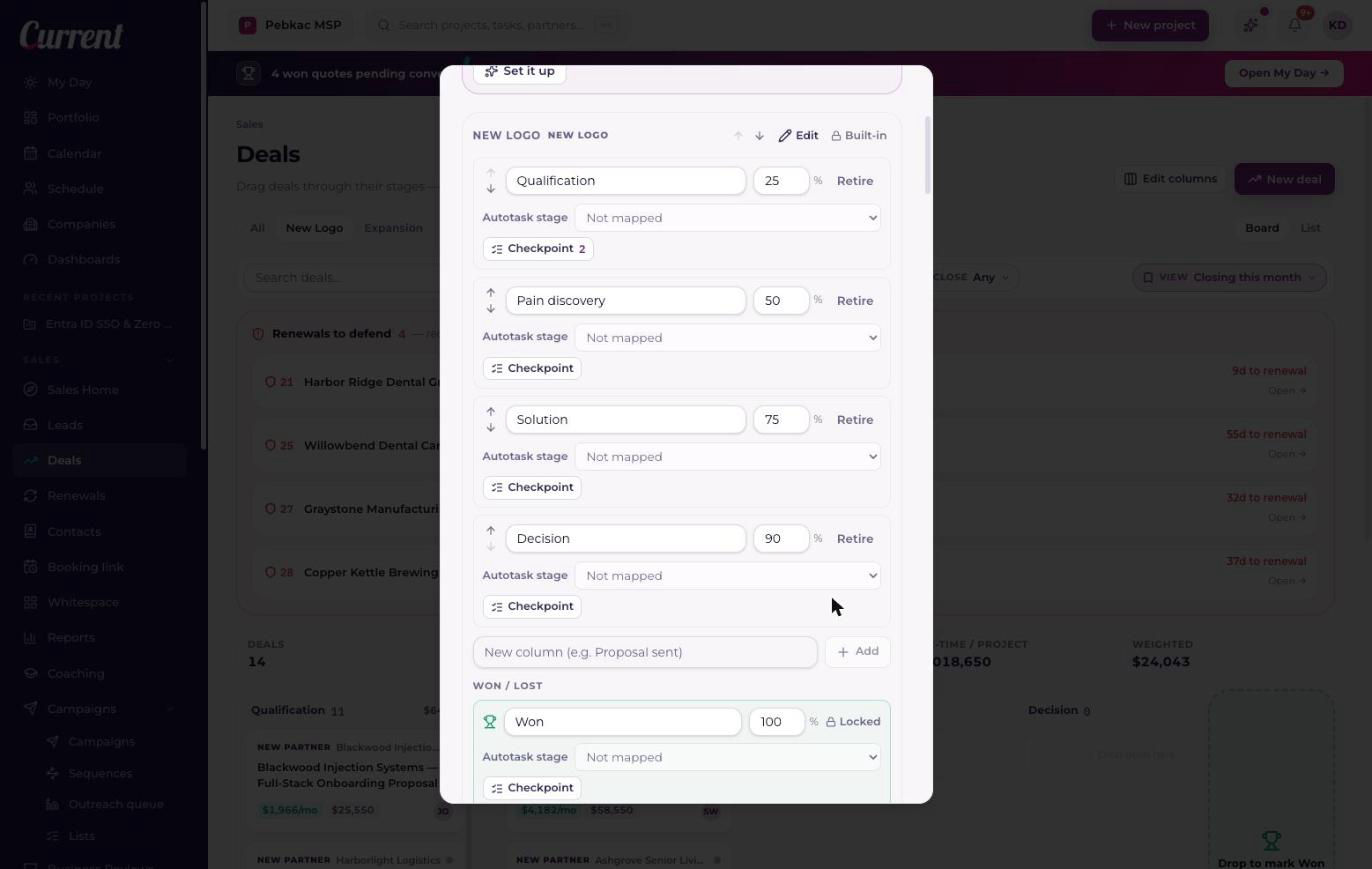
Setting one up
- 1Open Edit columnsOn the Deals board, choose Edit columns to open Pipeline columns. Sales Managers and Admins with CRM access can change any of this; everyone else works the board as it is.
- 2Press Checkpoint on the stageEach stage row has a Checkpoint button, carrying a count when the stage already asks for something. The dialog names the stage and lists what it asks today.
- 3Add your questionsThe Add a question menu splits into three groups: Deal numbers, Fields on this pipeline, and Company facts. Pick from any of them. The arrows reorder the list, and that order is the order a rep is asked in.
- 4Or write a new field hereNew field creates a real field on this pipeline, so it's on every deal in it from then on, not only inside this checkpoint. That one is written the moment you add it.
- 5SaveCancel writes nothing: a checkpoint you opened, read, and backed out of leaves every board exactly as it was. An empty list is a valid answer, clearing every question turns the checkpoint off.
The eight kinds of question
A custom field on a pipeline holds one of eight kinds of value. Five have been there since fields shipped; three arrived with checkpoints, and those three are the ones to reach for on a question with a right answer.
| Type | What it holds |
|---|---|
| Money | An amount. Sorts and exports as a number. |
| Number | A plain count, sites, seats, servers. |
| Percent | A percentage. |
| Text | Whatever the rep types. Right for "what problem are we solving?", wrong for anything you want to count later. |
| Date | A single day. |
| Dropdown | One answer from a list you write, one choice per line. |
| Checkboxes | Any number of answers from a list you write, one choice per line. |
| Yes / no | A single yes-or-no answer. |
What a rep sees
Drag a deal onto a stage that asks questions and a short dialog opens, headed "Before this moves to" and the stage's name. It asks for what's still blank and nothing else, so a deal that already carries its close date is never asked for it twice.
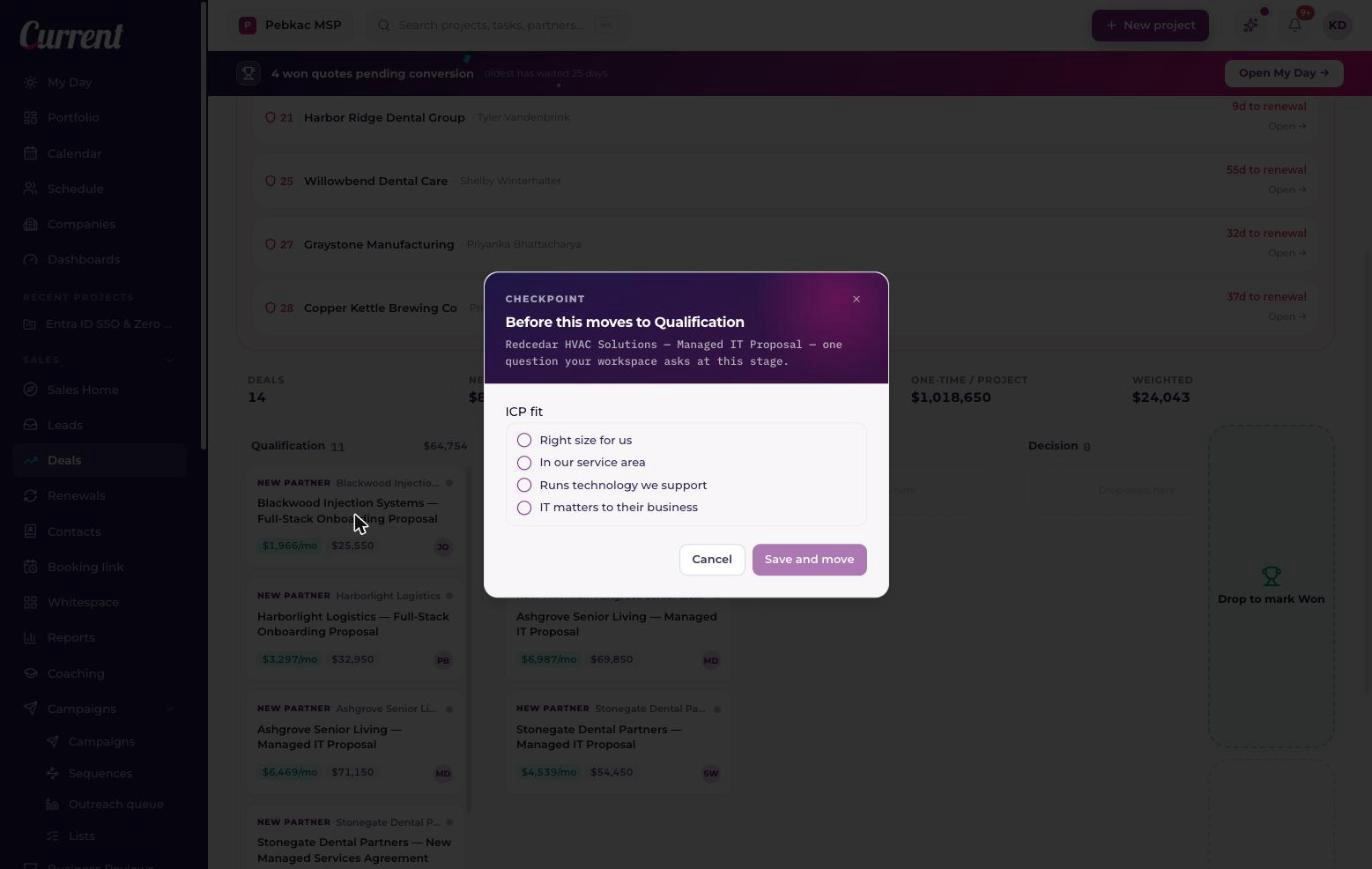
- +Fill it in and press Save and move. The answers are written to the deal and the move completes in the same motion.
- +Cancel, press Escape, or click the background and the card goes back where it was. Nothing is written, not the answers you typed, not the move.
- +Only the landing stage is asked. Dragging a deal across three columns asks the column it lands on, never the ones it passed over.
- +There is no override. A sales manager and a workspace admin get the same dialog a rep does, because a checkpoint people can wave through is a checkbox nobody trusts a month later.
Questions the company answers once
Some qualifying questions are not about the deal at all. Whether a business is the size you serve well, how many sites they run, when their current agreement ends. The answer is the same on every deal you will ever open with them, and asking for it again on the third one is how a checkpoint starts to feel like paperwork. So a checkpoint question can point at a field on the company instead of a field on the deal.
- +A rep answers it in the same dialog as everything else, and the line under the box reads "Saved on the company, so every deal for it starts with this answer", so nobody has to guess where it went.
- +The answer lands on the company record and shows on the company page, in the Your fields band at the top with the rest of that account's key facts.
- +The next deal with that company arrives already carrying it. The checkpoint has nothing left to ask, and the move goes straight through.
- +There is one copy of the answer. Change it later on the company record and every deal for that company reads the new one.
Sales leadership adds these the same way as the rest: they sit under Company facts in the Add a question menu. The fields themselves are made and edited on a company record, from the gear on the Your fields band, see "The company record: your single view of every account".
Where else the questions turn up
A checkpoint belongs to the stage rather than to the board, so every place a person puts a deal on a stage asks the same questions through the same controls.
- +The Won and Lost close dialog. Terminal stages can carry a checkpoint too, so "what do we need before this is Closed Won" is a real thing to ask; those questions sit inside the close dialog beside the reason.
- +Both ways of creating a deal. Start Opportunity on a company record and New deal on the board ask the landing stage's questions inline, so a new deal is never created already behind.
- +The stage control in the deal drawer.
- +Converting a lead. The convert form asks the landing stage's questions along with the pipeline, the amounts, and the owner, see "Website leads: intake forms, routing, and SLA timers".
- +A bulk move on the deals list moves every deal that's ready and tells you how many still need answers. Move those individually and each one gets its dialog.
- +The command palette refuses a move that needs answers and names what's missing, because there's no room for a form in a palette. Open the deal and the dialog is there.
Two rules for how deals move
Beside the checkpoints, each pipeline has two switches under "How deals move". Both start off, and both belong to that one pipeline, so a tightly run New Logo board and a loose Projects board can each work the way they should.
- +"Deals move one stage at a time", no jumping ahead. A deal has to visit each column on its way.
- +"Deals can't move backward". Once a deal is past a column, it stays past it.
A move a rule turns down says which rule stopped it and what to do instead. On a bulk move, the deals the rules held back are counted in the same sentence as the ones waiting on answers, because the two need different next steps.
Letting quotes move deals for you
Under Quote automation, a pipeline can say where a deal should go when its quote reaches a point in its life. Both pickers offer that pipeline's own working columns, and Off.
- +When a quote is created, move the deal to, the column that means "we're pricing this".
- +When a quote is sent, move the deal to. The column that means "it's with them now, not with us".
Deals only ever move forward this way, and a closed deal is left alone, so an automation can't drag a card back down the board or reopen something your team finished.
The two endings are built in and aren't settings: a signed or won quote moves its deal to Closed Won, and a lost quote moves it to Closed Lost. A won quote still pays commission. A quote your rep built, sent, and won is a win made in Current, exactly like closing a deal on the board. See "Closing a deal: Won, Lost, and the celebration".
| Quoting tool | What it tells Current |
|---|---|
| ScalePad Quoter | Created and sent, as they happen |
| ConnectWise CPQ | Wins, revisions, and losses |
| HaloPSA | Wins only |
So the created and sent moves are worth wiring up where ScalePad Quoter is what your team quotes in. On ConnectWise CPQ and HaloPSA those two events never arrive, and the built-in close still runs on a win.
Quotes that arrive with no deal
One pipeline in the workspace can be marked "New quotes start deals in this pipeline". When somebody builds a quote for a company that has no open deal, Current opens the deal there rather than leaving the quote attached to nothing. Only one pipeline can hold it at a time; switching it on where another pipeline already has it names the one to turn off first.
Current Sales OS
Current Sales OS is a ready-made MSP sales process, applied in one pass: five stages, four questions, checkpoints on the two stages where deals go wrong, and quote automation already pointed at the right columns. It's a card in Edit columns, and everything it sets up is yours to edit the moment it lands.
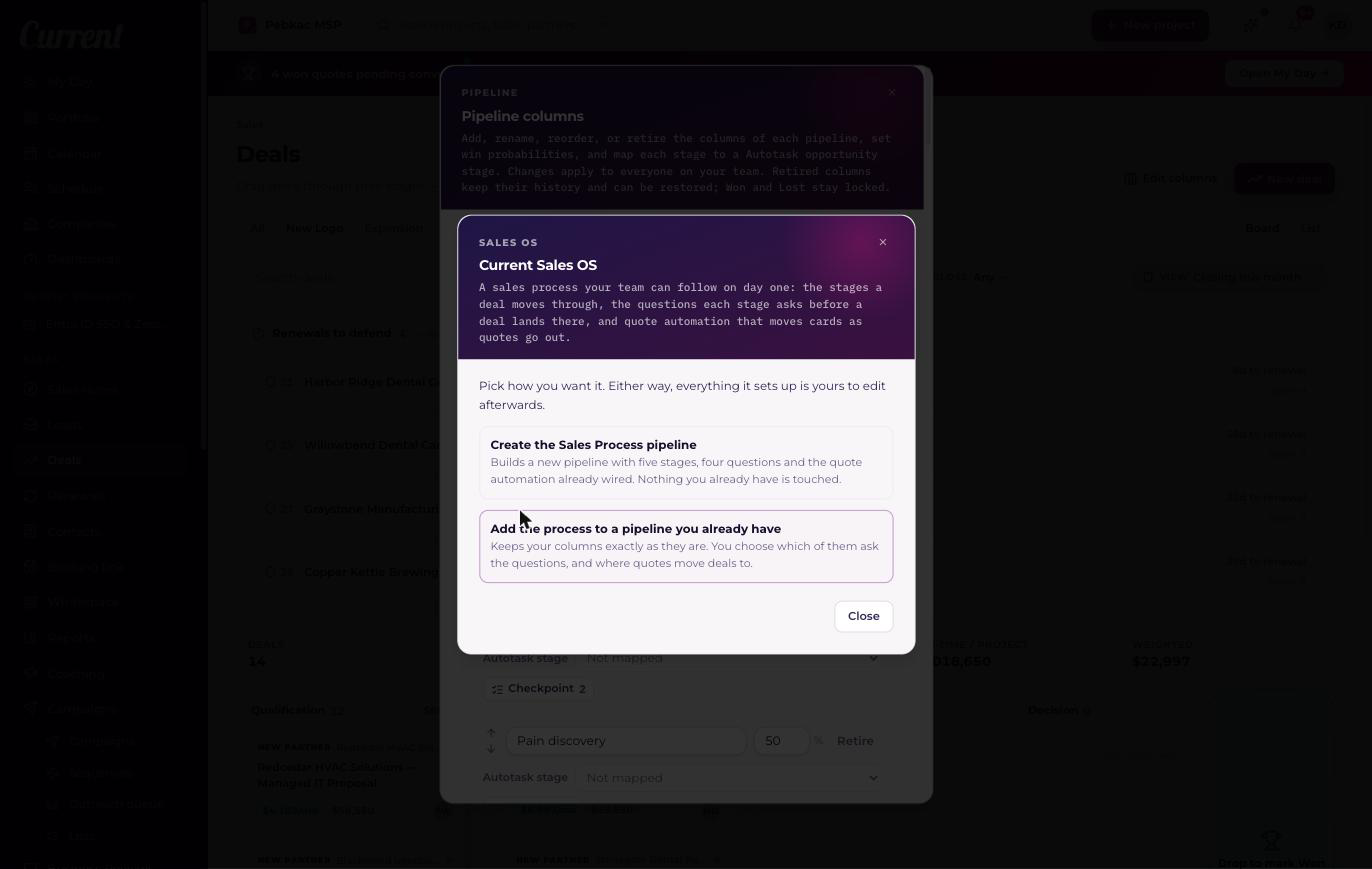
Path one: create the Sales Process pipeline
One confirmation builds a new pipeline called Sales Process. Nothing you already have is touched.
- +Stages: New Opportunity at 10%, Discovery at 25%, Quoting at 40%, Proposal Sent at 60%, Decision at 80%, plus Won and Lost.
- +Fields on the deal: "What problem are we solving?", Decision maker met, and Budget confirmed.
- +One field on the company: ICP fit, a set of checkboxes reading right size for us, in our service area, runs technology we support, IT matters to their business. Whether a business is a fit is true of the business, so it is answered once and every later deal with them starts with it filled in.
- +Discovery asks for ICP fit and the problem you're solving before a deal can land there.
- +Decision asks for the decision maker, the budget, the projected close date, and the monthly amount.
- +A new quote moves the deal to Quoting; a sent quote moves it to Proposal Sent. Quotes with no deal start one here, unless another pipeline is already marked for that.
The movement rules stay off. The process decides what a stage asks for; whether deals also have to walk the board in order is a separate switch you turn on when you want it.
Path two: add the process to a pipeline you already have
Your columns stay exactly as they are. Current reads their names, guesses which of them stands for Discovery, for Decision, for the quote-created column and for the quote-sent one, and puts every guess in front of you to change or skip.
- +Any row can be set to "Skip this one", so you can take the Discovery questions and leave the rest.
- +Questions a stage already asks are kept. The template's questions are added to them, never in place of them.
- +Fields the template needs are created once. Running it on a second pipeline reuses what's already there rather than making a second ICP fit, and ICP fit sits on the company, so it is shared across every pipeline in the workspace to begin with.
- +A pipeline with no working columns has nothing to match against, so add its stages first and come back.