
Billing owner on won quotes: every billing change reaches the person who bills
When a quote is won, somebody has to change the customer's contract or check the one-time billing. Current names that person, the billing owner, and hands them the work: the "Contract/Agreement Update" task when the quote becomes a project, or an internal ticket in your PSA when it does not. The same happens when anyone presses Request contract change on a company page, so billing changes no longer travel by forwarded email or a shared inbox.
Set the billing owner once
Settings › Billing owner. A Tenant admin picks the person, sets the ticket defaults and chooses whether Current may create billing tickets in your PSA. Everyone else sees a read-only line naming the billing owner.
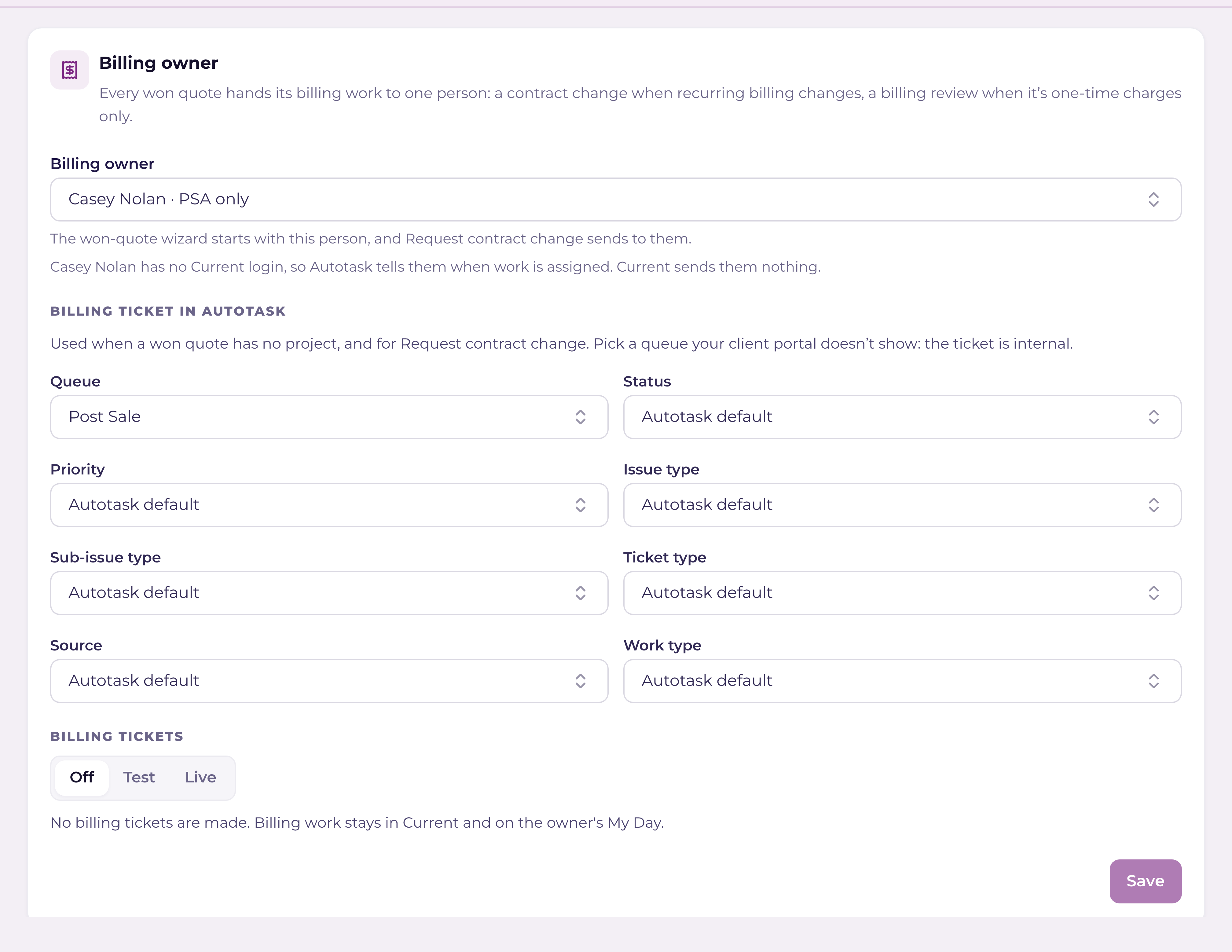
- +Billing owner: the list shows your Finance members first, then the rest of your staff, then PSA resources who have no Current login. Pick a PSA-only person and Current assigns the work to them in your PSA; your PSA's own assignment notice tells them, because they have no Current bell or email.
- +Ticket defaults: the queue, status, priority, issue type, sub-issue type, ticket type, source and work type for billing tickets, each filled in from your PSA's own lists. A field your PSA does not have reads "Not used by" your PSA. Pick a queue your client portal does not show: the ticket is internal, and the full details go in an internal note.
- +Billing tickets: Off, Test or Live. Off (the default) keeps ticket-path billing work in Current. Test sends tickets only to a company named ZZ-Current Test, so you can see one in your PSA before anything reaches a real customer. Live sends them on the customer's own company, and asks you to confirm first.
The Billing step in the won-quote wizard
Every won quote you convert passes through a Billing step after Charges. It shows which kind of billing work this is, and why:
| Kind | When |
|---|---|
| Contract change | A recurring line is ticked on the Charges step, or you answered Yes to "Contract or agreement change?". The task is critical. |
| Billing review | One-time charges only. The task is high priority but not critical, and asks the billing owner to check the one-time charges in your PSA. |
The step also asks for the billing owner. It is filled in from Settings › Billing owner, or with your only Finance member when nothing is saved; with neither, you pick someone before Next unlocks. On the post-sale ticket path the step also asks "Contract or agreement change?", because that path has no Questions step. A line under the picker says what Current will make: a task in the project, an internal ticket in your PSA, or a record kept in Current when no PSA is connected or billing tickets are Off.
- +With a project: the "Contract/Agreement Update" task is always added and assigned to the billing owner, in Current and, once the project is built in your PSA, in your PSA too. If your PSA refuses the assignment, the step shows a warning with your PSA's reason and the task stays assigned in Current; the conversion still finishes.
- +Without a project: Current creates an internal ticket on the customer's company, titled "Contract update: <Company> – Quote <number>", with " (recurring change)" added when recurring billing changes. The ticket's description is one line. An internal note holds the kind, the quote numbers, the one-time total, the recurring monthly total and each recurring line. The quote PDF is attached where your PSA accepts attachments, and linked otherwise.
- +If Current cannot tell whether your PSA made the ticket (the answer was lost), it records that and does not try again on its own, so you never get two. Check your PSA before you press Retry.
Request contract change
A Request contract change button sits in the actions at the top of a company page. Any staff member who can open the company can press it, Finance included; a Partner Viewer never sees it. The form asks what is changing (required), the effective date (required, today by default) and an optional attachment (one file, up to 10 MB), and shows who it goes to. Send makes the same internal ticket as the wizard, titled "Contract update: <Company> – requested by <your name>", due on the effective date. The result names the ticket number, or says why the request stayed in Current.
What the billing owner gets
- +A bell, "Contract change for <Company> is yours" or "Billing review for <Company> is yours", linking to the task or ticket. It rings once the item has settled (a few minutes after it was made, so the ticket number is on it), and never for the person who made it.
- +An email beside the bell. Turn the email off in your notification settings; the bell always rings.
- +A Teams post, in a workspace that runs Teams for your team. When Teams accepts the post, the email is skipped.
- +A Billing work tile on My Day listing their open billing items. A task row opens the task. A ticket row opens a small window where they change the ticket's status (from your PSA's own list), add an internal note, or press Open the ticket. An item kept in Current opens with Mark done and a note.
What Finance can do on billing work
Finance reads money and changes nothing else in Current, with one exception: the billing work assigned to them. On the "Contract/Agreement Update" task they can change its status, tick its checklist items, read and add comments, and log time. On the billing ticket they can change its status and add an internal note from the Billing work tile on My Day, and log time where your PSA's two-way time is on (elsewhere Log time opens the ticket in your PSA). The database checks a mark on the items Current made, so a task with the same name that Current did not make stays read only for Finance. See "Roles & permissions: who sees what".