
Task dependencies: types, lag, and the dependency map
The four dependency types, adding lag days, drawing a link by dragging on the dependency map, the refusals you can meet, how cross-project links are treated, and how cycles are blocked.
On this page · 7 sections
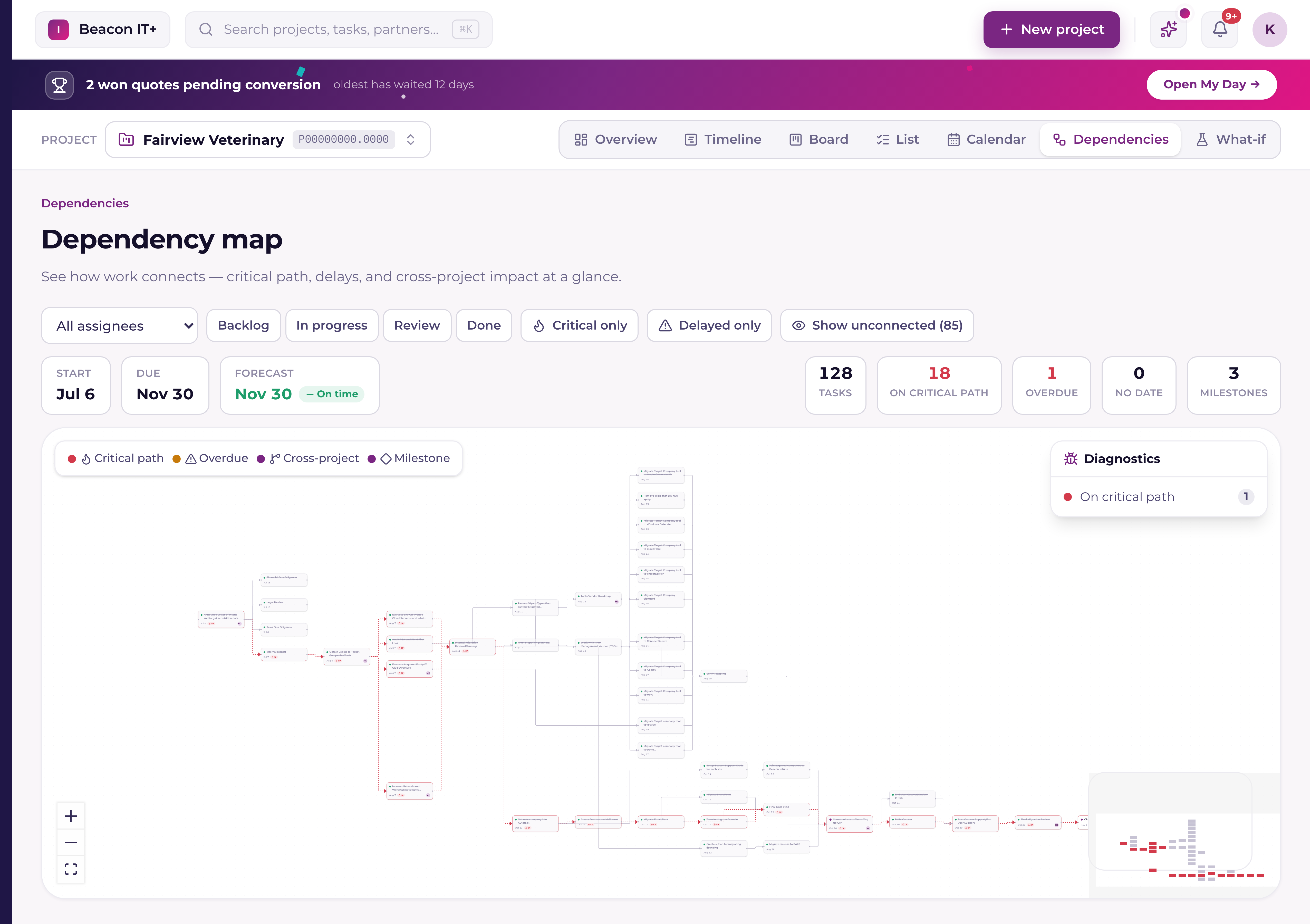
Dependencies are what let Current compute a real schedule instead of just a list of dates, one task's timing drives another's. Add a dependency from the task drawer, or by dragging one task to another on the Dependencies map.
The four dependency types
Current supports all four standard project-scheduling dependency types:
| Type | Plain-language meaning |
|---|---|
| Finish → Start | This task starts once the other one finishes, the most common link. |
| Start → Start | Both tasks start at the same time. |
| Finish → Finish | This task can't finish until the other one finishes. |
| Start → Finish | This task finishes when the other one starts, rarely used. |
Adding lag
Every dependency can carry a lag, a number of working days added (or subtracted, for lead time) between the two tasks. A lag of +2 days means the successor waits two extra working days after the dependency is satisfied; a negative lag lets the successor start early.
- 1Open the task and go to DependenciesFrom the task drawer, or click a task on the Dependencies map.
- 2Pick the other taskChoose whether it's a predecessor (this task waits on it) or a successor (it waits on this task).
- 3Choose the typeFinish → Start is the default and covers most cases.
- 4Set lag if neededLeave at 0 for back-to-back, or add days for a required gap (e.g. waiting for hardware to arrive).
The Dependencies map
The Dependencies view lays out every task and its links as a visual graph, auto-arranged left to right. Tasks on the critical path are highlighted in red with a thicker, animated edge; links between tasks in different projects are shown as dashed purple edges. A diagnostics panel flags tasks that are on the critical path, overdue, forecast to slip, an at-risk milestone, missing dependencies entirely, carrying invalid dates, or missing a work estimate. Tasks with no links yet sit in a grid below the network, ready to be linked.
Draw a link on the map
Every task on the map has two dots on its border: one on the right edge, one on the left. Drag from the right dot of the task that comes first to the left dot of the task that waits on it. Both dots turn purple when you hover a task, and the line snaps back mid-drag if the target can't take the link.
Dropping opens a short confirmation rather than writing straight away. It spells the direction out in both task names, offers the four types with "Start after it finishes" already picked, and takes a lag in working days, 0 by default, or a negative number to let the successor start early. Add dependency writes the link and the map redraws with it; Cancel writes nothing. When the two tasks live in different projects the dialog says so, because Current then schedules around the link on both sides.
Working with dependencies in the task drawer
Open a task and its Dependencies section lists what it's waiting on and, under "Waiting on this", the tasks waiting on it. Every row is a real, clickable link that always shows the actual task name. Never a generic "task" placeholder, even when the other task was archived or removed.
- Click any dependency row to jump straight to that task; a Back control returns you to where you started.
- A task that no longer exists reads "Deleted task", and an archived task carries an (archived) tag, so a broken or hidden link is obvious instead of mysterious.
- A dependency on a task in another project shows that project's name next to it, so a cross-project link is never ambiguous.
- Remove buttons are always visible on every row, including the "Waiting on this" rows, and the add-dependency picker shows a clear loading state instead of disappearing while it loads.
How circular dependencies are blocked
Current checks every new dependency before it's added: it traces forward from the task you're about to make dependent, and if that trace ever loops back to the task you started from, the link would create a cycle, an impossible schedule where two tasks each wait on the other. Current blocks the add and tells you it would create a dependency loop, and a task can't (indirectly) wait on itself. The same check runs on a map drag, and again in the database underneath, so a link that slipped past the browser is still refused.
The other refusals you can meet
- The two tasks are already linked, or already linked the other way round.
- A task can't wait on itself.
- You dragged the wrong way. Current asks you to drag from a task's right dot to another task's left dot.
- You don't have rights to that link: a project manager can add it, or you can add one on a task you're assigned to.