
Set up campaign email, and why Current uses two mail paths
The five steps that get live campaigns sending from your own domain, the DNS records they need including the tracking record that makes opens and clicks work, and which Current emails come from the platform instead.
On this page · 7 sections
Live campaign email goes out from your own domain, through your own Resend account. Integrations → Email (Resend) → Manage walks the setup as five steps, ticking each one off as it lands, and it takes about ten minutes plus however long your DNS takes to propagate. Everything below is what those five steps ask for.
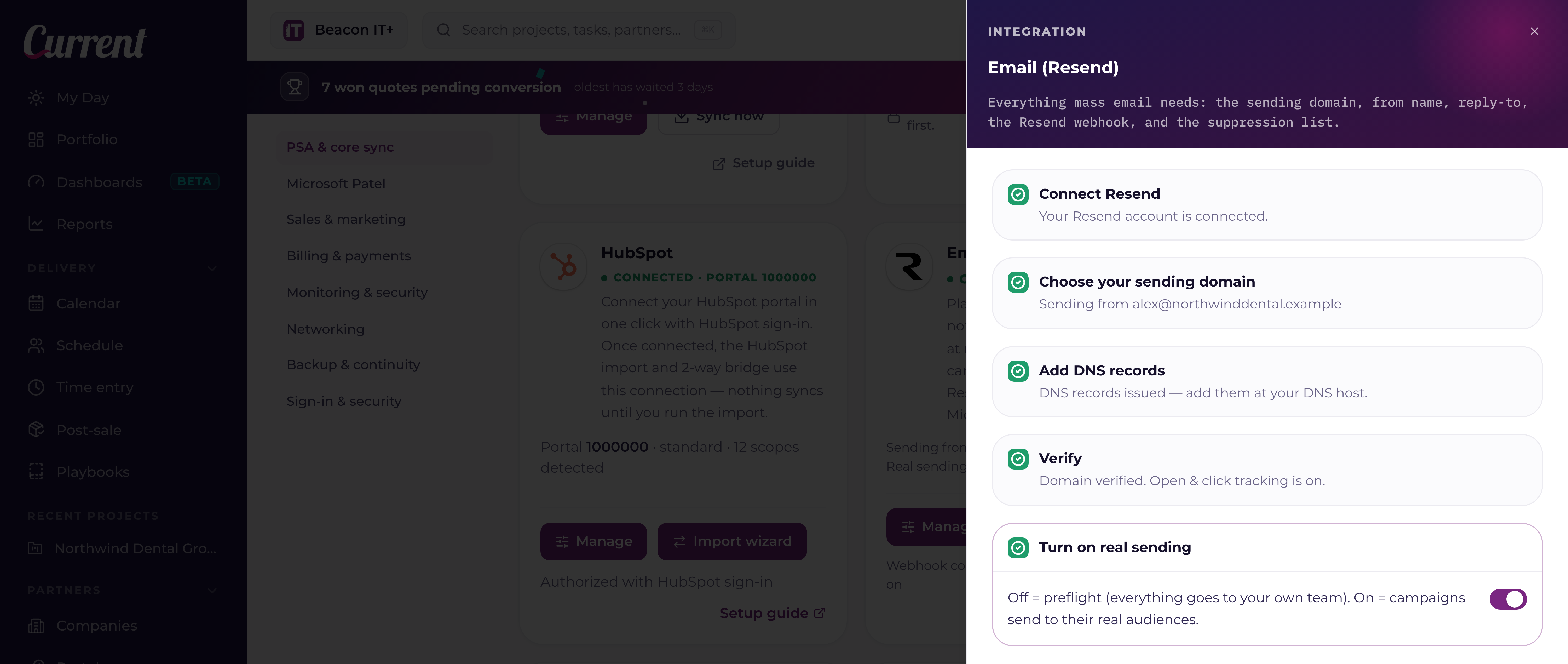
The five steps
- 11. Connect ResendCreate a free account at resend.com, open API Keys, and create a key. Paste it into step 1 and press Save & verify. Current checks the key against Resend before it stores it, keeps it server-side, and never shows it again. The account is yours, so your domain's reputation, your sending history, and your replies all stay with you.
- 22. Choose your sending domainType the domain campaigns should send from and press Create in Resend & get DNS records. Use a subdomain you keep for outreach, such as news.yourcompany.com, rather than the domain your everyday mail uses: a rough campaign then cannot drag your day-to-day email down with it. No https://, no @, just the domain.
- 33. Add DNS records at your DNS hostStep 3 lists every record Resend wants: the DKIM and SPF records that authenticate your mail, a CNAME at links.yourdomain for open and click tracking, and sometimes a CAA record if your domain already publishes one. Click any Name or Value to copy it. Add them exactly as shown at whoever runs your DNS (Cloudflare, GoDaddy, Route 53, your own server).
- 44. VerifyPress Check verification. Current asks Resend to re-read your DNS and shows the result per record, plus a separate line for open and click tracking. DNS usually lands within a few minutes and can take longer; press the button again rather than re-adding the records. The step ticks green when Resend reports the domain verified.
- 55. Turn on real sendingUntil this switch is on, every campaign is in preflight and reaches only your own team's addresses, no matter what the audience says. Flipping it on asks you to confirm, because the next campaign goes to real recipients. Turn it off again at any time and preflight comes straight back.
Why there are two mail paths
Current sends two very different kinds of email, and it deliberately sends them from two different places. Understanding the split helps you answer the question every admin eventually asks: "why did this email come from a generic address instead of our own domain?"
Platform mail: system and transactional messages
Sign-in codes, invitations, project digests, booking confirmations, and in-app alert emails are transactional. They're triggered by something that just happened in the system, and they need to land in the inbox within seconds. Current sends these through its own Resend account, at no extra setup for you, from a single sending address: notifications@current.day. This is the only mail Current's built-in sending carries.
- Sign-in codes, the 6-digit two-factor code sent when a password sign-in needs a second check.
- Invitations, the "you're invited to [workspace] on Current" email with an accept link, sent when an admin invites a teammate.
- Project digests, a nightly summary of projects that need attention, sent to project owners.
- Notification alerts, mentions, comments, new assignments, at-risk flags, weekly summaries, and CRM alerts, based on each person's notification preferences.
- Booking confirmations and reminders, sent the moment a guest books a time, and again before the meeting. These always send, whether or not campaign sending is switched on.
Because this is one sending domain used only for transactional mail, Current's operator handles the SPF and DKIM authentication records and keeps the domain's sender reputation clean. You never have to configure anything for this mail to arrive. It just works, the same way password-reset email from any SaaS product works.
Outreach mail: sent from your own identity
Sequence and campaign email is different. It never goes out on Current's built-in sending, because outreach has to carry your identity, not the platform's. Sequences have always worked this way: when an account executive enrolls a contact, the email is sent through Microsoft Graph using that AE's own, already-connected Microsoft 365 mailbox. The message shows up in the recipient's inbox as if the AE typed it themselves, and a copy lands in the AE's own Sent Items.
Live campaigns now follow the same principle, with two ways to satisfy it. Save your own Resend API key in Integrations → Email (Resend) and campaigns send from your verified domain through your own Resend account. With no key saved, a live campaign sends from the connected Microsoft 365 mailbox of whoever the campaign is from, the same transport sequences use. Test sends and preflight campaigns are the exception: those still go out on the platform's identity, so you can test a setup before you own one.
Campaign sends on the Microsoft 365 transport are paced at 25 emails per mailbox every 5 minutes, and they draw on the same daily budget as that mailbox's sequence email, so campaigns and sequences can never combine to push one mailbox past its safe daily volume. A larger audience simply takes longer; nothing is dropped.
See "AI sequences and campaigns" for how sequences are built and approved. This article is about the sending mechanics specifically.
Why the split matters
Transactional mail (sign-in codes, invites, digests), and outreach mail (sequences, campaigns) have opposite reputational needs. Transactional mail is expected, opted-into, and rarely marked as spam, perfect for a shared platform domain with strong authentication. Outreach mail is higher-volume and higher-risk: if it went out from the same shared domain, one bad campaign could hurt deliverability for every tenant on Current, and (just as importantly) it would land in the recipient's inbox from a stranger's domain instead of your own team's real Microsoft 365 address, which reads as far less trustworthy.
Sending sequence email from each AE's own mailbox keeps your domain's reputation entirely in your own hands, keeps replies flowing straight into that AE's normal inbox, and keeps a hard daily send cap (250 sequence emails per mailbox per day), so no single account can accidentally trigger a spam filter. Enroll more than that in one go and Current simply paces the rest over the following business days; nothing is dropped.
The Do not email list moved to Lists
Every address that campaign and sequence email skips lives on one list, and since September 10, 2026 it lives under Sales → Lists as the pinned Do not email row, not on this tile. Search it, export it, add an address by hand or upload a CSV there. Every send still re-checks the list at the moment it goes out, and Resend's bounce and complaint events still land on it through the webhook below. See "Do not email: the one list every send checks" in the Lists article for who can manage it, what an upload does, and which kinds of mail honour which reasons.
Wire the delivery webhook, or your campaign report stays empty
Sending is only half the loop. Delivered, opened, clicked, bounced, and complained events flow back into Current through a webhook you register in Resend, and it must live in the same Resend account as the API key that sends your mail. Without it, every campaign report shows zero deliveries and opens even when mail is landing fine, and bounced or complaining addresses are never added to your suppression list automatically.
- Open Integrations → Email (Resend) → Manage. The Webhook endpoint URL box shows your workspace's unique URL, click it to copy.
- In your Resend dashboard (the account whose API key is saved above): Webhooks → Add endpoint → paste the URL, and select the sent, delivered, opened, clicked, bounced, and complained events.
- Copy the new endpoint's signing secret and paste it into the Webhook signing secret box in Current. Every event is signature-verified. An event that doesn't match your secret is rejected.
- If you ever switch to a different Resend account (a new API key), re-create the webhook there and paste the new signing secret. Webhooks don't move with the key.