
Connect ConnectWise PSA and choose what syncs
How to connect ConnectWise PSA to Current as your PSA, in ConnectWise's cloud or on your own server: API Member keys, automatic instance discovery, the 5-minute poll, the one-PSA rule, connection health that names what it can't reach, and what disconnecting really does.
On this page · 6 sections
ConnectWise PSA is a first-class PSA in Current, the same depth of two-way sync Autotask and HaloPSA get. ConnectWise stays the source of truth for time, billing, and financials, while Current owns scheduling and the views your team lives in. Companies, contacts, agreements, opportunities, projects, and time all flow in; the writes you allow flow back.
Before you start
- A ConnectWise API Member with an API-key pair, not a person's login. Created under System → Members → API Members; the private key is shown exactly once.
- Nothing from the ConnectWise Developer Network. The integration Client ID ConnectWise requires on every API call belongs to Current, and Current sends it for you. There is no Client ID box to fill and nothing to ask support for.
- Your site URL (the host you sign in at, like na.myconnectwise.net) and your company ID (the Company field on the ConnectWise login screen). If your ConnectWise runs on your own server, you need that server's address instead, like psa.yourcompany.com.
- Tenant Admin role in Current. Integrations are an admin-only action.
If any of those are missing, work through "Prepare your ConnectWise before onboarding: the setup checklist" first. It walks each one with the exact clicks.
Connect
- 1Open Settings › Integrations and press the ConnectWise PSA rowThe drawer opens with its card. Only Tenant Admins can connect it or change its keys; anyone else who opens it sees a short summary.
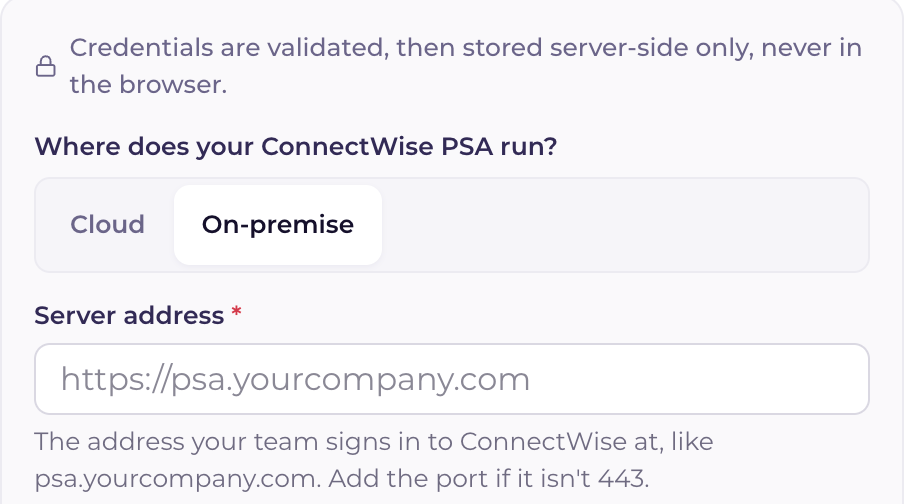
- 2Choose Cloud or On-premiseThe first choice on the form. Cloud, the default, is ConnectWise's own hosting (na, eu or aus.myconnectwise.net). Choose On-premise when your ConnectWise runs on your own server. Everything after this works the same way for both.
- 3Enter the four credential fieldsSite URL (Server address for On-premise), company ID, public key, and private key. The first two are not secrets; the key pair is, and it's kept server-side only once stored. ConnectWise also requires an integration Client ID on every call. That one is Current's own and travels with every request automatically, so you never see or enter it.
- 4Run the test connectionCurrent resolves your instance automatically from ConnectWise's public site-discovery endpoint (there's no API URL to look up) then makes one cheap authenticated read to prove the keys are real before anything is stored. Secrets are encrypted at rest and never sent to the browser again.
- 5Nothing has synced yet. That's deliberateConnecting stores credentials and connection details only. No data is pulled until the first sync runs, so you can connect, review the sync-behaviour switches and board-noise toggles, and pull on your schedule.
- 6Start the initial pullCompanies, contacts, agreements, opportunities, projects, phases, project tickets, members, and time entries come across. Large books take a while; the sync resumes automatically if interrupted.
On-premise ConnectWise
Current works with ConnectWise PSA on your own server the same way it works with ConnectWise's cloud: the same sync, the same field ownership, the same write gates. The only differences are where Current reaches your server and what the server needs.
- Choose On-premise on the connect form and enter the address your team signs in to ConnectWise at, like psa.yourcompany.com. If the server answers on a port other than 443, add it: psa.yourcompany.com:8443.
- The server must be reachable from the internet over HTTPS. Current connects from the cloud and has no fixed IP address to allow through a firewall, so a server reachable only on your network or over a VPN can't be connected.
- The server needs a certificate from a public certificate authority. A self-signed certificate is refused, because Current can't tell your server from an impostor with one.
- The server must run ConnectWise PSA 2020.2 or later.
- The address must be a public name. Current refuses a name that points at a private network address.
| If the test says | What to check |
|---|---|
| That isn't a ConnectWise cloud address | Choose On-premise if your ConnectWise runs on your own server |
| We couldn't reach the server | That the server's HTTPS port is open to the internet, and the address and port are right |
| Its HTTPS certificate isn't trusted | Install a certificate from a public certificate authority, issued for the address you entered |
| It points to a private network address | Give the server a public DNS name and an HTTPS port open to the internet |
| We couldn't find it on the internet | The address for typos, and that its name is in public DNS |
| It runs an older version | Update the server to ConnectWise PSA 2020.2 or later |
| That's a ConnectWise cloud address | Choose Cloud: addresses ending in myconnectwise.net are ConnectWise's cloud |
| It answered with a redirect | Enter the address the server itself answers on, the one in your browser once ConnectWise has loaded |
The 5-minute poll
After the first pull, a delta sync runs every 5 minutes, asking ConnectWise only for records updated since the last pass, ConnectWise timestamps every record, which keeps the polls small and cheap. Pushes (the writes you allow) go out immediately, not on the poll. Current also recognizes its own writes coming back in a poll and skips them, so an edit never ping-pongs between the systems.
Who owns which field
The field-ownership map prevents the two systems from fighting. Current never overwrites a ConnectWise-owned field on push, and ConnectWise pulls never clobber a Current-owned field.
| ConnectWise owns | Current owns |
|---|---|
| Project, ticket, and task names and status | Task start and end dates |
| Hours worked, work roles, agreements, invoicing | Critical-path and milestone flags |
| Time-entry billing and invoice status | Project health (Current Score) |
Disconnecting, and switching PSAs
- Disconnect lives in the Manage drawer's danger zone and requires typing DISCONNECT. It stops all syncing but deletes nothing already pulled.
- Projects that were syncing to ConnectWise freeze rather than break: they keep their data, show a clear synced-to-a-disconnected-PSA state, and make no ConnectWise calls until you reconnect.
- Switching to Autotask is disconnect-then-connect: disconnect ConnectWise here, then connect Autotask from its own card.
- Switching is free on a fresh workspace, but once you've synced a real book from ConnectWise, connecting Autotask is blocked at connect time so the two providers' records can't collide on their ids, email support@current.day and we'll run a guided migration first.