
The same company twice: find the duplicates and merge them
Find the records that look like one company entered twice, see which one should survive and why, and merge everything the other carried onto it.
On this page · 10 sections
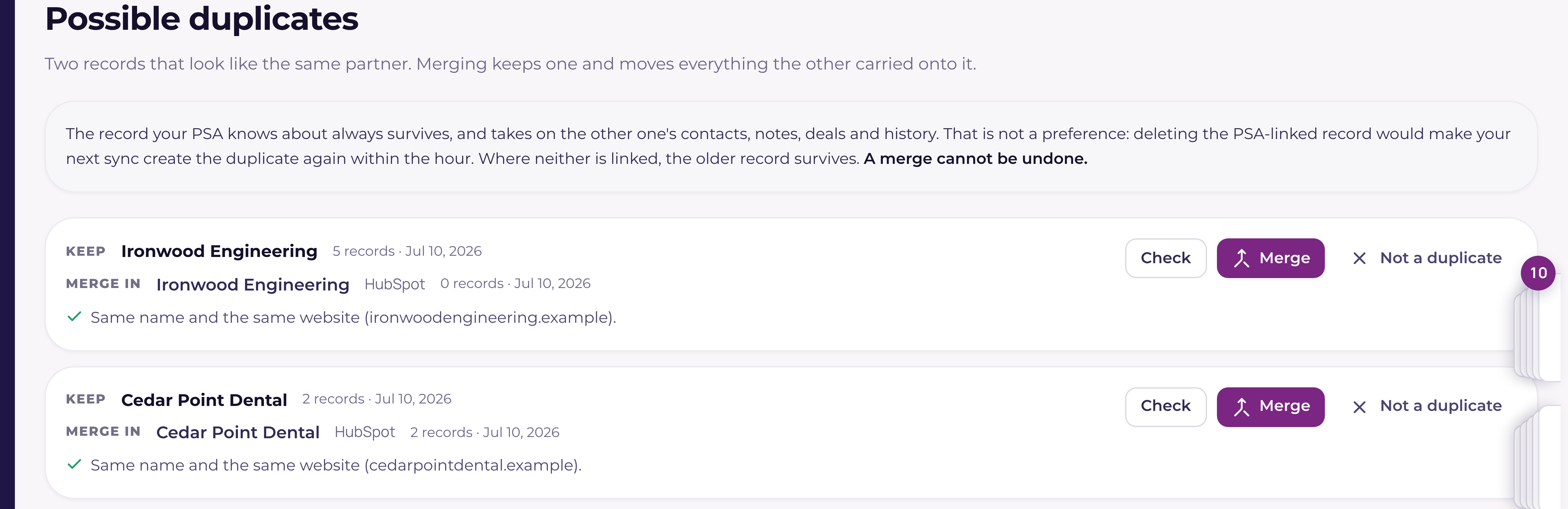
One company entered twice is the quiet kind of mess. The opportunities sit on one record, the notes on the other, and the account no longer adds up. Possible duplicates (under Sales, in the Manage group) finds those pairs for you, shows the evidence behind each one, and merges them so nothing is lost.
What counts as a possible duplicate
Current looks for three things. The same name once punctuation and capitals are ignored, so "Acme, Inc." and "ACME Inc" are one match. The same name once the company suffix comes off, so "Acme" and "Acme LLC" are another. And the same website under two different names, which is how a record created from a web lead often ends up beside the one your PSA already had.
Consumer mailbox domains are ignored on purpose. If somebody typed a prospect's gmail address into the website field, that is not evidence two companies are the same, and without this rule gmail.com would be the largest duplicate group in every workspace.
Which record survives
The record your PSA knows about always survives, and takes on everything the other one carried: contacts, notes, opportunities, quotes, activities, tickets, documents, the lot. That is not a preference. Deleting the record your PSA is linked to would only make your next sync create the duplicate again within the hour. Next, a company linked to a customer's own Current workspace survives over one that is not, because it is where that customer's support requests arrive. Where neither record is linked to your PSA or to a customer workspace, the older one survives. Two companies that are each linked to a different customer workspace are two customers, so Current never offers them as a pair and will not merge them.
| What you see | What it means |
|---|---|
| Same name and the same website | Two signals agree. Current is confident these are one company. |
| Same name, and only one is in your PSA | Almost always a record somebody typed in beside the one that syncs. |
| Exactly the same name, and no website, location or PSA link on either record says otherwise | Scored 90% by Current's own exact-name rule and shown as Exact name match. The auto-approve run merges these. |
| Same name, but different websites, or in different places | The records disagree, so the pair waits for you. The line names both websites or both places. |
| The same name apart from the company suffix | "Acme" beside "Acme LLC". Usually one company, sometimes a real corporate split, so this one waits for you. |
| Different names on the same website | Worth a look. It can also be two parts of a group you bill separately, so check before you merge. |
| Both are linked to different records in your PSA | Current will not merge these. They are two live records in your PSA and the merge belongs there first. |
The three groups
Above the list, three buttons split everything into Safe to merge, Needs a decision, and Both in your PSA, each with how many pairs are in it across the whole workspace. Safe to merge is the group where two things agree, and the button at the top right clears a page of them at once. Needs a decision is usually the biggest group and the one the suggestions are for. Both in your PSA holds the pairs Current will not touch: each is two live, separate companies in your PSA, and your PSA has no way to merge companies, so a merge from here would lose history and the next sync would bring the deleted record straight back. If they really are one company, merge them in your PSA first and Current follows on the next sync. If they are two companies that share a name, mark the pair Not a duplicate and it leaves the list. Where your PSA is Autotask, each record has an Open in Autotask button so you can decide there.
The counts are pairs, not companies. Three records of the same company are three pairs, and merging two of them leaves one pair behind.
Let Current narrow it down
Most of what this page finds is not clear cut, and a long list of maybes is no easier to work through than the duplicates themselves. Suggest, at the top of the page, reads the pairs in Needs a decision and tells you which look like one company, which look like two, and which are genuinely unclear, with one sentence naming the evidence it used. It works through a batch at a time and does not ask again about a pair it has already answered, so press it again and it moves on to the next set. The one exception is a pair where a record has been renamed or given a different website since the AI looked: the auto-approve run described next will not merge on the old answer, and sends that pair back for a fresh review instead.
It reads the name, the website, the town, the industry, whether your PSA has a matching record, how much history each record carries, and the email domains the contacts use. It is never given revenue, contracts or ticket history, and never anybody's email address, only the domain.
Let the AI merge the clear ones
When Needs a decision is open, a panel above the list offers Start auto-approve. It merges every pair the AI rates "Looks like one company" at 70% or more, only when both records have the same name (a suffix such as Inc or LLC aside), and only where neither record is in your PSA. A pair with a record your PSA knows about is always left for you, however sure the AI is, because that is the record every sync depends on. So is a pair with two different names that share a website: a parent company and its subsidiary often run on one site, and the AI has called such a pair one company before, so those always wait for you to merge by hand. The same survivor rule applies as everywhere else on the page: where neither record is in your PSA, the older one is kept.
Pairs with exactly the same name (capitals, spacing and punctuation aside) merge too, at 90%, shown as Exact name match with Current's rule beside it. That score comes from Current's own rule, not the AI, and it holds only when nothing about the records with that name disagrees: two different websites, two different towns, states or countries, both records linked to your PSA, two companies in your PSA with that name, an AI answer of "Looks like two companies", or a Not a duplicate that anyone has marked. The check covers every record with the name, not just the two in the pair, because merging one into a second and a third into the first would join the second and third even when their websites disagree. Any one of those holds the pair for you, and the line under the pair says which. An AI answer of "Not clear either way", or a lower "Looks like one company", does not lower the 90%, and the AI's own line stays beside the rule's so you can read both.
The panel says how many pairs qualify right now. The run works in short steps. A step that finds pairs ready to merge merges them for up to about 45 seconds, then updates the panel. Once nothing is left to merge, a step asks the AI about pairs it has not reviewed yet, and the next step merges the new ones that qualify. While it runs, the panel says whether it is merging or reviewing, how many companies it has merged so far (the count moves every few seconds) and how many pairs are ready to merge (50 or more once the list is that long). Once the AI has reviewed pairs during the run it says how many, and while the AI still has pairs to review it says how many are left.
Pause stops it after the step in progress, and so does leaving the page or closing the tab. Nothing is lost: press Start auto-approve again and it picks up from the list as it stands. If the connection drops, the run stops and tells you so rather than sending the same step again; anything already merged stays merged. A pair that does not merge is named at the end with the reason and stays in the list, and a pair whose record was linked to your PSA since the list was read is skipped.
Every merge the run makes is recorded in the audit log (Workspace, then Audit log, for tenant admins) as an automatic approval, with its confidence, the sentence behind it (the AI's, or the exact-name rule's) and which of the two it merged under, beside the usual record of the merge itself.
Merging a pair
Check runs a dry run. It changes nothing and tells you how many rows across how many tables would move onto the record you are keeping, so you can see the size of what you are about to do. Merge then does it. Large accounts take a moment, because every opportunity, contact, note and activity has to be repointed one at a time, and a merge is all-or-nothing: if it cannot finish, nothing is changed and the message says so. Merge the safe ones works through a page of pairs one at a time and tells you at the end how many merged and which ones did not, with the reason for each; those stay in the list to try again on their own.
Not a duplicate sets the pair aside for good. Use it on two companies that genuinely share a name or a website, and you will not be asked about them again.
Two sites of the same customer group are never offered as a pair, and auto-approve never merges them: a customer with an office in each town is one customer on purpose, not a duplicate. If you merge a company that sits in a group, the company you keep takes its place in the group, unless the company you keep is already in a group, in which case it keeps its own. See "Customer groups: one customer with several sites".
Merge two companies you pick
Possible duplicates only lists pairs it found itself, mostly records with the same name or the same website. When you know two records are the same customer and the names differ ("Intech", "Intech Pacific" and "Intech Hawaii", say), open one of them, go to the foot of its Overview tab and press Merge another company into this one under Merge companies. Search for the other record and pick it.
Current then shows Keep and Merge in, the same two sides as on Possible duplicates, with one sentence saying why that record is kept. The rule is exactly the one above: the record your PSA knows about, then the one linked to a customer's own Current workspace, then the older one. You do not choose the survivor. If the rule keeps the other company, the dialog says so, the merge goes that way, and you land on the company that was kept afterwards. If the two can't be merged (two different records in your PSA, or two different customer workspaces), the dialog says why and offers no merge.
Press Check what moves to see what would move without changing anything, then type merge in the box to turn on the button. Picking a different company clears the check, so the merge you confirm is always the one you checked. The merge itself is the same one Possible duplicates runs, recorded in the audit log the same way, and it sends nothing to your PSA.
Stopping new ones
New company now refuses a company you already have. If the name or the website matches an existing record you get "that company already exists" with an Open it button that takes you straight to it, rather than a second copy under a slightly different spelling. A CSV import does the same thing quietly: a row that matches a company you already have is linked to it instead of creating another, and the import carries on.
Who can do this
Merging is for tenant admins and sales leadership only. A merge deletes a company and rewrites timelines that mostly belong to other people, so an account executive, including one with Full CRM, can see a duplicate on a company record but cannot merge it.
Why the list is one page at a time
Possible duplicates shows the strongest matches first and only a page of them. Clear that page and the next set appears. The search gets more expensive as merges concentrate history onto the survivors, and a page that took too long would come back looking like you had no duplicates at all, which is the one wrong answer nobody questions.