
Reading the sync health dashboard (and fixing a stale sync)
Every panel on the PSA sync health page explained (job states, telemetry, the outbox) plus the first three checks when data looks stale.
On this page · 10 sections
Sync health is the single pane for everything moving between Current and your PSA. Autotask, ConnectWise, HaloPSA, Syncro, Rev.io, or SuperOps: whether the connection is alive, when data last landed, what's waiting in the queue, and what failed. The page reads the same whichever PSA you run; where this article says "your PSA," the page itself names your provider. When someone says "the numbers look wrong" or "my tasks aren't showing up," this is the page that answers it in under a minute.
Where to find it
- 1Open IntegrationsSettings › Integrations. It's a Tenant Admin area, sync health reads admin-only data, so anyone else lands on an "admin-only" notice.
- 2Find your PSA's card (ConnectWise PSA or Autotask)The card shows the connection state, when it last synced, and whether there are open conflicts.
- 3Click Sync detailsThat opens the full sync health page. You can also jump straight there with the ⌘K command palette, type "Sync health."
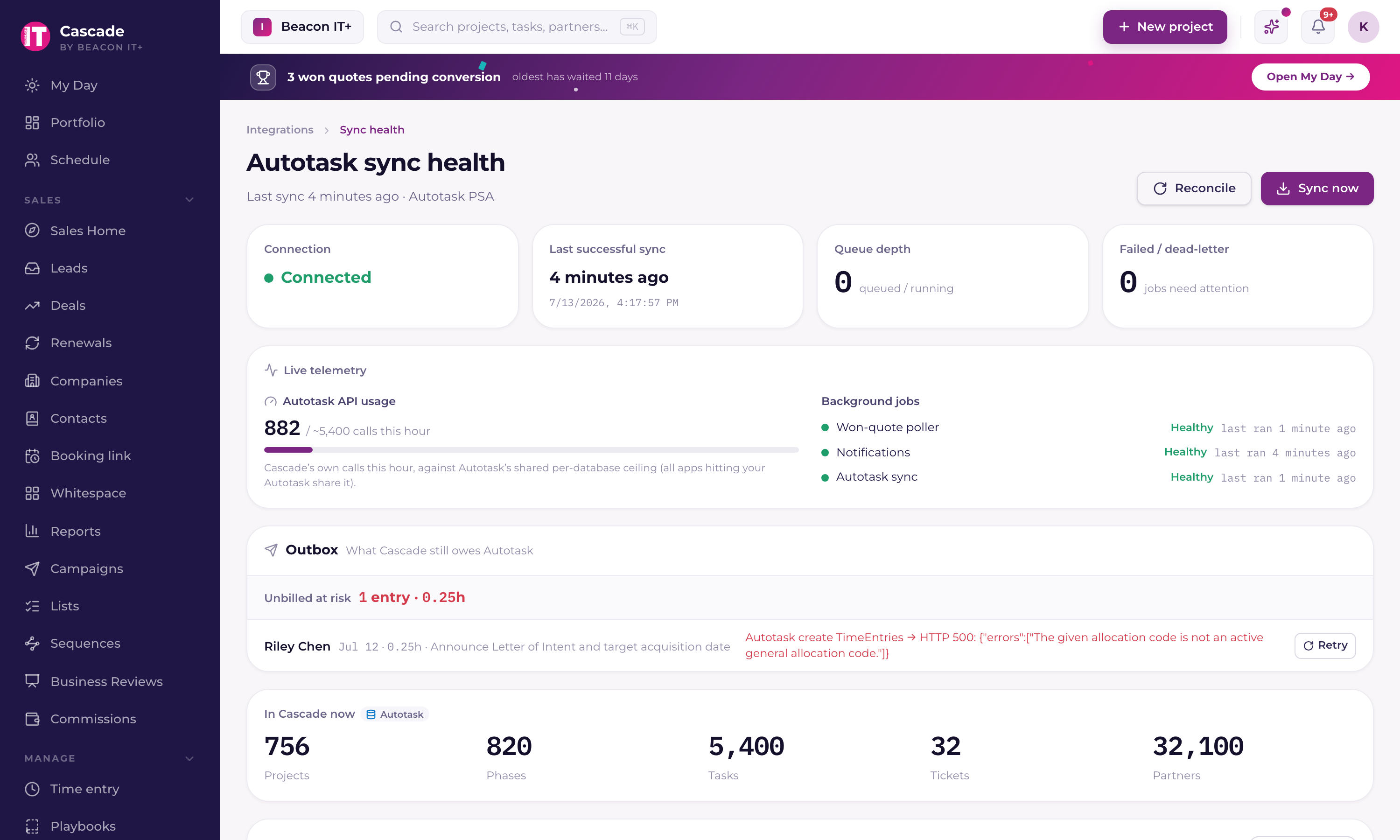
The four numbers at the top
| Tile | What it tells you |
|---|---|
| Connection | Connected, Disconnected, or Connection error. On an error, the last error message from your PSA is printed right underneath, with a link to your PSA's card in Settings › Integrations where you fix it. Read it before doing anything else. |
| Last successful sync | How long ago PSA data actually landed. Current polls for changes every 5 minutes, so anything older than a couple of poll cycles deserves a look. |
| Queue depth | Jobs queued or running among the 25 most recent (the same set the Recent jobs table shows); it tops out at 25. |
| Failed / dead-letter | Failed or dead-lettered jobs in that same recent set. |
Job states
| State | Meaning |
|---|---|
| Queued | Waiting for the next drain cycle (every 5 minutes). A job whose last attempt errored also sits here, with a later scheduled time. Retries back off about 2, 4, then 8 minutes, capped at 60 (up to 120 when a PSA rate limit was the cause). |
| Running | In flight now |
| Synced | Done; the record's last-synced time updates |
| Partial | Not an error. The run either ran out of its wall-clock time or paused because the PSA was throttling (on Autotask, the hourly request budget was nearly spent). It synced what it could and picks up where it stopped on the next run. A partial background queue job whose record type supports resuming re-queues itself automatically and continues within a couple of minutes. You don't need to press anything. On the per-entity rows, a short note under the status says exactly why the run paused (for example, which record failed to save) instead of a generic budget message. Pressing Sync now also no longer clears the history of previously failed jobs: they stay listed with their Retry buttons until they succeed. |
| Failed | A queue job whose run appeared stuck (still Running after 30 minutes) and was reset by Current's sync watchdog, or an entity whose pull errored (on the per-entity rows). Failed queue jobs carry a Retry button. |
| Dead letter | A queue job that used up all 5 attempts. Current's watchdog automatically retries a dead-lettered job once every 24 hours and alerts tenant admins, but a job that keeps landing here needs a human: read its last error and press Retry. |
Live telemetry
Two readouts sit under the KPI row. PSA API usage shows the calls Current itself has made this hour. On Autotask, that's read against Autotask's shared hourly ceiling of roughly 10,000 requests. The bar turns amber past about 7,000, meaning Current may start pacing its own syncs. ConnectWise publishes no fixed hourly quota (it throttles bursts as they happen), so there the readout is a plain call counter and the pacing happens automatically through backoff. Background jobs shows a heartbeat for each scheduled worker (the PSA sync, notifications, the won-quote poller, and mail capture): Healthy if it ran within the last 15 minutes, Behind between 15 and 30, Stalled beyond that. Mail capture is judged on its own clock, because it runs every 30 minutes rather than every five minutes. It reads Behind after about 45 minutes and Stalled after about 80.
A Stalled PSA sync heartbeat is the loudest signal on the page. It means the scheduled worker itself isn't running. Nothing else on the page will be fresh either. See "PSA rate limits and dead-letter jobs" for what Current does when throttling is the culprit.
The rest of the page, top to bottom
- Outbox. What Current still owes your PSA: time entries that failed to submit (with one-click retry, or Fix and Write off when your PSA will never accept them), drafts sitting more than three days, undelivered pushes, and failed jobs. This is where unbilled hours hide.
- CRM pushes, companies, contacts, and opportunities whose last push to your PSA failed, each with a plain-language reason and a one-click Retry. When your PSA refused Current's saved credentials, the reason says so: a tenant admin gets a link to your PSA's card in Settings › Integrations, and a sales manager reads that a tenant admin can fix it. Failures your PSA can plausibly recover from retry themselves in the background; anything still listed here is waiting on a person. When everything has landed, it reads All synced with the last sync time. When a push failed because the same person exists twice, a Review duplicates button appears above the list: it shows the two records side by side (name, title, contact details, how much timeline history each carries), recommends which one to keep and says why, and merges them in one click with every note, email, and to-do moved to the kept record. If the twin lives in HubSpot, Current merges the pair there first; if several Autotask contacts share the email, it lists them so you pick the one to link, with an optional checkbox to deactivate the others in Autotask.
- In Current now, row counts of what's stored in Current, enough to prove a sync landed: projects, phases, tasks, tickets, partners, contacts, opportunities, and ticket hours (with a second tile for how many of those hours name a partner). These are counted against your workspace's rows, not estimated. If projects are above zero but tasks are zero, the page tells you so, tasks pull per project, so press Sync now.
- Ticket sync diagnostic. A read-only probe of your PSA that answers "why are there no tickets?" It reports the PSA's total tickets, how many are attached to a project, how many of those projects Current tracks, and what's stored. The usual answer: your tickets are service-desk only and none are linked to a project, so there are no project tickets to sync. On Autotask a project manager or admin can attach one right there: type the ticket number, pick the project and press Attach. Current refuses a ticket that is already on another project or belongs to a different company.
- Per-entity sync, one row per syncable entity with its direction, last success, stored count, and status. This includes rows for Company notes, Project charges, and Company tickets. CRM mirrors that were always synced but previously had no row here, so staleness on them was invisible. Contracts get three rows because three separate pulls feed them: Contract names (the list the time-entry contract picker offers), Contracts (your PSA's contracts, which drive coverage and monthly revenue), and Contract services (the service lines on each recurring contract). When a row is Partial, the note under its status says exactly why, and a row that has no bookmark to resume from says it starts over each pass.
- Recent jobs, the last 25 jobs, newest first, each with its attempt count (n/5), and last error (hover for the full text). Rows in Failed or Dead letter carry a Retry button, which re-queues the job immediately and resets its attempt counter. A job that is Queued with a future scheduled time is already waiting on its own backoff. There is nothing to press.
- Conflicts, open conflicts and recently auto-resolved ones. See "Fix a sync conflict between Current and your PSA."
- Removed in your PSA / Blocked from re-import. Records whose PSA counterpart is gone, and records you deleted in Current on purpose that the pull is deliberately not re-importing. A task deleted in your PSA that has no logged time is archived automatically. It disappears from every board, list, timeline, calendar, and My Day, so it never sits here waiting. Deletions are spotted by the nightly reconcile, so a task you delete in your PSA today clears itself overnight without anyone pressing anything; press Reconcile if you would rather not wait. Only tasks that carry logged time are held for your review (their billing history is never removed silently), each with Archive (hide it, keep the time entries), Delete in Current, or Keep. If you open one of those tasks before it is cleared, the task now says it was deleted in your PSA and offers to remove it there and then. Deleted projects still appear here for Review & delete.
Last full sync
Last full sync is the record-by-record ledger of the most recent full pass: for each record type, how many were newly applied, how many are waiting on a parent company, and how the record type finished. Fetched and Unchanged appear too when the run recorded them. The label next to the title says which kind of pass it was, Full sync (someone pressed Sync now), Completeness check (a Reconcile), or the Initial-history marker set when the workspace first connected.
A record type the pass left partial reads Caught up since once the routine background sync has finished it, and the whole pass reads Finished by background syncing when nothing it left behind is still outstanding. A failed pass keeps its own status either way.
A timestamp here that reads hours old is not an outage. Routine syncing keeps running in the background between full passes; per-record-type freshness is in Per-entity sync further down the page.
Something looks stale, check these first
- 1Look at the last successful pull timeIf it's older than two poll cycles, the connector is likely failing, the Connection tile prints the last error. An authentication message means the credentials or the API user's permissions changed in your PSA; fix that first, because no amount of retrying will help.
- 2Scan the retrying and dead-letter jobsRecent jobs lists the last 25 jobs, each with its attempt count (n/5), and its last error (hover for the full text). A job that keeps erroring shows as Queued with a future scheduled time (it is already waiting on its own backoff, so there is nothing to press) until it hits 5 attempts and lands in Dead letter. Expired credentials and PSA permission changes are the usual suspects. Rows in Failed or Dead letter carry a Retry button, which re-queues the job immediately and resets its attempt counter.
- 3Check per-project healthEach synced project carries its own sync badge on the project page. One project stale while everything else flows usually means a deleted or re-permissioned record on the PSA side. The "Removed in your PSA" panel will often already be showing it.
Symptom → cause
| What you see | Most likely cause | What to do |
|---|---|---|
| Connection error with a message about credentials | The API user's secret, integration code, or key pair changed in your PSA, or the user was disabled | Re-enter the credentials on your PSA's card and use Test connection. See "Connect Autotask and choose what syncs" or "Connect ConnectWise PSA and choose what syncs." |
| Last successful sync hours old, nothing in the failed / dead-letter tile | The scheduled worker is stalled, check the PSA sync heartbeat | Press Sync now. If that works but the heartbeat stays stalled, the background scheduler needs attention. |
| Queue depth stuck, nothing completing | Jobs claimed but not finishing, or a job repeatedly erroring | Read the last error on the stuck jobs. Clear queue drops the queued read jobs so they stop piling up. It leaves outbound pushes, jobs already running, and a queued reconcile alone, so it cannot throw away work you owe your PSA. |
| Projects synced but zero tasks | Tasks pull per project, and the first run spent its time budget on projects | Press Sync now again. It resumes where it stopped. |
| Zero tickets, everything else fine | No PSA ticket is attached to a project | Run the ticket sync diagnostic. If project-linked tickets are zero, attach a ticket to a project in your PSA, then re-sync. |
| A single project is stale, others are fine | The PSA record was deleted, moved, or re-permissioned | Check "Removed in your PSA," then Reconcile. |
| Everything is amber / Partial | The workspace is large, or the PSA is throttling (on Autotask, the hourly budget is nearly spent) | Nothing is broken, each row's note says why it paused. Let the next cycle run (the most out-of-date entity goes first, and CRM records get a guaranteed slice), or press Sync now to continue immediately. |
| A project shows nothing at all and has no sync badge | It's a Current-native project. It was never meant to sync | Expected. See "Project modes: PSA-synced or Current-native." |
Sync now runs an immediate, ordered pull: projects, phases and tickets first, then people and the lookup lists, then the heavy task pull, and finally time entries (which chase in a follow-up run if the task pull used up the time budget). It reports exactly what it brought back. Reconcile runs in the background: pressing it queues a job you can watch in the queue panel below. It compares Current against your PSA, logs any drift it finds, and corrects it by queueing the same idempotent pull one entity at a time, so it finishes reliably even on a very large workspace. It's the only path that can notice records deleted on the PSA side, since a deleted record simply stops appearing in normal pulls, which is why it now runs by itself every night as well as on the button. Reconcile also runs two repair passes: it applies task date changes made in the PSA that an earlier sync recorded but never applied (each correction is listed in the Conflicts panel with a "Restore my value" undo), and it closes out open push failures for tasks whose PSA record was deleted, so one deleted task no longer keeps a project's badge stuck on "Sync error."
Clear queue: what it actually drops
Clear queue only drops queued jobs that read from your PSA. Three kinds of work are never touched: outbound pushes (anything Current still owes your PSA), any job already running, and a queued reconcile. The button shows the number it can drop, so "Clear queue (12)" means 12 queued read jobs, not 12 of everything. It only appears when there is at least one job it may drop, and pressing it asks you to confirm first, naming the count. Choose Keep them to back out. The next sync re-queues the reads it still needs, so nothing is lost by clearing.