
Roles & permissions: who sees what
The ten roles, from Tenant admin to Read-only, plus the super admin tier, the scoping rules that matter, and how a Tenant admin changes somebody's role and permissions in Users & roles.
On this page · 5 sections
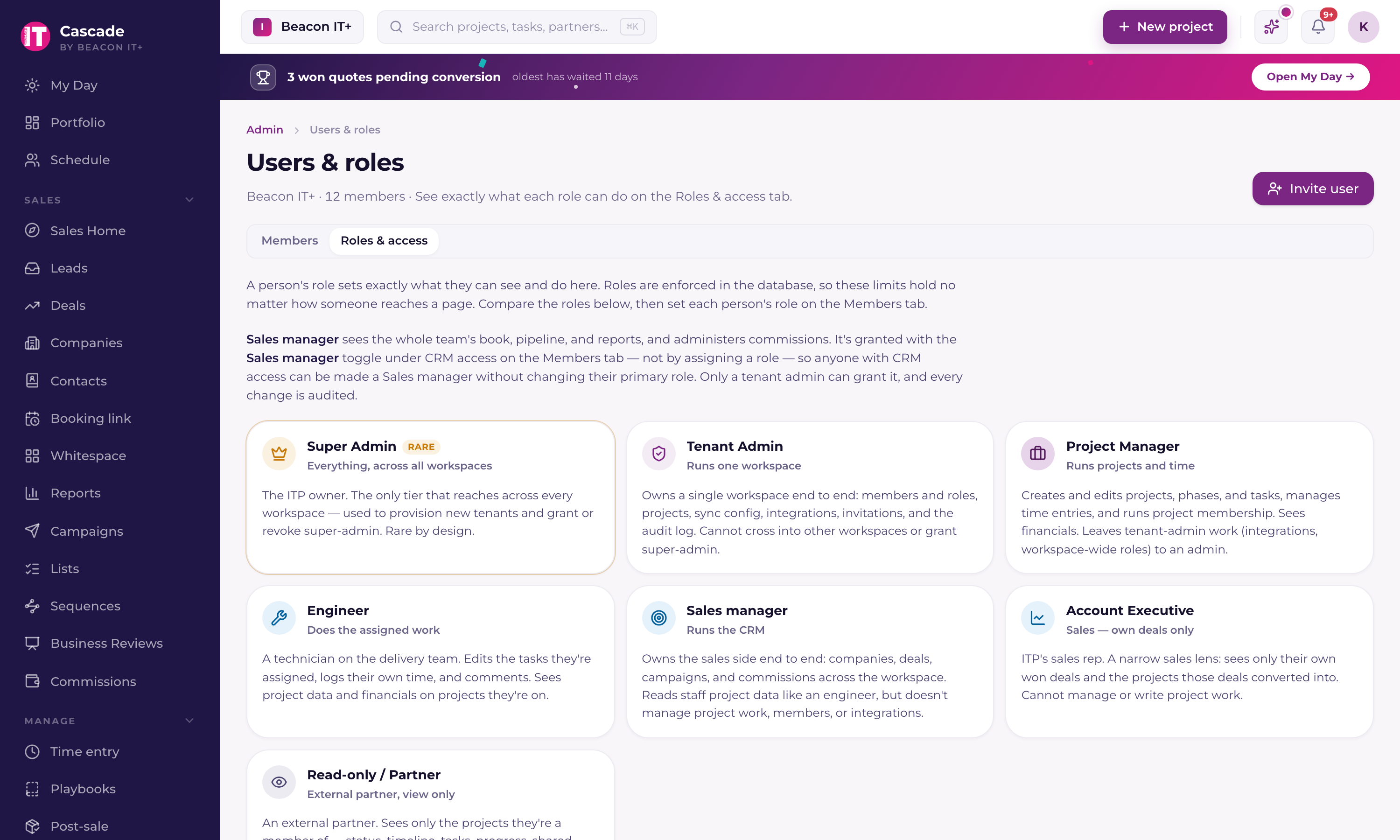
Every member has exactly one role, and every rule below is enforced in the database, removing a button never removes access; the data layer does.
| Role | In one line |
|---|---|
| Super admin | Current staff only, the sole cross-workspace tier, used to provision tenants. A flag on a person, not one of the ten roles. |
| Tenant admin | Runs your workspace end to end: members, roles, integrations, sync config, billing and the audit log. |
| Service manager | Everything a project manager does, plus running the service desk: dispatch, anyone's tickets, deleting tickets, device decisions, shared boards, Time saved, and Pods and Skills. Offered only in a workspace that runs its tickets in Current. |
| Project manager | Creates and edits projects, manages time and membership, sees financials. Works the service desk as an engineer does. |
| Dispatcher | An engineer who also hands out the desk's work: assigns or reassigns any ticket from the dispatch board and the Dispatcher page, and sees everyone's lane. The desk's setup, device decisions, deleting tickets, Time saved, and Pods and Skills stay with managers. Offered only in a workspace that runs its tickets in Current. |
| Engineer | Edits their assigned tasks, logs their own time, comments, and works the tickets they hold. Sees financials on viewable projects. |
| vCIO | Works projects and the service desk like an engineer, and has the whole CRM on every account (Full CRM turns on with the role). A Tenant admin may also give a vCIO the Sales manager switch. Never commissions or cost rates. |
| Finance | Reads the money for every company: cost rates, profitability with the cost of each person, margin, contracts, billing items and ticket time. Reads companies, projects, tasks, hours and desk tickets without changing anything, and never reads project comments, except on billing work assigned to them (below). Never commissions, and never the Sales manager switch. |
| Read-only (Partner) | External client. Only shared projects, through partner-safe views. Never any financial data. |
| Account executive | Views any company in the workspace; edits only their own book of accounts and opportunities. Never a raw cost rate or a per-person cost; account-level margin, cost to serve and hours only inside a company's renewal dossier. |
| Sales manager | Owns the CRM, all companies, opportunities, campaigns, commissions. Reads project data, doesn't manage it. New sales managers get the Sales manager switch under CRM access instead of this role. |
The scoping rules that surprise people
- Engineers see all workspace projects, but can only edit tasks assigned to them and log their own time.
- Sales Managers read project data like an engineer but can't edit tasks, manage membership, or configure integrations. The two CRM connectors are the narrow exception: on ScalePad Lifecycle Manager and CrewHu they can test the connection, run a manual sync, map and ignore clients, disconnect, and set the alert thresholds. Saving the API key or token is Tenant Admin only, on those two as on every other connector.
- Account Executives can now VIEW any company in the workspace and find it in search (assigned to them or not), but can still only EDIT their own book (creating or changing a company, opportunity, activity or note on someone else's account is blocked). Sell price and opportunity margin still show only on their own opportunities, and project hours and budget burn stay hidden because they carry cost data. One deliberate exception, added in August 2026: the renewal dossier's private profitability section, where an AE can read account-level gross margin, cost to serve, effective hourly rate and total hours for any company they can view. The breakdown by technician inside that section is workspace admins only, and the cost rates themselves are still admin only.
- A Dispatcher assigns any desk ticket to anyone, but changes only the tickets assigned to them or that they opened, like an engineer. Changing someone else's ticket in any other way stays with service managers and admins.
- Finance changes nothing, with the one exception below: no project, task, time entry, desk ticket or CRM record. Giving the role turns CRM access on so they can open company records and their money. Finance is the one role outside Tenant admin that reads the four cost-rate tables.
- A vCIO gets CRM access and Full CRM the moment the role is given. A Tenant admin can turn either off afterwards under CRM access, and can turn on the Sales manager switch for a vCIO, which adds sales management (goals, coaching, approvals) but never commissions.
- Moving someone to Finance turns their Sales manager switch off, and Users & roles does not offer the switch for Finance.
- Full CRM is a per-person switch a Tenant Admin turns on under CRM access, for an Account Executive, Service manager, Project Manager, Engineer or vCIO. It opens the whole CRM on every account in the workspace, including opportunities, notes, Business Reviews, campaigns and every website lead, and the person keeps everything their role already allows. It never opens commissions, sales management such as goals, coaching and approvals, the team's performance views, or cost rates.
- Only Tenant Admins can invite users, change roles, configure integrations, or read the audit log. A role change that takes away desk management, dispatch or Finance's money access asks before it saves.
- Converting a won quote into a project is PM-and-up, Sales Managers run the CRM, not conversions.
Change somebody's role or permissions
A Tenant admin changes what someone can do in Settings › Users and roles › People. Their role sets most of it, and three CRM switches add to it.
- 1Open Settings › Users and roles › PeopleOpen Settings from the row with the purple gear at the foot of the left menu, then Users and roles, or press / and type users.
- 2Click the person's rowTheir panel opens with Role & CRM at the top.
- 3Pick the new roleChoose it from the role list. It saves the moment you pick it, except a change that takes away running the service desk, dispatch or Finance's access to money, which asks you to confirm first. It applies on the person's next click, with no sign-out needed.
- 4Set the CRM switchesUnder CRM permissions: CRM access opens the Sales area at all; Sales manager adds sales leadership across every account executive (goals, coaching, approvals, pipelines); Full CRM gives an Account executive, Service manager, Project manager, Engineer or vCIO the whole CRM on every account, without commissions or sales management. Sales manager and Full CRM appear once CRM access is on.
- Only a Tenant admin can change a role or a switch. Nobody can change their own role, and the role list is locked on your own row.
- To give someone admin rights, pick Tenant admin. Tenant admins start with CRM access and Sales manager on.
- Service manager and Dispatcher are listed only when your workspace runs its tickets in Current.
- Sales manager is no longer a role you pick: it is the switch under CRM access, which works on top of any staff role except Finance.
- To give an outside customer contact view-only access to the projects you share with them, pick Read-only. They see only the projects they are a member of, never financial data, and they don't take a paid seat.
- Moving someone from Read-only to a staff role takes a seat. When every seat is taken, Users & roles offers one more seat with the exact cost before anything is charged.
- The same panel links the person to their PSA resource, which logging time that reaches your PSA needs. Someone with no account in your PSA can still use Current: see "People in Current who aren't in your PSA".
Who gives a role, and what it costs
- Only a Tenant admin gives a role: in Users & roles, on an invitation, or when approving a pending sign-in. Nobody moves to a new role on their own, including the three roles added in October 2026 (Dispatcher, Finance and vCIO).
- Every role except Read-only (Partner) is a billable seat at the same price. A Dispatcher, a Finance member and a vCIO each take one seat, like an Engineer.
- Service manager and Dispatcher are offered only in a workspace that runs its tickets in Current. Everywhere else Users & roles leaves both out of the role list, because there is nothing to dispatch. Finance and vCIO are offered in every workspace.
Everyone can look up a company
Companies heads the menu section named for whatever your workspace calls the businesses you serve (Partners, Clients, Customers), and every internal member has it. It's a read-only directory of your current partners (customers), open one to see its contacts, recent support tickets, and latest activity. No money figures appear here: MRR, opportunity values, quotes and contract amounts stay with the sales team.
- Current partners (customers) are visible to everyone on the team, view-only.
- Prospects stay private to CRM users (anyone with CRM access). They never appear in the everyone view.
- Sales users (account executives, sales managers, admins, and anyone with Full CRM) get the full CRM record with financials from the same menu item; everyone else gets the read-only slice.
- Partner (read-only) guests never see the Companies directory or any CRM data.
Checking what a specific person sees
- 1Open Settings › Users and roles › PeopleClick the person's row to open their panel.
- 2Open the link under the role pickerIt reads with their first name, for example What Dana can do with this role, and opens a plain-language digest of what they can do, what they see and what they cannot, generated from the same rules the database enforces. The Roles & access section at the bottom of Users & roles describes every role the same way.