
Devices in the customer portal
Show the people at a customer the devices you look after for them and how each one is doing, in plain words, so they can see what needs attention without asking you.
On this page · 7 sections
The people you invite to the customer portal can see the devices you look after for their company and how each one is doing: backup, security, updates, warranty and when it was last seen. They see facts in plain words, never the name of a tool, and they can raise a ticket about a device from its page.
Who sees devices
Devices follow the same switches as the rest of the portal. On a company's Portal tab each person has a preset, and the company has a ceiling no person can go past. The switch is See their company's devices. The Requester, IT team and IT admin presets hold it; Viewer and Projects viewer do not. A person without the switch has no Devices page at all, rather than one that is greyed out.
Devices also need your device register, because that is where a customer's devices are kept. In a workspace without it, nobody sees a Devices page.
Which devices appear
- Devices that belong to the person's own company. Nobody sees another company's devices.
- Devices that are active and that at least one of your connected tools reports. A device nothing reports, or one you set to ignored, stays out.
- Computers, servers, virtual machines, printers, and phones or tablets. Network equipment and other kinds stay out.
- A device whose kind none of your tools can tell shows with the kind Unknown. It stays out only when one of your tools says it is network or backup equipment.
What a customer sees
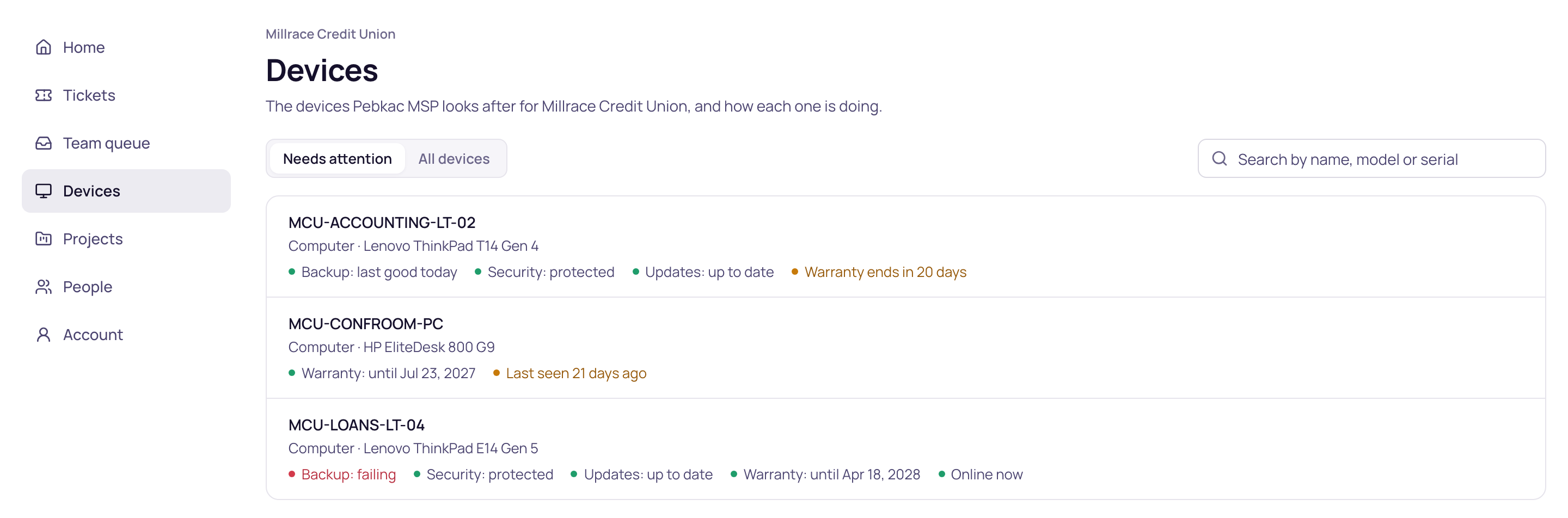
Home gets a Devices card with one line, such as "2 of 14 need attention" or "All 14 are doing fine". The Devices page lists every device, with Needs attention and All devices as filters and a search by name, model or serial. A device's page shows what it is and how it is doing:
| Line | What it can say |
|---|---|
| Backup | Last good today, yesterday or a number of days ago; failing; or not confirmed, with the day it last worked, when the last good backup is more than 14 days old and no tool says how it is doing now. |
| Security | Protected, or needs attention. |
| Updates | Up to date, need attention, or restart needed. |
| Warranty | Covered until a date, ends in a number of days, or ended. |
| Last seen | Online now, when one of your tools saw it online within the last day, or how long ago one of your tools last saw it. |
When none of your tools has an answer for a line, the page shows a dash and makes no claim. A device with no backup tool does not read as failing, and one with no warranty date does not read as covered. A tool you have disconnected, or one that has not reported to Current for two days, no longer feeds these lines, so its last answer does not stay on the page.
What counts as needing attention
- Its backup is failing.
- Its security needs attention.
- Its updates need attention.
- Its warranty has ended, or ends within 30 days.
- None of your tools has seen it for 14 days.
These come from the tools you have connected and that are still reporting, so the list is only as complete as they are. If a device shows as needing attention and you already know why, a short ticket reply or a note to the customer saves them asking.
What a customer never sees
- Network addresses. If a device's name holds an IP or MAC address, the portal shows its model and serial instead, or "Unnamed device".
- Who signs in to the device, and anything about its user accounts.
- The names of your tools, alert details, scripts, or your internal notes.
- Cost, contract or agreement details.
Raise a ticket about a device
A person who can raise tickets gets Raise a ticket about this device on each device's page. The new ticket starts with that device already chosen, so your team knows which one they mean. This needs tickets to be on in the portal for that customer.
Check what a person will see
On the company's Portal tab, the Preview as button beside each person shows the portal as that person sees it, worked out from their own switches. For someone who holds See their company's devices, it includes their Devices card and page, so you can read their list the way they do.