
Strategic Business Reviews: the QBR, rebuilt on evidence
Current builds the quarterly review as a print-quality magazine PDF. The quarter's story, the value ledger, peer comparison, security, fleet, hardware lifecycle detail, backup, priced risks, a coverage map of where the partner is exposed, a quarter-by-quarter road ahead, the budget picture, and your own PDF appendix. Through a five-stage builder that only asks what your systems can't see, brings the pages up beside the controls once the review is written, saves as you type, and resumes where you left off. A section with no data drops; nothing is ever padded with a zero. The words are written a chapter at a time from every connected service, with the key facts bolded so a leader can skim; every number stays computed from the record.
On this page · 20 sections
- Check the review before you present it
- The magazine, sheet by sheet
- How the review gets written
- Why some facts are bold
- Explainer diagrams
- Where the industry benchmarks come from
- Rewriting one chapter
- The value ledger: your constants, your math
- How you compare: real peers, or your own trend, never an invention
- Who you are compared with
- The measures on the band
- With us: where your team's work shows
- Where you're exposed: the coverage map
- The builder: five stages, and it only asks what your systems can't see
- Every review is kept
- Presenting: the same magazine, in print and on the TV
- Plan in live mode with the partner
- The builder: five stages on one screen
- Risks you raise, and the decisions you need
- Source documents: what the feeds cannot see
The quarterly business review most MSPs run is a night of copy-paste: export a ticket count, screenshot a chart, write a summary that says "we had a great quarter" because nobody has time to check. Current builds the review as a magazine instead. A print-quality PDF assembled from the records you already keep, shaped by a short builder that only asks the questions your systems can't answer. Every number on it traces to a live feed, and every risk carries evidence chips a partner could ask about.
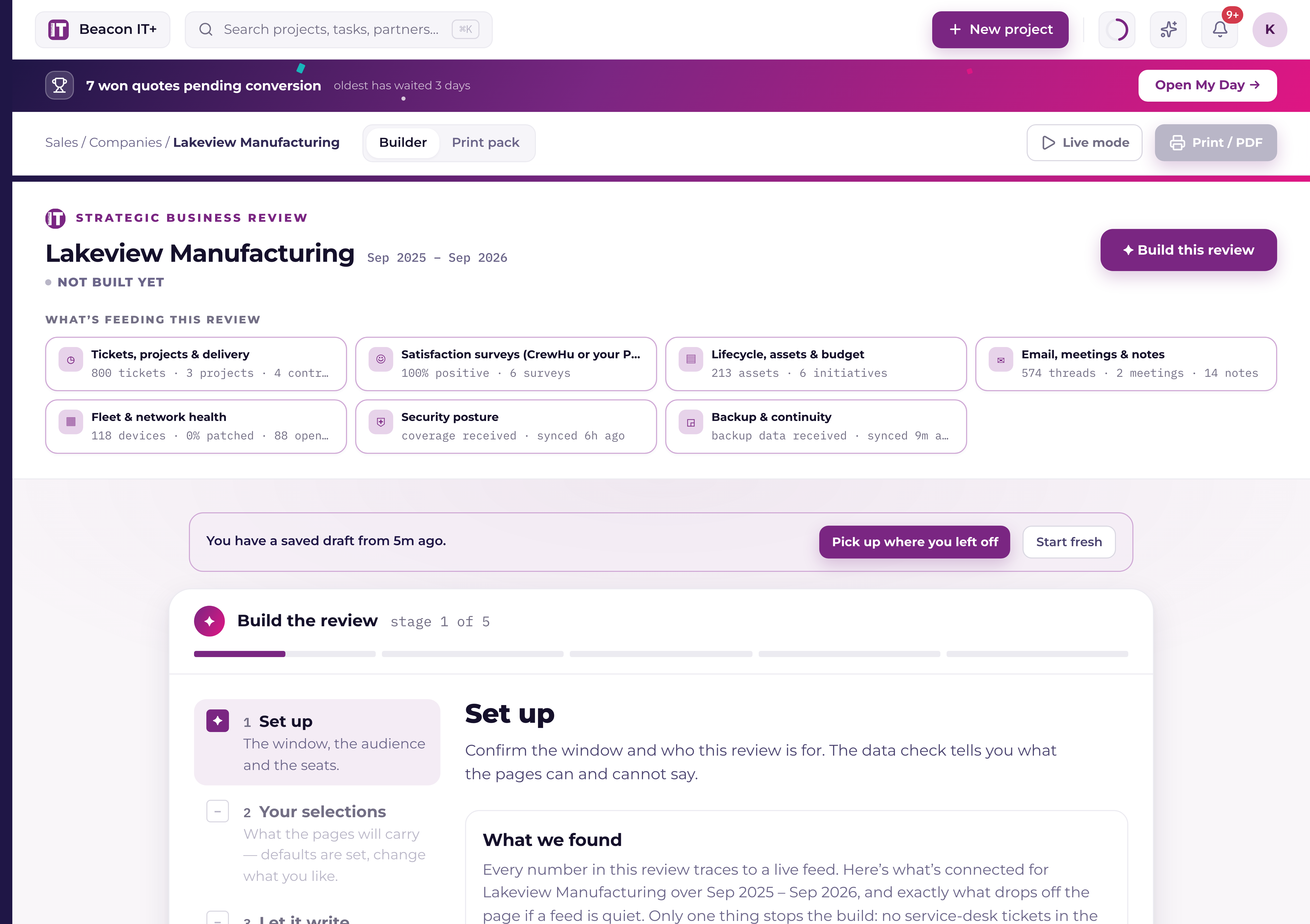
You'll find it at Partners → Business reviews (the page itself is titled Business reviews). This article covers how a single review gets built and what lands on its pages. For running the program across a book of partners quarter after quarter (the library, filters, and starting the next one) see "Running your SBR program quarter to quarter."
Check the review before you present it
The numbers in a review are computed, not written. Every figure on the page traces back to a live feed, and a measure Current cannot read is dropped rather than guessed. The words around those numbers are written by AI, and AI can make mistakes. It can read a trend the wrong way round, draw the wrong conclusion from a real number, or phrase something in a way you would never say to that client.
This pack goes to your customer with your name on it, so read it before it goes in the room. Stage 4, Check and adjust, is where that happens: read every chapter, rewrite any that lands wrong, edit a line directly on the page, and hide a page you do not want to show. Catching a mistake before the meeting is your job, not Current's. Section 10 of our Terms sets out that AI output is a draft for your review.
The magazine, sheet by sheet
A finished review reads like a magazine issue, not a slide dump: a cover, an agenda, up to fifteen chapters in a deliberate arc, and any appendix pages you attached. The agenda numbers itself from what's actually present: when a chapter has no data for this partner this period, it drops, and the agenda and page folios renumber as if it were never there.
- Cover, your logo (with your favicon as a small mark beside it), the partner's name, the period, and two or three headline stats. Two, when only two qualify, the cover is never padded to three.
- Agenda, each chapter's title with a one-line promise of what it answers, plus a line for each appendix document you attached.
- The quarter on a page, the hero ticket total, split into the times their people asked for help and the issues your monitoring caught on its own, with an AI-written synthesis and up to four pull stats.
- The value ledger, the quarter's invisible work priced in plain arithmetic: monitoring catches, quarantined phishing, and outage-class saves, converted to hours and money using constants your workspace controls (see below).
- The partnership scorecard, four to six tiles, a satisfaction pull-quote you approved in the wizard, and a "how we work" band in your own words.
- How you compare · service. Opens by naming who the partner is measured against ("Compared with other legal firms with 100–150 employees: 7 firms in our book, and published figures for the industry."), then sets them against that group on the service and money measures: first response, tickets per person, after-hours share, urgent-ticket share, positive-survey rate, and IT spend per person per month. The sources behind the published figures are listed at the foot of the page.
- How you compare · fleet & AI, the same sentence and the same treatment for the security and fleet measures: patching, multi-factor sign-in, endpoint protection coverage, backups verified, security training up to date, phishing click rate, average machine age, out of warranty, and Copilot adoption. It carries its own sources footnote, for its own rows.
- Security posture. Coverage, detections, and identity hygiene, including the MFA coverage figure you confirmed in the wizard when no feed could read it.
- Fleet health, led by the device-maturity gauge: a 300–850 score, read like a credit score, over a fleet-age histogram whose buckets always sum to the real endpoint count.
- Hardware lifecycle detail. The exact machines behind the fleet numbers, worst first: hostname, model and OS, age, and a warranty or OS state for each, plus the roadmap initiative a device is already attached to. When the fleet is bigger than the page, a note says how many more devices sit past warranty, the list is trimmed, never the type size.
- Backup & continuity, the proof strip: up to six real, dated boot-verification screenshots of recovered systems (with no screenshots it falls back to the verification log, never stock imagery), plus the recovery drill you recorded and cloud seats protected. Screenshots appear on reviews built from August 6, 2026 onward; an older pack picks them up the next time you refresh or rebuild it.
- What we're watching, priced, one to three fully evidenced risks, each with evidence chips and a price column, over the warranty runway for the next eight quarters.
- Where you're exposed. The coverage map: every offering in your catalog for this partner, filled when their agreement lines match it and hollow when they don't, with the in-place and not-covered counts above it, and up to three featured gaps beside it carrying what each one leaves open, how often their own team raised it, and your target price when one is set.
- The road ahead. The roadmap as a quarter-by-quarter timeline: each row under the quarter it's planned for, with its price, status, and a why-line that traces to a record, and one-time and per-year totals summed separately.
- The budget picture, quarters of forward IT spend from your lifecycle feed's budget forecast, split into contracts and subscriptions, roadmap initiatives, and the replacement backlog, with per-quarter totals, an overdue-backlog callout, and a grand total. Appears when a budget forecast exists for the partner.
- Your AI footing. Where AI can already help and what has to be true first, from four measures the record already holds: the share of accounts with a second sign-in step, the managed devices still on a system their maker supports, the latest phishing test or security training, and Copilot seats against headcount. Each is scored out of 25, under a readiness figure out of 100 with the arithmetic printed under it. A measure no connected feed can answer reads "not read" instead of a zero, the caption says how many of the four were read, and the whole page drops when fewer than two of them can be.
- The AI opportunity, its own page: a value-per-year lead grounded in the partner's seat count and the plays you chose to put on the table, with the factors printed beside the figures.
- Your team + next steps, the people behind the account and the next review on the calendar. The one chapter that can never drop.
- Appendix, the PDFs you attached in the wizard, printed one page per sheet after the closing chapter.
How the review gets written
The words on a review are written a chapter at a time rather than produced in one pass, and the order matters. Current reads everything your connected services hold for that partner and that period, turns each service into a fact sheet, plans the storyline for the whole issue, and only then writes the chapters one by one, each one knowing what the chapters before it already said. It usually takes about six minutes. The rail on the Let it write stage says so up front, carries a bar that keeps moving through the long steps (each step is weighted by how long it usually takes, so the bar never sits still while a slow step runs), shows how many minutes are left, and lists the last three chapters written with their own headlines the moment each one lands.
- 1Reading every record and building the fact sheetsTickets with what the person asked and what your engineer wrote back, project phases and tasks with their dates, every device with its age, warranty, patch and protection state, every backup agent's last result, survey comments, and the opportunities open on the account by name. Each of those becomes a fact sheet, and the fact sheets are what the writer works from after this step. Anything that looks like a password, a key or a personal phone number is redacted on the way in.
- 2Planning the storylineWhat kind of quarter it was, the one thing the partner should be proud of, the one or two things they have to decide, and the ten to fifteen facts worth bolding. Each of those facts is bolded in exactly one chapter and mentioned plainly everywhere else, which is what stops the pack repeating itself.
- 3Designing the explainer diagramsOne or two per review, chosen from a fixed set of shapes and built only from values already in the review's evidence.
- 4One step per chapterThe quarter on a page, the value ledger, the scorecard, both comparison pages, security, fleet, hardware lifecycle, backup, what you're watching, where you're exposed, the road ahead, the budget picture, your AI footing, and your team and next steps, then the executive brief that Live mode opens with. A chapter with nothing to say for this period is marked “nothing to write this period” rather than padded out.
- 5Sourcing industry benchmarksThe measures that compare against the wider market are filled from the benchmark library, and anything the library has no current figure for is researched and filed (see below).
- 6Reading it all backThe last step is an edit pass over the finished issue: a number that came out differently in two chapters, a claim that contradicts another one, a phrase used three times, bold used so often it stopped meaning anything. It returns targeted corrections rather than a rewrite, so the chapters you watched land are the chapters you get.
Why some facts are bold
Every paragraph carries one to three bolded spans, and the rule behind them is narrow on purpose: a number with its unit, a decision, or a dated commitment. Never a whole sentence, never an adjective, never a headline or a short caption. The test is whether a leader who reads only the bold can still retell the quarter.
The bold is yours to move. Click a sentence on a built pack to edit it, select a phrase, and press ⌘B (Ctrl+B on Windows), or click B in the small toolbar under the field; ⌘I does the same for italics. If you'd rather type it, wrap the phrase in two asterisks either side (341 tickets prints bold), and deleting the asterisks takes the bold away. Nothing else you type is read as formatting, and the figures themselves still can't be edited.
Explainer diagrams
One or two diagrams per review turn a point that would otherwise cost a paragraph into something a reader takes in at a glance: a hundred-dot grid with the share painted in, two bars for before and after, a funnel with the true counts down its side, a glyph repeated once per machine, or a handful of dated beats on a rail. Current picks the point and the shape from that fixed set; it cannot draw freehand. Every value in a diagram has to already exist in the review's evidence, and a diagram that fails that check is dropped rather than drawn wrong.
A diagram sits inside the chapter it belongs to, in your brand colors, and it animates in Live mode while the printed pack gets the final frame. Eleven chapters can carry one. The quarter on a page, the value ledger, the scorecard, both comparison pages, security, fleet, hardware lifecycle, backup, what you're watching, and Your AI footing, and never more than one each. When a page has to give something up to fit, the diagram goes near the end of that order rather than at the front of it (the optional paragraphs around it come off first), and the type is never shrunk to fit it.
Where the industry benchmarks come from
The comparison pages answer “is that normal?” from your own book first, as anonymous peer medians. Published industry figures sit beside that, and they come from a benchmark library the Current team curates: each entry carries the number, its unit, the slice of the market it describes, the report it came from, a link to it, and the year it was published. A figure with no source never prints, and the figure is printed with its source every time.
When a review needs a measure the library has no current figure for (nothing published in the last two years) the run looks one up on the web, takes a single dated figure from a source a business reader would recognize, and files it into the library. That review uses it straight away and it reads on the page exactly like a curated one. The run is told the partner's industry and size band, so it looks for a figure published for a firm like theirs first and takes the general small-business figure when there isn't one, and it records the industry on whatever it files. A figure published for a different industry is never used on a review: the choice is this industry's figure, the general figure, or no row. Platform administrators review, edit, approve or remove entries under AI Studio → Benchmarks, where each one also shows its industry and how many reviews have used it.
Rewriting one chapter
On Check & adjust, Regenerate narration lists the chapters in the pack. Click one and only that chapter is written again, against the evidence the run already gathered, so it takes seconds instead of minutes and nothing else on the pack moves. Chapters the writer doesn't own (the cover, the admin rights page, the AI opportunity page), and packs built before this wave fall back to re-running the whole analysis.
The value ledger: your constants, your math
The ledger chapter turns invisible work into money, and the conversion factors are yours rather than ours. In Settings › General › Profile and branding, your workspace sets the minutes returned per monitoring catch, per quarantined phishing email, and per outage-class save, plus your published downtime cost per hour. Sensible defaults ship out of the box so a day-one pack works, and every priced line prints its factors (the count, the minutes, the rate), so a customer can redo the arithmetic on a napkin. The ledger prints in your workspace currency.
The downtime line carries one more rule. If you record the customer's own cost of downtime in the wizard, that figure is used and labeled as theirs. If you don't, the pack uses half your published default (and states the halving on the page) rather than valuing their downtime at a number nobody agreed to.
How you compare: real peers, or your own trend, never an invention
The two comparison pages answer the question every partner asks. "is that normal?", from your own client book and from figures published for their industry. With five or more similar-sized customers, you get a true peer comparison: dot-plots of the partner against the anonymous cohort median. No peer is ever named, each measure states how many peers reported it, and a measure too few peers have data for stays off the page.
With a smaller book, the pages neither fake a cohort nor silently vanish. They switch to a fallback: the partner against their own last quarter (the same measures, trending) optionally alongside a clearly labeled industry framing written as general context, never dressed up as a measurement from their record. Any external figure these pages cite carries its named source, printed with the number.
Who you are compared with
Both comparison pages open by naming the group, in a line under the headline: "Compared with other legal firms with 100–150 employees: 7 firms in our book, and published figures for the industry." Two sources sit behind that sentence. The first is your own book: other partners of yours, as anonymous medians, never named. The second is figures published for that industry at that size, researched while the review is written and stored with the source and year they came from.
The group drawn from your book is same-industry and similar size when at least five of your partners qualify. Below five it widens to partners of a similar size across every industry, and the sentence says which one you are reading: "Compared with other legal firms with 100–150 employees through published figures, and with 9 firms of that size in our book across industries." A widened group is never described as an industry one. With no industry on the record the sentence names the size alone: "Compared with 12 firms with 100–150 employees in our book."
The size band is rounded from the headcount the review is sized by, on fixed edges (10, 25, 50, 100, 150, 250, 500, 1,000, 2,500 and 5,000 people), so a partner with 118 staff and a partner with 146 both read "100–150 employees". Under ten reads "under 10"; five thousand and over reads "5,000+". The industry phrase follows the label: Legal becomes "legal firms", Healthcare becomes "healthcare organizations".
The industry itself comes from the partner's company record, and Set up › The review now carries it as a dropdown so you can set or change it while you build. When your PSA is connected and offers its own industry list, those are the choices and a tag above the field says so; otherwise you get Current's own list, and whatever the record already holds is always an option. "Not set" clears it. Picking one saves it to the partner's company record and sends it on to your PSA through exactly the path the pencil on their company page uses, and the note under the field says which of those two happens for your PSA before you click. The comparison re-asks itself on the spot, so the sentence under the headline follows your choice.
The measures on the band
A measure prints only when two things are true: the partner has a real reading for it, and there is something to set that reading against, either a median from the peer group or a published figure. A reading no connected feed could take is a missing row, never a zero, and a reading with nothing to compare it to stays off the page. That rule is what makes the band safe to hand to a business owner: every row on it is a real number beside a real comparison.
The band runs across both pages, split by what each measure is about. How you compare: service carries the service and money measures, first response, tickets per person per month, after-hours tickets, urgent tickets, customer satisfaction, and IT spend per person per month. How you compare, fleet & AI carries the security and fleet measures: patch compliance, multi-factor sign-in, endpoint protection coverage, backups verified, security training up to date, phishing click rate, average machine age, out of warranty, and Copilot adoption. Each page's footnote covers its own rows.
With us: where your team's work shows
When a measure is ahead of the group and an offering the partner already has in place is the reason, the row carries a small line under it, "With us · Managed detection and response", naming that offering. It is set only when one of their in-place offerings genuinely matches the measure, so a backup result credits the backup service and not the endpoint one, and a page with no match simply prints no line. A row that is behind never carries one: what you are going to do about a gap belongs on The road ahead, where it comes with a quarter and a price, rather than on a line claiming credit.
Where you're exposed: the coverage map
Between the priced risks and the road ahead sits a page that reads like a coverage review. It lists every offering in your catalog for this partner, grouped the way you grouped them under Manage offerings, and marks each one filled when their live agreement lines match it or hollow when they don't. Two counts sit above the map: how many are in place and how many are not covered. The marks come from the same nightly match that powers the Whitespace grid, so the page and the grid can never disagree about a partner.
Up to three gaps are featured beside the map, loudest ask first. Each card names what the gap leaves open, in the partner's terms: the AI's own line when the review's analysis raised that offering, otherwise the description you wrote for the offering, and always yours to rewrite in the builder. Under it, when their own people have raised the topic, a line says how many tickets and emails mentioned it in the last 90 days. The count is the whole of it: the messages themselves never print. When you have set a target price for the offering, the card ends with it, per unit, per month, for example "From $6 per seat a month". With no target price the card carries no money at all. The estimate the Whitespace grid shows for a gap is worked out from what your other partners pay and never appears on a partner's page.
The builder: five stages, and it only asks what your systems can't see
Building a review is five stages, with a rail that names each one and takes you back to any stage you have already passed: Set up, Your selections, Let it write, Check & adjust, Deliver. The rule the builder lives by is unchanged. It never asks you to re-type something a system already knows, and every skip tells you exactly what falls off the page.
The pages arrive on Check & adjust, once every word on them has been written. Set up, Your selections and Let it write give the controls the whole width, because a pack shown before the writing run would be carrying computed numbers under standard copy. On a laptop or desktop the builder fits the screen: the stage strip sits across the top, the controls scroll in their own column, the pages scroll in theirs, and the page itself never scrolls. From Check & adjust on, the pages sit beside the controls, scaled up to fill their column (as much as a third larger than a printed sheet), and Full screen opens them edge to edge, larger still, with the Rewrite a chapter buttons along the top; Escape or the close button brings the builder back. On a narrower screen the controls take the width and Show pages brings the pack up underneath them. Printing is unaffected: every sheet is still composed at letter width, and the magnification exists only on screen.
- 11. Set upTwo cards on one screen. What we found is the feed wall: what's connected for this partner and period, each feed with its live record count or the exact consequence of its absence ("no surveys, the CSAT tile and pull-quote drop"). If backup devices aren't yet mapped to this partner, the backup line says how many, so a thin proof strip is explained before you build. Beside it, This review: the period (quarter, month, annual, or any custom range of 30 days or more) the descriptor line under the partner's name on the cover (leave it blank and the line drops, no placeholder), and the headcount every per-person number is stated against, read from the support contract or typed in. The only hard stop is a window with zero service-desk tickets; everything else builds from what exists.
- 22. Your selectionsEverything that is a choice from candidates, as nine sections listed down the left side of the card, the open one beside them: Timeline & facts, Source documents, Risks & prices, Whitespace, Cover numbers, Customer quotes, Roadmap, AI plays, Decisions & next review. Each entry in the list carries a live summary of what is inside it, "5 events · recovery drill", "3 cover numbers", so a closed section still says what it holds, a tick marks the ones that will print something, and a section with something to fix says so in its own entry. The list stays at the side on every screen size; Set up walks its areas the same way. Every section starts on a sensible default, so pressing Write the review without opening a single one is a valid path. The pages are not on screen yet. They come up once the review is written.
- 33. Let it writeOne button, and the writing run starts there rather than the moment you open the builder, so opening a draft to check something costs you nothing. The rail says it usually takes about six minutes, keeps its bar moving through every step, counts down the minutes left, and shows the last three chapters written with their own headlines as each one lands. You can close the tab: the review keeps writing on Current's side and is here when you come back. Cancel the write stops every call at once and keeps what was written. When the last chapter lands, the builder moves itself on to Check & adjust. While it writes, Current offers a short quiz about the customer: five questions, and every answer is a number the review is about to print (never money), so you walk into the meeting already knowing them. Press Play the quiz, or Just watch it write. If the review finishes while you are mid-quiz, the builder waits for you, and See your review takes you on.
- 44. Check & adjustThe stage that needs the pack to exist first, because the risk cards you price here are the writer's own. One to three complete cards, two strong cards beat three padded ones. A complete card has a title, the story in plain words, and at least one evidence chip pointing at a real ticket or asset; an unevidenced risk can't be saved. A price from a real quote wears a QUOTED chip; anything else reads "By quote" or "Included", the builder will not print a made-up price. With no risk candidates at all, the chapter drops and the stage says so instead of dead-ending you. Beside that, Regenerate narration lists every chapter the writer owns: click one and only that chapter is written again. This is the stage the pages appear on, beside the controls, so you read what you are changing.
- 55. DeliverThe layout check, run on the real sheets, character budgets, the footer reserve, sheet overflow, colliding text, type below the legibility floor. It gates the save, so a pack that would print broken never leaves the building. Save & build writes the review, and from the built pack you present it live or print it.
The eight sections on Your selections, in the order they appear:
- 1Timeline & factsThe section that asks for what no feed can read, and every box is optional: pick the quarter's timeline moments from the auto-ranked candidates (the top ones come preselected), or add your own, record the partner's own cost of downtime if you know it, log a recovery drill if you ran one, confirm MFA coverage when no security feed could read it, and put the backup proof strip in the order you want it told. Dates use real date pickers and money uses real money fields, no free-text guessing at formats.
- 2Cover numbersChoose the cover's stats from the qualified list only. A stat that didn't clear its qualification bar is never offered. The cover carries two or three; it is never padded to three.
- 3Customer quotesEvery survey comment your integrations brought in for the window is listed (CrewHu's and your PSA's own surveys alike) with its score, its month and where it came from. Feature up to three: the first prints large on the partnership scorecard page, the next two close the review in their words. Each featured card says which slot it fills, and the arrow moves one up. A comment with a negative score is offered only as friction, and friction prints only beside the dated fix you write for it. Nothing is featured until you choose it, and a quote is always attributed to the survey, never to a person.
- 4Coverage gapsThe Where you're exposed page, on by default whenever this partner has a gap. Switch it off, feature up to three gaps (the loudest asks come pre-selected), leave an offering off the map when it does not apply, and rewrite a card's "what it leaves open" text over the suggested line. The counts, the ask numbers and the target price are read from the record and are not editable here.
- 5RoadmapPrefilled from the company's roadmap board and from your lifecycle plan, banded by quarter. Add your own items, set each row's quarter, price (one-time or per-year), and status, and hide anything that isn't ready. A hidden row stays in the builder but doesn't print. Lifecycle rows can be hidden but never deleted, and any row can carry a short detail line and the devices behind it. The road-ahead page prints whatever ships here, and in Live mode it is the board itself, with Approve, Defer and Decline on the slide, see "Roadmaps: the account plan and the board".
- 6AI playsThe AI page you put on the table. Check the plays worth proposing to this partner (each shows why you'd raise it and what the partner's page will say), and the page's headline and lead figure follow your selection. With nothing checked, the page drops rather than printing a generic pitch.
- 7Decisions & next reviewRecord the decisions you're asking the room for (pre-seeded from your roadmap choices, then yours to trim, reorder, or rewrite), and schedule the next review, pre-filled when an upcoming meeting is already on the calendar.
- 8AttachmentsAttach the PDFs you already hand out (a project one-pager, a detailed device list), and each prints after the closing page, one sheet per PDF page, with its own line on the agenda. Up to 15 pages per document. Nothing attached means the review ends at the closing page.
Every review is kept
Every Save & build writes a new version of that review rather than replacing the one before it, so a review you have already presented is still there after you rebuild it. A company record carries a Business reviews section listing every review it has ever had, newest quarter first, with that review's versions under it. The library groups the same versions under each quarter.
- Which version it is and the day it was built, so "Version 3 of 4, built Sep 13, 2026" reads as the third build of that period.
- Who built it, by name.
- When and how it was presented, for example "Presented Sep 15, 2026 in the room". A version nobody has presented carries no presented line rather than an invented date.
- Where the version stands: current, superseded, or archived.
- Open, which brings up that exact version to read.
- Present live, which runs Live mode from that version.
- Rebuild from this version, which starts a new build from its selections and saves as the next version.
- Mark as presented, on any version that has not been marked yet.
- Archive, which hides a version, and Restore, which brings an archived one back from the Archived filter.
Mark as presented asks two things: the day it was presented, which starts on today and cannot be in the future, and how it reached the partner, in the room, by PDF, or by email. It sits on the review you just built and on every row of a review's history, because a review reaches a partner as a leave-behind or an email at least as often as on a screen in the room. Live mode still marks a version presented on its own, the first time you move past the cover, and records that it went out in Live mode. Marking again is how you fix a date you got wrong.
Presenting: the same magazine, in print and on the TV
Print / PDF produces the magazine, and Live mode presents the same numbers as a full-screen deck for the conference-room TV. One source of truth, so the deck can never disagree with the document you leave behind. It is a walkthrough rather than a copy of the PDF: after the cover comes a journey slide naming three acts, and the chapters outside those acts sit after the last one under "More" with the appendix pages behind them, one arrow key away when somebody asks. Two of the act slides read the company's roadmap rather than the pack, the plan confirmed in the room, and the road ahead decided card by card. The stage is dark, in your brand colors, and the drop rules hold on screen exactly as they do on paper: a chapter with no data has no slide, and the deck renumbers as if it were never there. Move with the arrow keys or by clicking either side of the screen; a rail along the bottom shows where you are, and clicking a dot jumps straight to it. See "Running your SBR program quarter to quarter" for the arc in full. Reviews built before the magazine redesign present in the same deck; there is no old format left to fall back to.
A built pack stays click-to-edit sentence by sentence. The figures stay computed from the record and can't be typed over, so the pack can never contradict its own numbers, and because Live reads the same edited pack, a sentence you polish before the meeting shows on stage too.
Plan in live mode with the partner
The road ahead slide is where the account manager and the partner plan the next year together. Every card on it is a real roadmap card, and what you change in the room is written to the roadmap as you go.
- Decide on the spot. Approve, defer to a later quarter or decline a card, and pick who decided from the people on the Account plan's room list. With nobody picked, the stamp says the date and who entered it.
- Drag to re-plan. Drag a card to another quarter, or press Move on the card and pick the quarter, which works without a mouse. A deferred card moved onto a quarter is back up for an answer.
- Watch the budget. Under the board, each fiscal year on the slide shows what is planned against the budget the partner stated, and how far under or over it is. It is the same total the roadmap's Budget view shows, contract renewals included, and it changes the moment a card moves.
Prices and new cards stay off the stage. Change a card's investment, or add a card, on the roadmap itself.
The builder: five stages on one screen
Since September 14, 2026 the builder is one screen that fills your browser, with a stage rail on the left, the work in the middle, the pages beside it once the review is written, and a staff-only sidebar on the right. Nothing on the page scrolls except the column you are in, so a laptop shows the whole thing. The five stages are Set up, Your selections, Let it write, Check & adjust and Deliver; the rail shows how far you have walked and lets you go back to any stage you have reached.
- 1Set upSet up has three short areas, all on one screen. The review sets the window (quarter, month, the full year, or a custom range of at least 30 days), the cover subtitle, the audience and the seat count side by side, with "Use last review's settings" to copy everything from the last saved review. Source documents has two panels: the documents Current reads (a PDF, an XLSX or a CSV the feeds cannot see, up to 20 pages across all documents) and the appendix, files that print as-is after the closing page. What we found lists every feed that will be read, so a missing connector is a fact before the writing starts, not a surprise on the page. The only thing that stops a build is a window with no service-desk tickets.
- 2Your selectionsYour selections is nine sections you can walk in any order: the timeline and facts, the facts read from your documents, risks and their prices (raise one by hand when the feeds found none), whitespace (what the partner is not buying from you yet, with the price shown or hidden by a switch and a link to how a target price is set), the cover numbers, customer quotes, the roadmap, the AI plays, and decisions and the next review. Each section keeps a one-line summary of what you chose, and a default you accepted counts as a choice.
- 3Let it writeLet it write shows the run as it happens: each chapter arrives on its own sheet the moment it lands, the bar keeps moving through the long research step, and the minutes left count down. A chapter that fails the evidence check is written again on the spot; if it fails twice its sheet says why in plain words and Check & adjust offers Retry. Close the tab and the writing carries on; Cancel the write stops it within seconds. While you wait you can play the quiz about the customer, built from the review's own figures.
- 4Check & adjustCheck & adjust is the finished pages, large. Read full screen, or click any page, opens the page editor: click a block to change its words in place, select a phrase for Rewrite, Shorter or Plainer, rewrite a whole chapter from the button at the top, hide a block from the gutter beside it, or hide a whole page. Esc closes an open block first and the editor second.
- 5DeliverDeliver shows the layout check (every sheet is measured; anything that would not fit is trimmed from the least important block first, and the check tells you what it took), the optional review-meeting date, and Save & build the pack. Present live and Print / PDF unlock the moment the pack is saved. Print / PDF opens a clean print view in a new tab: every sheet is one US-Letter page, backgrounds print, and the PDF is named after the review.
Risks you raise, and the decisions you need
Risks & prices lists what the feeds found this window. When they found nothing, or missed something you know, raise a risk yourself: a title, why it matters in your partner's words, and, if you want a figure on the page, a price picked from Manage services or typed. A risk you raise is kept on the partner's record and prints on every review, marked "raised by your account team", until you close it.
Decisions & next review is the list of answers you need from the partner: each one is a question and a by-when (the end of this meeting, within 30 days, next quarter, next year, or a date) and who answers it. The page prints "Decisions we need, by when". The next review you build for that partner offers the open ones at the top so they get ticked off, and a ticked decision leaves the page.
Source documents: what the feeds cannot see
A partner's roadmap, a budget, a cyber-insurance questionnaire, an asset list from a system Current is not connected to, drop it on Set up › Source documents and Current reads it in the background. Each file is a PDF with a text layer, a spreadsheet or a CSV, up to 10 MB, and the whole review may carry up to 20 pages of documents; a file over the line is refused with a plain sentence and the rest of the drop still goes in. A PDF that is only a scan says so and offers the appendix instead.
Every fact Current reads is listed under Your selections › Source documents with the page or rows it came from, its confidence, and the chapter it belongs to. High-confidence facts are accepted for you; a fact that disagrees with a live feed waits for your call, Feed or Document. Untick anything you would rather keep out. The writer receives only what is accepted, each line carrying its source, and treats it exactly like the record: a figure from a document may be printed as the document printed it and never totalled, converted or reworked.